Understanding Enterprise Endpoint Protection Needs
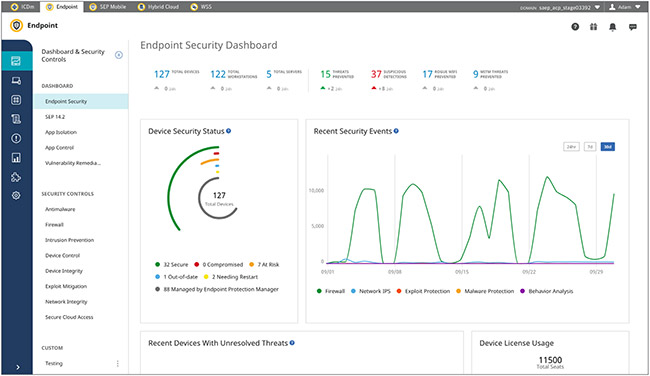
Choosing the right endpoint protection platform cuts the risk of infections, data leaks, and shutdowns caused by attacks. Enterprise networks face nonstop cyber threats aimed at endpoints—laptops, desktops, servers, mobile devices. One breach can dump vital business data or grind operations to a halt.
Endpoint protection platforms (EPP) act as the first defense on every device hooked to a company network. They bundle antivirus, firewalls, behavior tracking, and device control into a single system built to spot and block sneaky threats. This setup trims down complexity for businesses and helps enforce security policies uniformly across all endpoints.
Companies weigh several major points when picking an endpoint platform:
- Threat detection that goes beyond signature checks to catch zero-day exploits and advanced persistent threats.
- Scaling smoothly as device counts climb without slowing performance or management.
- Central management consoles that make policy enforcement, alerts, and reports straightforward.
- Ability to integrate with existing security tools and IT workflows, breaking down silos and speeding incident response.
- Support for different operating systems and setups whether remote, hybrid, or in-office.
- Clear pricing models that fit enterprise budgets and deployment sizes.
- Proven success backed by independent lab tests and real-world case studies.
- Reliable vendor support with frequent updates and swift reactions to emerging threats.
The endpoint protection market twists and shifts constantly. By 2026, threats have grown craftier and bulkier, pushing platforms to combine automated defenses with real human oversight. Enterprises look for tools that don’t just guard—they arm IT teams with sharp intel and user-friendly controls.
The goal is to give businesses a grounded picture that fits their security needs and operating limits—whether guarding a few dozen or tens of thousands of endpoints. This article zeroes in on the best endpoint protection platforms for enterprises, breaking down features, pricing, setup headaches, and user results (for the most part). Juxtaposing main features against hidden flaws lets companies snag technology that stands firm as cyber risks surge.
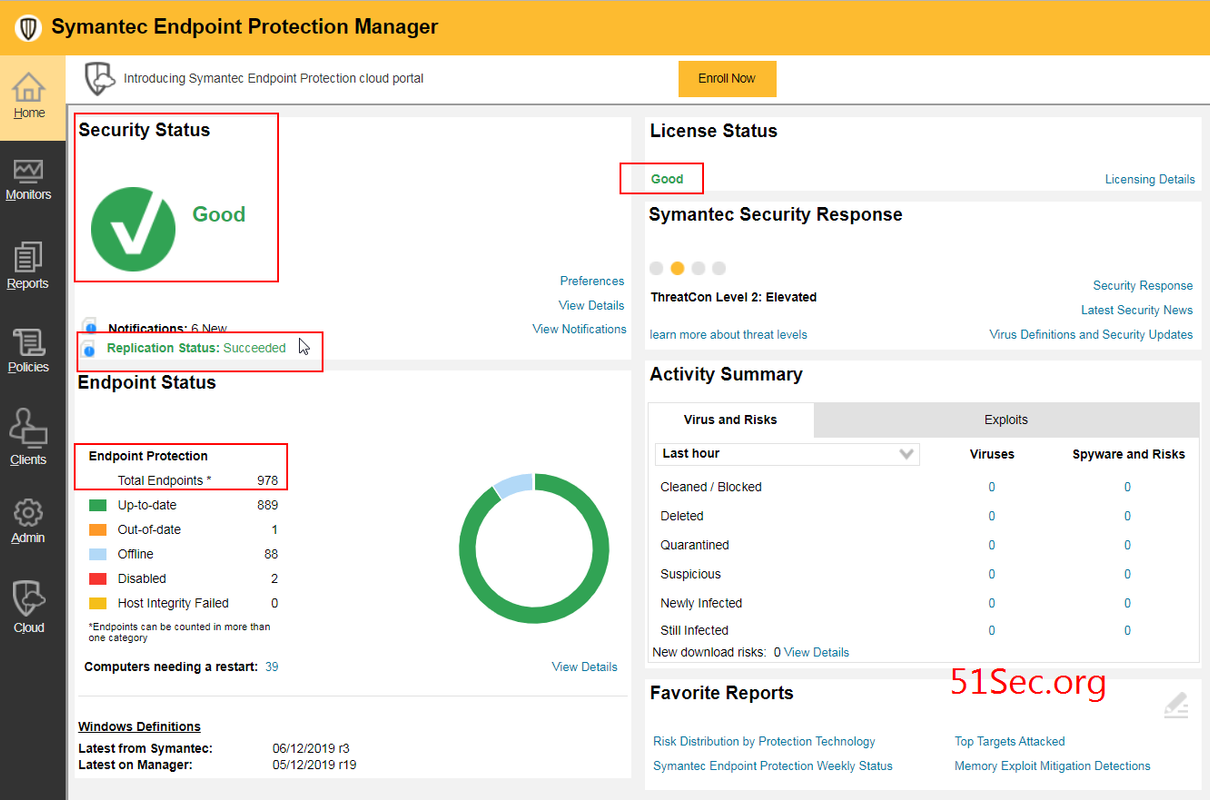
Symantec Endpoint Protection Features and Overview
Strong endpoint protection stops infections and keeps a company’s whole digital system humming—making sure business keeps rolling, compliance stays solid, and trust doesn’t crack when threats jump out of nowhere. Endpoint breaches mean downtime, fines, and sometimes lasting harm.
For companies new to this critical tech zone, sorting slick marketing from real value is key. This guide looks beyond surface features to see how products perform under tough corporate pressure. Deployment pain, management load, and clear ROI spotlight which options actually deliver. For a broader look at endpoint security’s role in the fight, check 5 Cost-Effective Solutions For Best Endpoint Detection And Response Software, which focuses on detection and response tactics.
- Symantec Endpoint Protection — Subscription pricing starts as low as $2 per user/month with annual payment option.
- McAfee Endpoint Security — Pricing starts at $2 per user/month as an add-on to select Defender packages, enabling flexible budgeting.
- CrowdStrike Falcon — CrowdStrike Falcon pricing starts at $59.99 per endpoint annually for small businesses, offering cloud-based protection.
- Bitdefender GravityZone — Pricing starts at $2 per user/month, offering an affordable entry point for endpoint and server protection.
- Trend Micro Apex One — Pricing starts as low as $2 per user/month with an add-on to select Defender packages.
- Sophos Intercept X — Sophos Intercept X pricing starts at $2 per user/month for advanced attack protection features
| Product | Our Rating | Best For | ||
|---|---|---|---|---|
 |
1Symantec Endpoint Protection |
4.8/5
|
Enterprise device defense | Read More |
 |
2McAfee Endpoint Security |
4.2/5
|
Enterprise device protection | Read More |
 |
3CrowdStrike Falcon |
4.5/5
|
Enterprise endpoint security | Read More |
 |
4Bitdefender GravityZone |
4.3/5
|
Cost-conscious enterprises | Read More |
 |
5Trend Micro Apex One |
4.4/5
|
Pricing starts as low as | Read More |
 |
6Sophos Intercept X |
4.1/5
|
Sophos Intercept X pricing starts | Read More |
 |
7Cisco AMP for Endpoints |
4.7/5
|
Cisco AMP for Endpoints subscription | Read More |
 |
8Kaspersky Endpoint Security |
4.6/5
|
Cost-conscious teams | Read More |
Symantec Endpoint Protection Features and Overview
That pricing setup is pretty clear—unlike many competitors who bury their fees or demand custom quotes. Symantec Endpoint Protection kicks off with a low-cost basic plan, then climbs to pricier tiers meant for larger companies with broader needs. You get a solid sense of what you’ll owe over time. Small teams may struggle. But those higher prices can lock out small teams running tight budgets.
Symantec’s straightforward pricing cuts through the usual fog clouding IT budgets. Check out McAfee Endpoint Security for comparison. Still, there’s a snag: you have to buy extra modules to cover servers and full endpoint defense. Some rivals throw those protections in from the start. Also, Symantec doesn’t yet include AI-driven automatic remediation—a feature CrowdStrike Falcon offers and more companies expect now. So, it’s mostly a fit for mid-size or large firms happy to pay fixed annual fees and pick add-ons piecemeal. Small shops hunting a no-fuss, all-in-one package might look elsewhere.
What draws you to Symantec Endpoint Protection? It’s that mix of transparent pricing with strong blocks against nasties like ransomware and zero-day attacks. Entry-level packages cater to small and mid-sized enterprises needing fundamental endpoint protection, though costs jump majorly for add-ons aimed at large organizations. This model appeals to customers who want clear, modular buys instead of bundled combos and don’t mind paying extra for precise features. Since it sticks to defending endpoints and servers—no email security or AI fixes bundled—it’s not for those who want a single license covering everything. Still, if you want rugged malware defense and pay-as-you-go flexibility, it delivers good value. You just need to weigh Symantec’s open pricing and targeted shield against rivals who cram broader coverage into cheaper bundles. For companies wanting tight budget control and security focused on select assets, Symantec’s tiered plans fit well.
Deployment and Management Complexity
Getting started is fairly straightforward, but adding modules to cover servers bumps up complexity compared to some plug-and-play options. You manage Symantec Endpoint Protection through one console built for classic endpoint admins. The tools allow detailed policy tuning and incident responses, aimed at teams comfortable juggling layered setups—less handy if you want a quick, simple install.
Verified User Feedback and Case Studies
Large organizations trust its reliability within advanced IT environments, while smaller companies often complain about setup hassles and costs. Users praise Symantec for catching ransomware and zero-day threats, but many grumble about steep price jumps beyond the base level. The lack of built-in email security forces some to hunt for third-party fixes. In short, it suits buyers focused on strong endpoint defense and transparent pricing, but less so those wanting all-in-one suites or next-gen AI features.
Symantec Endpoint Protection stands out with clear pricing and open features, backed by independent cybersecurity tests (at least usually). That transparency beats rivals who hide fees or bury key functions behind murky licenses, making budgeting and license tracking easier. It suits groups craving predictable costs with focused endpoint defense—not those after one-stop cyber shields.
It covers tools that balance price and protection beyond just blocking malware. For budget-friendly endpoint detection options, see 5 Cost-Effective Solutions For Best Endpoint Detection And Response Software. If you’re sizing up Symantec Endpoint Protection, use this guide to match what fits your budget and security needs best.
| ✓ Pros | ✗ Cons |
|---|---|
| Subscription pricing starts as low as $2 per user/month with annual payment option. | Base subscription can cost up to $30 per user, which may be expensive for SMBs. |
| Pricing tiers begin at $5, suitable for small business endpoint security needs. | No documented pricing or feature information indicating integrated email security tools. |
| Enterprise quotes offer transparent per-device rates for clearer budgeting. | Some plans require additional add-ons for full endpoint and server protection. |
| Advanced threat protection includes capabilities against ransomware and zero-day exploits. | No direct mention of built-in AI-driven automated remediation in standard plans. |
McAfee Endpoint Security Capabilities and Pricing
The tiered model helps you guess your future spending better than many rivals with foggier price tags. Growth costs rise. McAfee Endpoint Security prices its service to grow with you, starting small to catch the eye of businesses wanting to expand without surprise costs. But watch out—the jump in fees for bigger setups can hit hard. Teams that want more security features will have to judge if the extra spend makes sense as they scale.
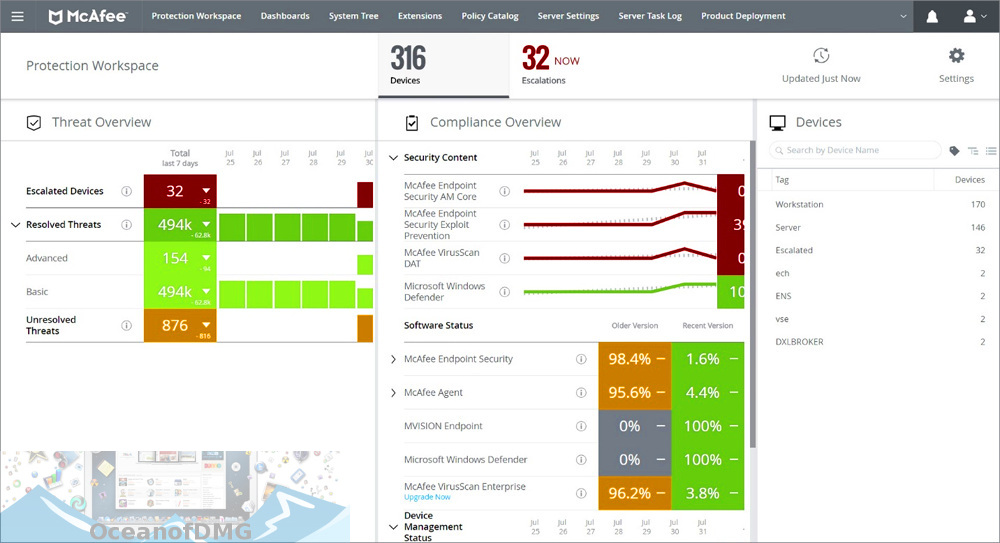
Stacked against SentinelOne, McAfee stands out by laying its costs bare and letting you pick licenses that fit your budget over time. That’s a welcome change from some competitors whose pricing feels like a puzzle. Still, McAfee doesn’t plug in deeply with Microsoft 365 out of the box. If your workspace leans heavily on those apps, expect more admin work and a clunkier rollout. So, it’s a solid pick if you care most about sharp threat detection and clear pricing—but less so if you need smooth Microsoft cloud integration.
Small teams will find the entry plans wallet-friendly. Before signing on, dig deep into how the costs and setup will grow with you—making sure it fits your goals and budget. The platform shines in its wide threat-sniffing reach and flexible pricing that suits many company sizes. Larger ones might wrestle with high subscription costs, needing to tweak their setups just right to get their money’s worth. Organizations hunting for strong armor against malware and tricky threats can lean on McAfee’s flexible licenses, but they should brace for extra spending to close the integration gaps, which could bog down operations.
For a wider view on wallet-wise endpoint protection, check out 5 Cost-Effective Solutions For Best Endpoint Detection And Response Software. McAfee balances a friendly starting price with solid security muscle, but don’t forget the bill climbs as you upgrade. Its strength against complex attacks stands out, but those rising subscription costs at scale can sting. Independent reviews like the Gartner endpoint security cost analysis expose pricing swings across the field, highlighting how McAfee’s upfront clarity can aid your 2026 financial planning.
Higher tiers bring sharper detection and fine-tuned controls—and more work for your IT squad. McAfee’s modular licenses make costs clear as you grow but crank up the configuration headache too, depending on your subscription level and endpoint count. This tug-of-war means teams scramble to keep strong defenses without drowning in admin tasks. Missing built-in Microsoft 365 hooks adds to the hassle, often forcing extra tools just to make everything click together.
McAfee Endpoint Security Capabilities and Pricing

User Experience and Feedback
Its tactical depth earns thumbs-up where advanced threats are a worry. Users lean on McAfee’s multi-layered defenses, especially for fending off tricky ransomware and zero-day bugs. But grumbles about steep license hikes and setup complexity linger. Budget-conscious groups often stick with entry levels that strike a decent balance (for the most part). Bigger companies hunt for steadier per-user prices or tighter tech markets.
Who Benefits Most from McAfee Endpoint Security
Companies ready to pour into higher tiers for stronger shields will manage the extra operational quirkiness from weak Office 365 integration. McAfee Endpoint Security suits medium firms needing tough threat spotting and clear pricing that scales. Smaller outfits, tighter on funds or craving smooth cloud app links, might be happier elsewhere.
| ✓ Pros | ✗ Cons |
|---|---|
| Pricing starts at $2 per user/month as an add-on to select Defender packages, enabling flexible budgeting. | Subscription plans can reach up to $30 per user, resulting in higher costs for larger teams. |
| Enterprise licensing offers transparent per-device rates helping predictable cost management. | Base pricing of $5 per user may be above some SMB budgets compared to lower-cost competitors. |
| Includes advanced attacks detection capability to protect against malware, ransomware, and zero-day exploits. | No direct mention of native integration with O365 tools, which might require third-party additions. |
 CrowdStrike Falcon Platform Strengths and User Experience
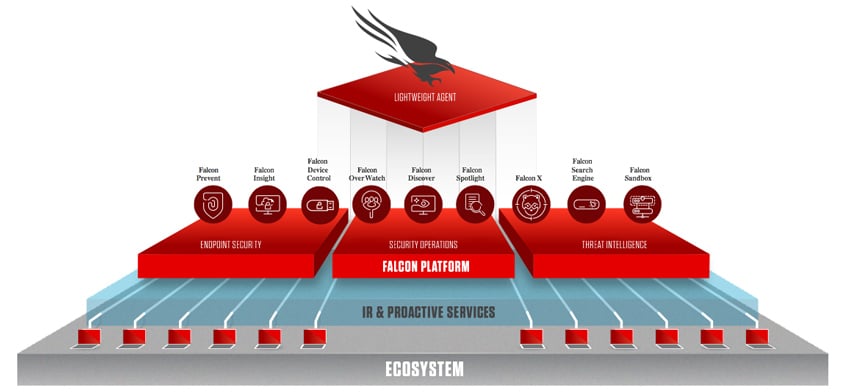
CrowdStrike Falcon aims at small businesses looking for cloud-based endpoint security with AI-driven real-time defense. The price per device can catch you off guard, though. The Falcon Pro plan throws in firewall management and threat intelligence, boosting network protection (by and large). But this boost comes at a cost that might strain budgets tight on cash.
McAfee Endpoint Security competes here, but CrowdStrike Falcon bundles detection and response across many security layers into Falcon Insight XDR. That cuts down the need for add-ons and the headaches they bring. Still, the overall price and a steep upfront fee for full features, along with confusing licenses, can make buying tricky and wear down smaller IT teams. This setup fits mid-sized enterprises better—those with solid security teams that want sharp threat hunting and quick reaction times. Budget warning.
One sharp edge of CrowdStrike Falcon is its single-agent design. For smaller outfits chasing simple, cheap, no-drama solutions, CrowdStrike Falcon might miss the mark. It’s light, runs AI protection nonstop, and barely touches system resources. Falcon Insight XDR covers detection, investigation, and response all at once, pulling from different security zones to build a tight defense. Watch out, though: installing the Falcon Sensor on personal devices can raise privacy and compliance flags that need ironing out. If you’re ready to spend on a complex, cloud AI security tool and don’t mind untangling complicated licenses, this fits.
Looking for hard facts on endpoint security? They break down vendor performance and how CrowdStrike Falcon stands at the enterprise level.
For integrators hunting endpoint detection tools, 5 Cost-Effective Solutions For Best Endpoint Detection And Response Software lays out ways to balance price against features like those CrowdStrike Falcon offers.
CrowdStrike Falcon Platform Strengths and User Experience
| ✓ Pros | ✗ Cons |
|---|---|
| CrowdStrike Falcon pricing starts at $59.99 per endpoint annually for small businesses, offering cloud-based protection. | Pricing can be expensive with plans starting at $59.99 per endpoint per year, possibly limiting small business budgets. |
| Falcon Firewall Management is included in the Falcon Pro plan at $49.99 per device annually, adding integrated threat intelligence. | Users report a large buy-in cost to fully use the feature-rich Falcon dashboard site. |
| Single lightweight agent in Falcon delivers AI-powered real-time protection with minimal memory utilization and processor impact. | Employers require installation of CrowdStrike Falcon Sensor on personal computers, raising privacy and compliance concerns. |
| Falcon Insight XDR provides detection, investigation, and response capabilities across endpoints and multiple security domains. | Complex licensing options such as pooled licensing versus direct purchase may confuse procurement and budgeting. |
 Bitdefender GravityZone Performance and Deployment

That entry price hooks in companies just beginning with endpoint and server protection. Bitdefender GravityZone starts at $2 per user each month. Features then ramp up with use. Advanced protections kick in at $5 per user monthly. Because of this pricing split, you pay only for what you need. CrowdStrike Falcon’s prices, by contrast, are murkier and begin higher. Bitdefender’s more budget-friendly route feels straightforward, though the cheapest plans come with fewer features (give or take).
The way Bitdefender’s pricing works is practical but layered. Instead of bundling everything upfront, it adds features stepwise. CrowdStrike’s all-in-one cloud model, however, tacks on threat hunting tools at the start—raising costs early. Still, Bitdefender’s lowest tier requires a full year’s prepayment. That barrier can trip up small businesses wanting monthly billing. Companies juggling a variety of endpoint types might find this setup fits their budget, despite some payment inflexibility and lacking high-end perks initially.
Its base package covers essential threat defense but holds back advanced attack protections for pricier levels. Bitdefender’s tiered plan matches security depth to budget constraints. This approach lets firms start small and scale as risks grow (in practice). Yet, it might frustrate those seeking all-in-one solutions with no add-ons. One sharp technical snag: Bitdefender lacks native email security integrations. Meanwhile, Symantec Endpoint Protection offers stronger interoperability in that area. To sum up, Bitdefender GravityZone suits businesses focused on affordable, growable endpoint defense—if they’re ready for upfront payment and gradual feature rollouts.
| ✓ Pros | ✗ Cons |
|---|---|
| Pricing starts at $2 per user/month, offering an affordable entry point for endpoint and server protection. | Small business plans range from $5 to $30 per user monthly, possibly costly for tight budgets. |
| Includes advanced attack protection within higher-tier plans starting at $5 per user/month. | Lowest-tier pricing requires annual payment, limiting flexibility for monthly billing preferences. |
| Advanced features may require add-ons not included in base Defender packages at $2 per user/month. | |
| Lacks detailed evidence of native integrations, compared to mentions of other specialized email security vendor options. |
Trend Micro Apex One Security Features and Pricing Models

Trend Micro Apex One’s starting price might seem manageable. But you have to pay for the entire year upfront. And unlocking all the features requires buying add-ons. Costs can balloon quickly, scaring off organizations with tight budgets or those wanting straightforward pricing.
Trend Micro, by contrast, targets companies prepared for a long-term commitment and layered defenses. McAfee Endpoint Security often offers clearer tiers and a month-to-month subscription option. Its pricing suits mid-sized to large firms with steady budgets—startups or small teams looking for flexible payments won’t find much relief here.
The platform excels at AI-powered threat detection. It protects laptops, servers, and phones across the network, yet offers no public multi-device discount. Cost grows directly with the number of devices. That favors businesses managing large device fleets that expand predictably; fluid environments pay more. Also, you must purchase bundled packages—there’s no low-cost entry point. The product clearly aims at enterprises focus oning depth over affordability.
Designed for groups focused on strong security and accepting rigid payment terms. Trend Micro Apex One stands as a high-end option. For those wanting both tech power and cost control, consulting reports on incident response platforms and endpoint detection pricing is wise. Experts emphasize AI threat detection’s importance, which improves Trend Micro’s position in advanced endpoint protection offerings.
| ✓ Pros | ✗ Cons |
|---|---|
| Pricing starts as low as $2 per user/month with an add-on to select Defender packages. | Pricing can reach $30 per user/month — on the higher end for small business budgets. |
| Designed to secure network-connected devices such as laptops, servers, and phones across enterprises. | Entry-level plans start at $2 monthly but require annual payment and add-ons, limiting flexibility. |
| Protects devices against malware, ransomware, and advanced attacks with AI-driven prevention and behavioral detection. | No specific mention of multi-device bundles or discounts may imply per-device pricing only. |
Sophos Intercept X Advanced Protection and Benefits
Sophos Intercept X starts at $2 per user each month. It uses smart detection tools to stop threats effectively. You pay per device, which helps companies plan budgets with fewer surprises. Some rivals tuck hidden fees into confusing bills. Sophos supports many devices—laptops, servers, phones—making it flexible across diverse tech setups.
Compared to McAfee Endpoint Security, Sophos lays out costs more transparently. That clarity simplifies budgeting and deployment planning majorly. However, you won’t find a free trial or basic version to test first. The cheapest plan costs $5 per user monthly, while top-tier protection bundles can reach $30. These prices generally suit larger businesses ready to invest heavily in defense systems. Small firms or startups may find the price steep, especially without a risk-free trial option.
It avoids relying heavily on old-school signature lists. Sophos Intercept X stands out because it blends AI-driven detection with behavioral monitoring and automatic threat responses. Coverage is broad. Covering a wide range of devices, it keeps pricing straightforward. Medium and large companies tend to gain the most from this powerful yet clear-cut security. Smaller outfits often look elsewhere, favoring vendors that offer trials or flexible entry points.
It delivers established industry standards and helpful insights.
| ✓ Pros | ✗ Cons |
|---|---|
| Sophos Intercept X pricing starts at $2 per user/month for advanced attack protection features | Base subscription costs $5 per user/month, higher than some entry-level competitors |
| Per-device rates offer transparency for enterprise clients, helping easier budget planning | Advanced endpoint protection bundles can reach $30 per user, impacting scalability for small businesses |
| Includes AI-driven prevention, behavioral detection, and automated remediation to stop ransomware and zero-day exploits | No publicly documented free tier or limited trial option for initial evaluation |
| Supports protection across multiple endpoint types including laptops, servers, and phones |
 Cisco AMP for Endpoints Integration and Effectiveness
Cisco AMP for Endpoints starts at $5 per user each month. It’s priced mainly for mid-sized and larger companies, not small ones. This model assigns a clear cost per device, which helps with budgeting. Smaller teams with tight IT funds might find the price too steep. The platform relies heavily on advanced AI to detect and block threats early. That makes it attractive to firms chasing top-tier defense rather than basic protection. There’s no discount or free tier, which can deter startups and lean organizations.
Look at McAfee Endpoint Security for comparison. McAfee offers cheaper add-ons, sometimes around $2 per user monthly, or bundled plans that better fit budget-focused buyers. Cisco’s advantage is AI-driven prevention that zeroes in on zero-day attacks and ransomware. It also automates remediation, with straightforward pricing aimed at larger enterprises needing tight cost control. Smaller setups might skip it entirely.
The platform shines in proactive defense, built for the complicated cyberthreats big companies face. Its premium pricing mirrors the AI-led protection and simpler budgeting it brings. Smaller businesses often balk at rigid pricing and the lack of bundled options when crunching total costs. But for organizations up against hard threats and demanding transparent billing, Cisco AMP blends technology and clarity well. This attention to enterprise needs makes it a specialized, value-heavy product—not a budget tool.
Advanced Threat Protection and Subscription Transparency
It catches sneaky attacks that slip past standard security measures. Cisco AMP pairs AI detection with automated threat remediation. This capability appeals to companies governed by strict risk policies. Its clear per-device pricing makes expense forecasts easier but means you might pay extra for email security features. The platform’s modular architecture suits well-funded enterprises with skilled IT staff, not smaller or cash-strapped outfits.
Pricing Model and Target Customer Profile
With a firm starting price, Cisco AMP avoids cheaper markets. It targets buyers seeking strong defenses against advanced threats. The lack of trial or entry-level tiers signals a commitment to consistent, high-quality service. Enterprises wanting Cisco’s security market and transparent costs will find this attractive. Smaller users or bargain hunters looking for bundle deals might find it hard to justify the cost. Industry analysts praise Cisco’s upfront pricing in a sector often riddled with hidden fees.
Cybersecurity is shifting toward a blend of AI detection and straightforward spending. For companies needing proactive threat management and predictable budgets, Cisco AMP is a sharp, dependable choice backed by Cisco’s reputation—mainly aimed at mid- and large-sized firms. Cisco AMP answers this by coupling smart tech with simple pricing. This sets it apart from competitors who slash automation or complicate offerings to lower price points.
| ✓ Pros | ✗ Cons |
|---|---|
| Cisco AMP for Endpoints subscription pricing starts at $5 per user per month providing enterprise-grade security | Pricing tier starts higher at $5 per user, less competitive against $2 per user add-ons available in the market |
| Integration with Cisco’s AI-driven prevention and automated remediation improves threat detection | No free or lower-cost tier available, limiting options for smaller businesses or tight IT budgets |
| Includes advanced attack protection features targeting zero-day exploits and ransomware | Lacks bundled integration with popular email security suites requiring additional purchases |
| Transparent per-device rates help easier budget management for enterprise deployments | Subscription costs of $5 or more may put Cisco AMP out of reach for very small businesses |
Kaspersky Endpoint Security Strengths and Pricing Transparency
Kaspersky Endpoint Security starts at a price point that many small businesses find manageable—if they opt for annual billing. That arrangement keeps budgets tidy and predictable. But you have to pay upfront. Some companies may see that as a hurdle, especially if their security needs fluctuate. Upgrading to the mid-tier plan gets easier as your team expands. It delivers more complete endpoint protection but still holds a reasonable price tag for smaller outfits. The trade-off comes when you want a ton of extras; the price escalates quickly. For large enterprises aiming to cover a broad device array, this might not be the most cost-effective choice.
Here’s a key difference between Kaspersky and rivals like McAfee: their subscription pricing hinges strictly on device count. No complicated bundles stuffed with hidden features. IT admins appreciate that kind of transparency. It makes annual expense predictions simpler. However, since you don’t get bundled packages, you must select and pay for add-ons individually. That approach can bog down budgeting and sometimes lead to unexpected costs. Also, Kaspersky’s lack of out-of-the-box compatibility with widely used platforms like Office 365 throws a wrench in workflow efficiency. That snag often burns up extra employee hours. So if your priority is rock-solid endpoint defense paired with steady budgeting, Kaspersky fits. But for smooth app integrations or flexible payment schedules, it might disappoint.
This clarity enables firms to forecast spending down to the penny. Kaspersky’s strong suit: effective malware detection combined with a pay-per-device pricing structure that’s easy to track. Yet the downside is the absence of all-in-one bundles—every add-on pumps up your total bill. The annual payment requirement can feel inflexible if you’re craving contract terms that adapt to shifting needs. Meanwhile, the shaky integration with popular tools such as Office 365 adds setup overhead for IT teams depending on those environments daily. Altogether, Kaspersky is tailor-made for organizations focus oning reliable malware defense and tight budget control rather than those seeking flexible billing or deep app interoperability.
For a broader take on endpoint security prices, check out Gartner’s latest market analysis: Gartner Endpoint Protection Pricing Trends
| ✓ Pros | ✗ Cons |
|---|---|
| Pricing starts at $2 per user per month on annual plans as an add-on to select Defender packages | Subscription pricing can reach up to $30 per user monthly, possibly expensive for larger teams |
| Competitive price tier at $5 per user enables small businesses to access strong endpoint security | There is minimal evidence of native integration with popular productivity tools like O365, impacting simplified workflows |
| Enterprise-grade protection includes advanced attack detection and malware defense capabilities | Entry-level pricing requires annual payment commitment, limiting flexibility for some buyers |
| Transparent per-device subscription pricing available, allowing better budget planning for enterprises | Lacks all-in-one bundled plans; some features available only as costly add-ons raising total cost |
The main points and Strategic Platform Matchups
You want solid protection but without pain in setup or the wallet. A strong pick if your budget can handle the upfront cost for tried-and-true security. Endpoint defense can be a headache. Symantec Endpoint Protection grabs attention for big companies needing layers of defense and one spot to manage everything. It leans on long-running threat data and integration tools for firms with lots of devices and tight rules (as a rule). Pricing begins at $45 per user each year. Plus, it offers a 60-day money-back promise.
It throws in behavioral analytics and firewall controls, aiming at mid-market needs while keeping IT teams from drowning. It costs more but delivers sharp scaling and deep insights into attacker tactics, ideal for fast-moving, tech-heavy outfits. McAfee Endpoint Security suits companies with a medium number of devices who want straightforward management. CrowdStrike Falcon stays top dog for those wanting cloud-native setups and live threat hunting across mixed environments.
Three others shine in niche corners: Bitdefender GravityZone leans on machine learning and multi-layered shields for large-scale operations; Trend Micro Apex One blends endpoint detection with built-in EDR, great for quick crisis responses; and Sophos Intercept X digs deep into exploit blocking with easy cross-platform use, fitting varied IT markets.
Match your choice to your security goals. Smaller teams tight on cash often lean toward Kaspersky Endpoint Security—it starts cheap and won’t swamp you with complexity. Industries handling sensitive info or critical systems gain from Symantec’s strict controls and solid compliance features, plus reliable support. Meanwhile, agile tech companies with heavy developer pipelines often pick CrowdStrike Falcon for its speed and post-breach smarts.
Each platform varies in rollout hassle and control depth. Veteran security squads can wrangle Falcon’s advanced panels and flexibility. Leaner IT teams often pick simpler dashboards like McAfee’s or Sophos’s. These choices shape your total cost—not just the sticker price, but how smooth daily operations feel and how much IT time gets swallowed by firefighting.
Bitdefender GravityZone Performance and Deployment
Security isn’t one-size-fits-all. Choosing the right endpoint tool changes how well you block malware, ransomware, and zero-days. Vendors who spell out pricing clearly, offer transparent refunds, and gather strong user reviews become lifelines as companies grow bigger. Independent tests from G2 and Gartner expose real gaps, so weigh those reports alongside your specific risks.
Serious cybersecurity means syncing your needs with vendor strengths to build tough defenses. For deeper looks at incident response layers boosting endpoint tools, see the detailed guides at incident response platforms. If you want extra muscle, the reviews on endpoint detection and response software highlight solid choices that pair well with the platforms here.
Careful research and tight business-fit turn endpoint budgets into real security wins you can track. As cyberattacks sharpen, your platform choice can flip fragile targets into manageable risks.
- Big enterprises with tangled setups should pick Symantec Endpoint Protection for deep coverage and easy compliance.
- Mid-size firms balancing cost and features find McAfee Endpoint Security fits moderate complexity and bundled tools.
- Tech-savvy companies craving fast, cloud-based defense thrive on CrowdStrike Falcon’s nonstop threat tracking.
- Those wanting growable, machine learning-powered layers should consider Bitdefender GravityZone or Trend Micro Apex One.
- Teams needing wide device support and simple management will value Sophos Intercept X’s cross-platform reach.
Endpoint protection sits at the core of modern business security (in most cases). Finding your right match by industry, skills, and budget locks down your defenses—and clears a way to safer, smoother operations backed by proven results.
Essential Insights for Endpoint Protection Selection
Understanding Pricing Structures Is Key
Symantec Endpoint Protection costs about $30 per device each year. If you buy in bulk, you can get discounts. That up-front fee makes budgeting simpler than with some vendors who hide costs in complex pricing tiers. You won’t face surprise charges. So, if you want predictable spending, this helps a lot.
Evaluating Deployment and Management Complexity
You can install the software on physical machines, virtual machines, or cloud servers. That kind of flexibility is built-in. But don’t expect to tweak every policy setting quickly—its many layers take time to learn. A centralized console shows all endpoints in one place. Still, your team will need some training to manage it smoothly and avoid mistakes.
Weighing Core Features Against Enterprise Needs
Symantec bundles malware blocking, firewall controls, and device management in a single package. They combine defenses like intrusion prevention and behavioral analytics to handle a wide range of threats. This isn’t a simple tool for casual use. It digs deeper, which suits complicated enterprise environments with diverse risks.
Assessing Customer Satisfaction and Feedback
Many reviews praise Symantec’s reliable threat detection and steady updates. But users sometimes complain about alert overload when systems get busy. Occasional support delays pop up in feedback, not often but enough to make you pause if you need fast help consistently. It’s a mixed bag on support speed.
Confirming Support and Service Levels
Basic tech support covers most essentials, but quick responses and specialist help require premium plans. Companies with heavy support demands often find upgrading worth the extra cost. That can shift your total expenses and the resilience of your security setup a lot. Don’t overlook this factor when choosing plans.
The best endpoint protection platforms for businesses combine clear pricing, strong defenses, flexible management, and tiered support wisely. That mix makes it a solid choice for organizations needing both power and pricing clarity. For a wider look at detection and response options, see 5 Cost-Effective Solutions For Best Endpoint Detection And Response Software. Analyst reports from Gartner and others add valuable perspective to these decisions.