Why Choosing a Downtime-Free Migration Matters
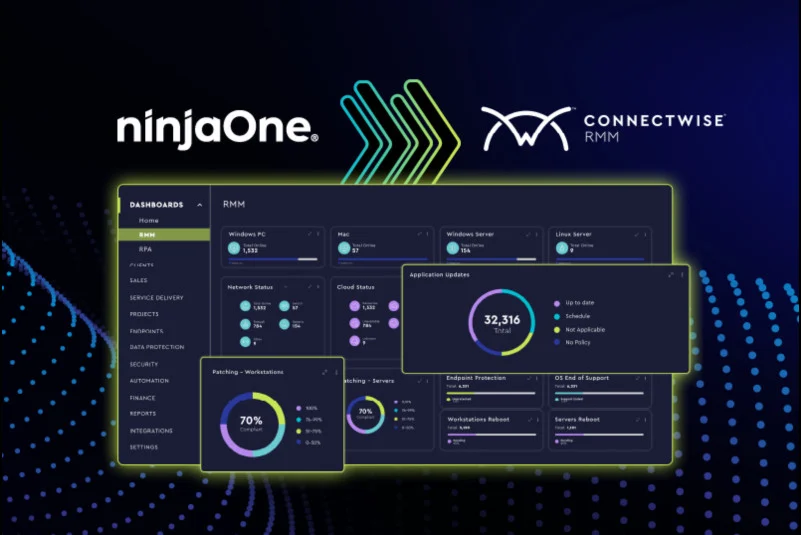
Switching management platforms can shake things up a lot for managed service providers (MSPs). Moving from ConnectWise to NinjaOne isn’t just about new software—it’s about smoother workflows, better endpoint control, and faster responses. But here’s the kicker: downtime lurks behind every migration. Servers, endpoints, tickets—if they go dark, revenue takes a nosedive, and clients get edgy.
Downtime cuts deep into service-level agreements and customer trust. Rush it, and data or access gets munged. Even a small outage can scramble support tickets, scramble data syncing, or mess with asset tracking. Dodging these disaster zones means running parallel systems, watching dependencies like a hawk, and testing every step carefully. Take too long, and bills pile up.
The migration splits into defined stages with practical timeframes: planning, exporting data, configuring the new environment, pilot testing, full switchover, and post-migration verification. Not here—you get the hard details that cut risk when handling complex ITSM and RMM data sets. This guide walks you through every step of how to migrate from ConnectWise to NinjaOne without downtime. Lots of guides skip timing or treat fallback plans like an afterthought.
It also shows how automated scripts handle repetitive jobs like tagging assets, assigning roles, and verifying audit logs, cutting human slip-ups. Beyond the timeline, this guide digs into common migration annoyances—broken APIs, messed-up permissions, or synced status mismatches—that often spark hidden downtime. These hands-on tools fill in gaps you won’t find in most standard ConnectWise or NinjaOne migration playbooks.
Testing alerts, double-checking ticket flows, and simulating patch rollouts catch errors before they snowball. Wrapping it up, the guide covers post-migration validation to prove the system’s solid once you switch over. MSPs get practical ways to roll out these checks so users never spot a glitch.
Reasons MSPs Migrate from ConnectWise to NinjaOne
In the end, getting the most from NinjaOne without hurting your clients rests on mastering zero-downtime migration techniques. This article gives decision-makers and tech staff the know-how to make transitions smooth amid hectic operations. For more on keeping enterprise data safe during shifts, check out the practical advice in Master how to harden mysql database on ubuntu server with new 2026 security steps.
Preparing for a Smooth Platform Transition

- Before touching any live systems, securing a complete backup of all your current ConnectWise data is essential. This ensures you have a reliable fallback if any glitch occurs during the migration, protecting critical customer and operational records.
- Map out every third-party tool, plugin, or script connected to ConnectWise. Knowing the scope of integrations helps anticipate compatibility challenges with NinjaOne and avoid unexpected service interruptions.
- Review and document all user roles and permissions within ConnectWise. This step simplifies replicating appropriate access controls in NinjaOne, ensuring smooth user experience post-migration without exposing sensitive data.
- Check hardware, network configurations, and security settings to confirm they align with NinjaOne’s technical requirements. This pre-emptive validation minimizes performance bottlenecks and configuration errors after the switch.
- Inform all internal teams and client stakeholders about the planned platform switch well in advance. Clear communication helps manage expectations, align schedules, and reduce resistance or confusion while migration proceeds.
- Assign skilled personnel with defined roles to oversee different migration stages. A focused team improves coordination, speed ups issue resolution, and maintains oversight on progress — critical for avoiding downtime.
- Identify potential technical or operational scenarios that could delay or disrupt migration. Prepare fallback procedures, such as rolling back to ConnectWise or running parallel systems temporarily, to keep services uninterrupted.
- Take this opportunity to audit, archive, or delete obsolete or duplicate records from ConnectWise. Cleaner datasets expedite migration, reduce clutter, and improve NinjaOne’s data handling speed and accuracy.
- Organize tutorials and hands-on workshops detailing NinjaOne’s environment and workflows. Helped users adapt faster, reducing post-migration support tickets and business disruption.
- Create sandbox instances to simulate the migration with sample data. This testing phase uncovers hidden technical compatibility issues, allowing adjustments on configurations and scripts before the official transition.
- Agree on specific dates and times for each migration phase, emphasizing low-traffic windows. Precise scheduling helps minimize impact on client operations and internal workflows.
- Ensure that all required data handling procedures and privacy policies align with industry regulations under the new platform. This preempts compliance violations during or after migration.
Taking these detailed preparatory steps forms the backbone for an interruption-free transition and answers many challenges inherent in complex software migrations. The stage is set to avoid costly downtime while moving from ConnectWise to NinjaOne. For further insights on managing IT environments and auditing, reviewing best Active Directory auditing tools adds valuable perspective on maintaining system security during such shifts.
Data Migration Process for Zero Downtime Transition
- Establish a Parallel Environment. Get NinjaOne running alongside your current ConnectWise setup so data copies over smoothly. This twin system acts like a safety net, letting you test migration steps without disrupting daily work.
- Initial Data Extraction. Pull key data with ConnectWise export tools or APIs—customer records, ticket logs, contracts, asset lists. Aim for low traffic times to ease server load. This step sets the stage for syncing both systems later.
- Data Mapping and Transformation. Compare fields between ConnectWise and NinjaOne carefully. Create rules to reshape dates, adjust formats, and fix custom fields. Scripts speed this up but need thorough testing to avoid corrupt data.
- Set Up Incremental Synchronization. Arrange continuous sync focusing only on updates since the first export. This trickles in most of the data right before switching, keeping both databases aligned.
- Implement Automated Migration Workflows. Write scripts for repetitive tasks like importing data, copying user permissions, and tagging assets. Automating lowers human mistakes and trims migration time — key when syncing ramps up.
- Thorough Data Validation Checks. Run automated scans and hands-on reviews to make sure NinjaOne’s data matches ConnectWise. Check record counts, ticket histories, and asset details closely. Watch relational data carefully to keep all links solid.
- Pilot Deployment with Select Users. Let a small group try NinjaOne while ConnectWise stays active. Gather feedback on accuracy and speed. This trial exposes hidden bugs before the full switch.
- Final Delta Sync and Cutover Preparation. Pick a quiet time to sync leftover changes from ConnectWise to NinjaOne. Lock edits in ConnectWise during this phase to stop conflicting updates, then flip all processes over to NinjaOne.
- Post-Migration System Validation. Right after switching, confirm key systems work—asset tracking, ticket queues, reports. Run scripted tests on alerts, automation rules, and access controls to catch unseen issues quickly.
- Backup and Fallback Strategy. Keep a fresh ConnectWise data snapshot from just before cutover. If NinjaOne hits a critical snag, this backup lets you roll back fast and cut downtime. Watch systems closely until stability feels solid.
- User Training and Documentation Update. Share clear guides focused on NinjaOne’s new workflows versus ConnectWise. Well-trained users ease support pressure and speed adoption after migration.
- Ongoing Incremental Sync for Non-Critical Data. Schedule NinjaOne to sync less urgent info or regular reports on a set timetable. This reduces network strain during busy hours while keeping optional data updated.
- Audit Logs and Compliance Checks. Capture detailed logs showing when and how much data moved. Compare them to ITSM proven methods in references like cloningpartner.com ITSM guide to stay ready for audits.
- Improve Migration Timing and Resource Allocation. Estimate phase durations sharply: initial extraction might take 2–4 hours depending on data size; incremental sync stays light and ongoing; final cutover fits inside a tight 30–60-minute window to seal things quickly.
- Deploy Monitoring and Alerting in NinjaOne Post-Migration. Switch on NinjaOne’s built-in monitoring immediately to catch odd behavior early. Setting alert thresholds triggers quick responses to dips in performance or data glitches.
Two forces drive this: nonstop syncing paired with sharp validation. Handled right, these steps keep downtime at zero. Automated scripts slash slip-ups. Backups stand ready to catch failures. Users hardly notice — yet behind the scenes, it’s a complex dance.
Deep validation plus fallback strategies show what IT service pros rely on. APIs, middleware sync, and scripted checks lift this way above plain migrate-and-hope guides. For MSPs drowning in tickets and assets, this zero-downtime plan isn’t optional — it’s survival.
Packing this care and detail into your plan hits every best practice. For teams plotting a calm route to modern tools, these workflows form the backbone. Skip checks or drop incremental sync, and downtime spikes, data drifts, and headaches pile up (as a rule). This steady method makes NinjaOne’s switch smooth, auditable, and steady, no matter how busy your MSP runs.
For deeper tech insight on Active Directory and device security during platform switches, check Which Best Free Active Directory Auditing Tools Excel For Enterprise Security Use Cases and Tested Free Mobile Device Management Software For Schools Reveals An Unexpected Leader. They dig into tools that plug security holes during moves, clamping down on hidden risks.
Effective Transition Management for Zero Downtime Migration
- Run ConnectWise and NinjaOne side by side to prevent service breaks. Overlapping operations let teams catch task mix-ups and data slip-ups early, cutting surprises. Let them run for at least two business cycles—hidden conflicts often show up only after some time.
- Write scripts that keep key data—ticket statuses, asset inventories, client messages—in sync across platforms. Frequent syncing stops stale records and duplicates that jam workflows. This constant automation blocks errors that would slow down live work.
- Spin up a sandbox copying your real setup to rehearse the migration. These practice runs flush out config mismatches, login glitches, or API caps that might stall your deployment. Testing here protects your live environment from unexpected breaks.
- After syncing and running migration scripts in the test area, check every workflow—from ticket creation through escalation routes, alerts, and reporting. Skipping this lets bugs slip through, which can wreck user experience and slam SLA compliance once live.
- Slowly open NinjaOne to staff while keeping ConnectWise available. This phased access means people can do daily work in both systems and spot weird behavior. It eases nervous users in, reducing mistakes born from unfamiliar tools.
- Hold role-specific sessions with hands-on labs focused on NinjaOne’s dashboard, device management, and ticket routing. Real scenarios quicken skill uptake. Well-prepared users cut down the workaround clutter that clogs workflows.
- Use tools to watch key metrics and system health on both ConnectWise and NinjaOne. Alerts catch sync delays, login slips, or slow responses fast. Early warnings let IT nip issues before they balloon into downtime.
- Share live status updates with MSP teams, clients, and stakeholders during migration. Appoint clear contacts for escalation. This openness wards off frustration from surprise outages and speeds problem-solving.
- Document exact steps to revert completely to ConnectWise if NinjaOne trips unrecoverable errors. Test rollback moves beforehand to avoid long outages. Having a no-downtime fallback steadies everyone and keeps business flowing.
- Make the final NinjaOne switch overnight or on weekends. This timing avoids busy stretches, limiting impact if odd bugs pop up afterward. Quiet windows reinforce the parallel run strategy for smooth zero downtime.
- Keep NinjaOne running alongside ConnectWise for a short while post-switch. This parallel tracking checks that NinjaOne works fully under actual loads, catching edge-case bugs missed in prior tests.
- Capture user and operator feedback right after the change. Tune settings, workflows, and automations as you learn to iron out kinks. Continuous improvement locks in stability after migration.
Following this step-by-step plan creates a tight migration that lets MSPs keep workflows steady and trust their new platform. Automated scripts, deep testing, and rollback options catch blind spots most guides miss. This careful method enables real live migration with zero downtime and faster team adoption. IT service management standards highlight these parallel runs and fallback plans as vital to reducing operational risk during platform swaps like this based on ITSM control frameworks.
Handling this phase right helps MSPs keep promises, shield client data, and dodge productivity drops that rushed moves cause. These detailed steps form the backbone of mastering a ConnectWise to NinjaOne migration with zero downtime—service quality standing firm all the way through.
Post-Migration Tasks: Ensuring Stability and Optimization
- Keep an eye on CPU, memory, and network use across all endpoints in NinjaOne’s dashboard. Spot anything odd fast—it might hint at slowdowns tied to the migration before clients notice a thing.
- Compare ConnectWise logs to what NinjaOne imported. Hunt for missing or mismatched details with care. Getting data nailed down is key to smooth ops and keeping client trust solid.
- Jump on every new ticket linked to the move. Patch up data conflicts or gaps without delay. Clients expect glitches fixed fast when you swap platforms.
- Test all NinjaOne automations, from patch installs to device setup. A script that misfires once can crash systems or open security holes, wrecking your “no downtime” claim.
- Double-check who can access what, how they log in, and endpoint policies inside NinjaOne. Missing a sloppy permission here hands hackers an easy door.
- Send clear, no-fluff status updates to clients and your teams about migration progress, known bugs, and next steps. Being upfront builds trust and keeps everyone on the same page.
- Measure endpoint health, patch rates, and network lags right now in NinjaOne. These markers act as yardsticks to spot future wins or trouble early.
- Scan task loads across devices. Tweak monitoring intervals, scheduled jobs, alert triggers. Custom setups slash false alarms and speed your team’s reaction.
- Run focused sessions on advanced tools like remote fixes and custom reports. A sharp crew squeezes more from the platform, making clients happier.
- Build regular reports showing key KPIs like system status and patch coverage. Automated feeds keep you informed without extra work, pushing ahead with smarter management.
- Record migration snags, how you tackled them, and proven methods. Solid notes smooth out future upgrades or platform swaps.
- Check in with MSP teams and clients often about NinjaOne’s performance and problems. Real feedback means tweaks that boost adoption and support quality over time.
Every step here is a brick in the wall of migration success and mastering NinjaOne’s power. MSPs who nail these moves build tougher IT services, keeping costly outages and unhappy clients far away. Mixing sharp monitoring with fast fixes and regular tuning shrinks the gap from switch-over to smooth running. That cuts downtime risk and speeds up your ROI (in plain terms).
For tighter security after migration, beefing up database defenses on Linux servers is a smart next step (at least usually). This guide shows solid tactics to shield backend systems during changes like this: Master how to harden mysql database on ubuntu server with new 2026 security steps.
Common Challenges and Solutions During Migration
- Data Inconsistencies Between Platforms
Switching from ConnectWise to NinjaOne often reveals missing fields or mismatches in the data. These gaps cause dropped tickets and lost asset records. The fix? Early and thorough data mapping, done well ahead of the migration date. Run automated scripts to scrub and normalize fields. Then import test batches inside NinjaOne’s sandbox environment, adjusting and repeating until everything aligns perfectly. Acting early cuts down on hours of tedious manual cleanup later.
- Managing API Rate Limits and Timeouts
ConnectWise APIs throttle requests aggressively, which slows bulk data pulls. NinjaOne stops ingesting if rate limits are hit too. Split the data transfer into smaller stages spaced out over time, and use batch uploads that respect these constraints. Build retry logic in your scripts to recover from intermittent timeouts. Watch API logs closely during migration—early spikes or chokepoints there signal trouble before everything grinds to a halt.
- Device Discovery and Endpoint Agent Conflicts
Running both ConnectWise and NinjaOne agents side-by-side invites clashes. They trigger double alerts or cause management errors. Instead, roll out NinjaOne agents gradually. Turn off ConnectWise agents soon after each deployment wave completes. Use alert suppression rules during cutover to silence false alarms. This layered approach cuts network noise majorly and minimizes spurious alerts.
- User Access and Permission Synchronization
User roles rarely match up perfectly across platforms. This mismatch risks locking users out or granting excess privileges. Before migration, audit every ConnectWise user role. Script matching roles into NinjaOne, precisely mirroring permissions. Open a temporary parallel access window so users can verify their access stays uninterrupted—avoiding workflow interruptions or confusion.
- Real-Time Monitoring Data Gaps
Monitoring can go dark if ConnectWise tools uninstall before NinjaOne agents activate. Begin by deploying NinjaOne monitoring on test devices and confirming full data flow. Then plan agent switchover during off-hours, when network traffic is low. This minimizes blackout windows and stops incident detection gaps from growing too long.
- Integration Breakdowns with Third-Party Tools
ConnectWise often integrates with CRMs or ticketing products using specific webhooks or auth methods. NinjaOne may differ here, breaking integrations. Run parallel integration tests in staging to verify workflows end-to-end before going live. Always prepare rollback plans in case a critical integration fails during cutover—a safety net for essential systems.
- Overlapping Scheduled Jobs and Automations
Both systems might run overlapping scripts, jobs, or automations, conflicting in subtle ways. First, audit all ConnectWise scheduled tasks. Next, carefully rebuild NinjaOne workflows, aligning timing and dependencies. Don’t disable ConnectWise schedules until NinjaOne jobs are verified running; otherwise, you risk duplication or divergent states.
- Addressing Network Capacity Constraints
Large data dumps and mass agent installs strain capacity, risking slow transfers or packet drops. Schedule heavy moves during off-peak hours. Use NinjaOne’s deployment tools to throttle agent downloads. Employ network monitoring that tracks traffic and lets you dynamically adjust migration speed to protect daily business operations.
- Post-Migration User Training Deficits
NinjaOne’s interface and workflows differ enough to confuse MSP teams and end-users. This leads to a spike in helpdesk tickets right after migration. Prepare custom training focused on the new UI, reporting, and task flows. Distribute quick-reference guides, provide online resources, and set up a temporary helpdesk escalation path to quickly resolve early confusion.
- Ensuring Backup and Fallback Readiness
Unexpected problems can still trip you up. Always keep a tested backup of all ConnectWise data. Have a firm rollback plan covering the first 72 hours post-migration. This lets you snap back quickly, minimizing downtime during unforeseen integration errors or data issues while the new system stabilizes. Keep it ready.
They help MSPs switch from ConnectWise to NinjaOne with zero downtime. These steps cut friction during platform migration. Automating repetitive tasks and pre-validating every major phase protects ongoing client services. For deeper ITSM practices basis these moves, the cloningpartner.com guide offers solid validation and fallback methods. When technical setup meets user readiness, the switch disrupts business as little as possible.
Adopting these fixes decisively shrinks common migration pitfalls faced during one of 2026’s toughest IT modernization challenges MSPs will encounter.
Common Concerns and Clarifications About Migrating Platforms
Key Steps to Avoid Service Disruption
Backing everything up is non-negotiable. You want a full copy before you touch a thing. Then, spin up the new system alongside the old one. Running both at once means you can check your data step-by-step and switch users over bit by bit. This cuts downtime to a minimum. Your clients barely notice.
The Role of Automated Scripts in Migration
Scripts take over repetitive work like moving bulk data or deploying agents across devices. This cuts down slip-ups human hands would make. Using scripting tools nails down each migration step from onboarding gadgets to setting up endpoint monitors. The smooth flow keeps the system humming without hiccups.
Expected Timeline for Each Migration Phase
Backing up the full database clocks in at 2 to 3 hours—size matters here. Preparing and staging your new environment usually takes 4 to 6 hours. The overlap phase, where both systems run side-by-side, can stretch from 12 to 24 hours. Finally, the final cutover slices off about 1 to 2 hours. Actual times depend heavily on how many assets and the state of your network, but these numbers offer a solid rough sketch.
Critical Post-Migration Validation Procedures
Once the switch flips, focus sharp on performance and alert accuracy. Run connectivity tests without mercy. Check every device agent to make sure it’s pinging status updates. Confirm that NinjaOne workflows act exactly like those in ConnectWise before you pull the plug on the old system.
Strategies for Handling Unexpected Errors
Keep a restored snapshot of your original setup ready to pull back to when things go sideways. Migration checkpoints let you roll back parts without yanking the whole system offline. Scour error logs and monitoring dashboards constantly during the move to spot the first flicker of trouble before it blazes out.
Data Integrity Assurance Methods
Checksum comparisons and database hashing bookend the migration to catch any corruption or loss. Incremental syncing between ConnectWise and NinjaOne locks in every ticket and asset record, so history stays complete and unblemished.
Considerations for User Training During Migration
Right after cutover, schedule live training sessions. This jump-starts your team on NinjaOne’s interface. Pair those sessions with thick, clear documentation that matches the new workflows. This combo smooths out the learning curve and keeps customer service flowing without interruption.
Handling Third-Party Integrations Without Interruptions
Pin down key integrations like ticketing and monitoring before the move. NinjaOne’s API and plugin setups let you mimic these connections during staging. Testing here guarantees that third-party tools keep firing on all cylinders once you flip the switch.
Communication Protocols to Clients During Transition
Tell clients what’s coming early and often. Share timelines and what changes to expect. Set up clear support lines so questions don’t fester. This openness calms nerves, so your clients stay loyal while your teams fix any glitches fast.
Impact of Hardware and Network Conditions
If your network chokes on latency or capacity, sync will crawl. Check these limits and fix them before migration. Also, verify agent compatibility and firewall rules beforehand—no surprises, no dropped connections during device onboarding.
These answers address usual worries about avoiding outages and data loss. Running parallel environments, automating tasks, and hammering out thorough tests combine into a strong zero-downtime migration formula. MSPs who’ve used this method report smooth operator status. For more on technical standards, see the ITSM guidelines on migration validations, a proven playbook for migrations that succeed referenced in ITSM migration proven methods.