Foundations of Reliable Data Backup Strategies
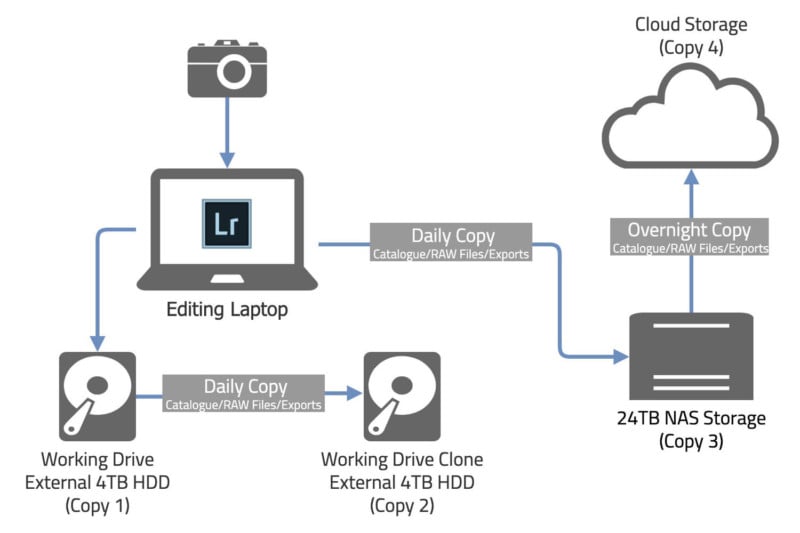
Understanding how essential data is to both individuals and businesses, adopting a reliable backup method remains non-negotiable in preventing irreversible loss. The 3-2-1 backup rule emerges as a time-tested formula, offering a blueprint for safeguarding valuable information against hardware failure, theft, natural disasters, or malware attacks. How to safely back up your data using the 3-2-1 rule involves creating multiple copies stored across diverse environments, minimizing the risk of total data loss.
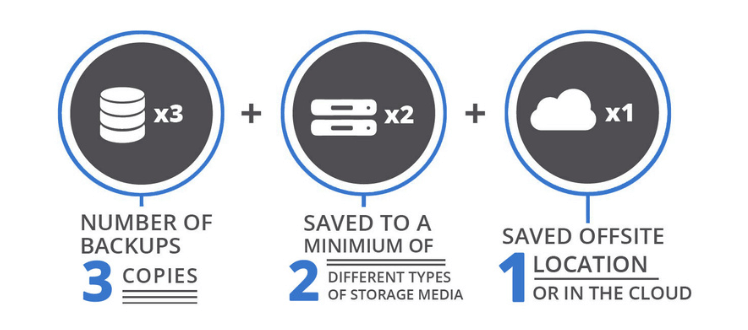
At its core, the 3-2-1 rule stipulates three main principles:
- Maintain at least three total copies of your data.
- Store these copies on two different types of media.
- Keep one backup copy offsite or in a separate physical location.
This approach ensures redundancy by avoiding a single point of failure. Imagine your main data resides on an internal hard drive, with two additional copies saved on an external SSD and a cloud provider. Such varied storage mitigates risks if one medium is compromised. The offsite backup safeguards against localized incidents, including fires or flood damage, which could otherwise wipe all on-premises copies.
Regular adherence to the 3-2-1 rule strengthens disaster recovery capabilities. When data corruption or loss occurs, users can swiftly restore from an unaffected backup, minimizing downtime and data integrity issues. This approach helps meet regulatory standards that require backups to be both secure and easily accessible, especially for systems handling sensitive or critical data.
The benefits extend beyond mere safety; efficient backup routines build operational continuity and improve confidence in managing data infrastructure. They also provide a foundation for data archiving and version control, enabling retrieval of different file states as needed.
What is the 3-2-1 Backup Rule?
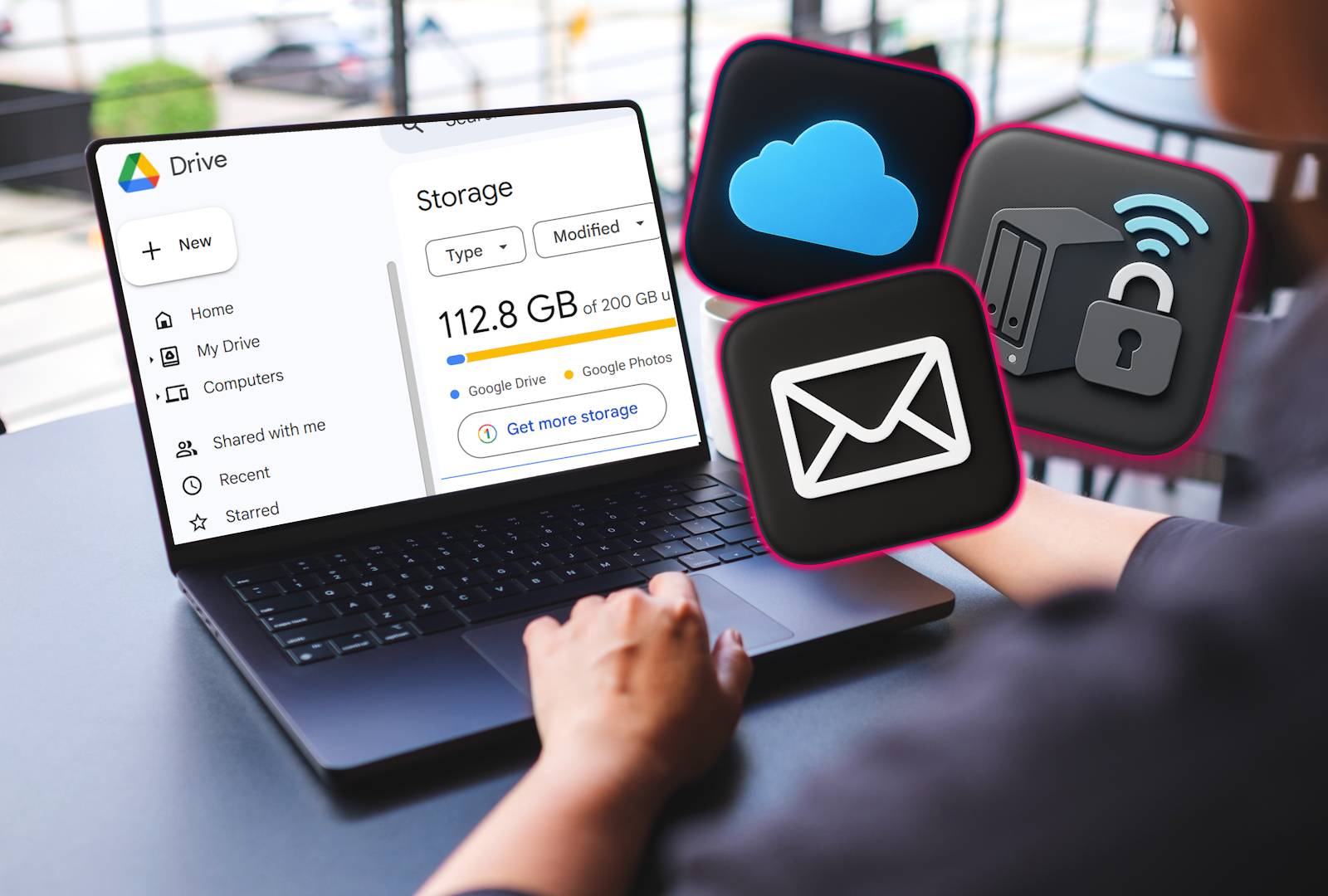
This discipline prevents human error like forgetfulness or neglect, which can leave datasets vulnerable. Implementing how to safely back up your data using the 3-2-1 rule involves selecting strong storage media and configuring automated backup processes to maintain up-to-date copies. Modern cloud services provide growable, affordable offsite storage options that align smoothly with this rule, eliminating the hassle of managing physical backup sites.
The rule’s simplicity belies its effectiveness—many catastrophic data losses happen when organizations place excessive trust in a single backup copy or system type. By distributing risk across media and locations, the 3-2-1 method ensures durability and recoverability. This fundamental principle remains relevant despite evolving technology markets, as confirmed by data resilience experts and industry proven methods published by major institutions like the National Institute of Standards and Technology (NIST).
Those realize better long-term cost management too, as data loss incidents often trigger expensive remediation efforts. People who integrate this method reduce risk exposure and preserve business continuity more reliably than those relying on ad hoc or incomplete backup strategies (in current public documentation).
In sum, mastering how to safely back up your data using the 3-2-1 rule is an indispensable foundation for protecting digital assets, ensuring recovery agility, and preventing permanent loss amid increasing threats to data integrity.
- Step-by-step beginner implementation guide for 3-2-1 backups
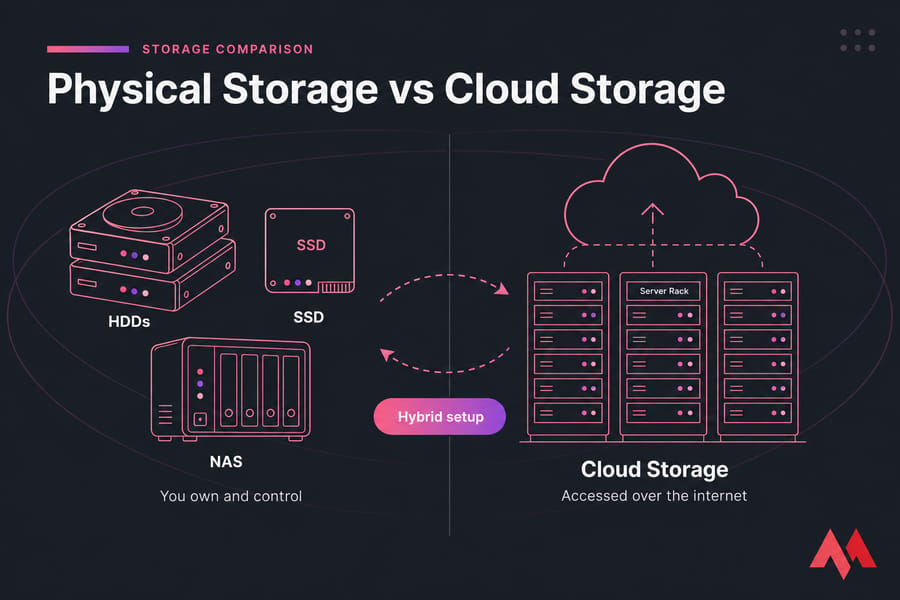
- Comparison of offsite storage options including cloud, physical, and hybrid
- Visual diagrams illustrating the 3-2-1 backup process
- Common pitfalls and troubleshooting tips when applying 3-2-1 rule
Breaking Down the Components of the 3-2-1 Backup Rule
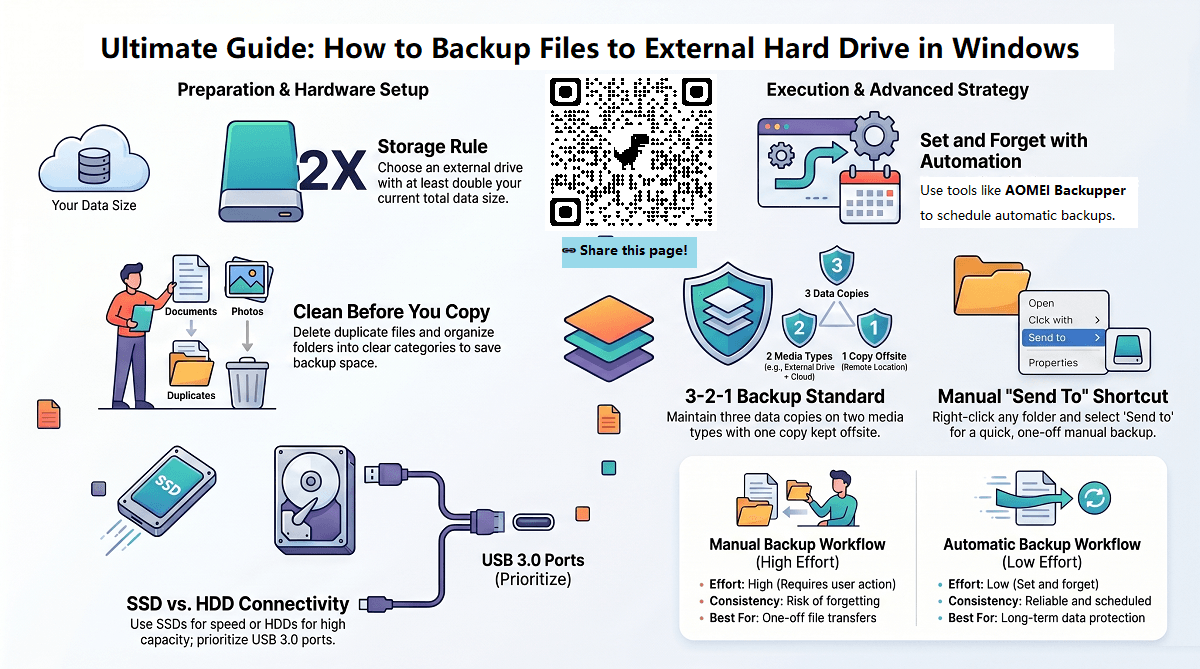
The core of the 3-2-1 backup rule lies in creating redundancy that minimizes the risk of complete data loss by diversifying where and how your data is stored. Each element of the rule plays a distinct role in ensuring your data remains accessible and safe in various failure scenarios. Understanding each step clearly is essential for implementing a strong backup strategy.
- Three Total Copies of Your Data
Maintaining three distinct copies — the original data plus two backups — provides layers of protection beyond a single duplication. If one copy becomes corrupted, deleted, or compromised, two more exist to fall back on. This redundancy guards against accidental file deletion or software corruption that often affects all copies stored in the same location.
- Two Different Storage Media Types
Storing data on at least two different types of physical or logical media reduces vulnerability to hardware-specific failures. For instance, one copy might reside on a hard disk drive (HDD), while another is saved on a solid-state drive (SSD) or optical media like DVDs. This variation mitigates risks from media degradation or technological faults that only affect a single type of storage device.
- One Copy Stored Offsite
Keeping a copy of your data offsite — away from your primary physical location — protects against catastrophic events like fires, floods, theft, or local hardware damage. Whether this offsite copy is stored on cloud servers or at a distant physical location such as a safety deposit box or partner organization’s data center, its geographic separation ensures that one disaster won’t wipe out all your backups. Period.
Together, these three elements address the primary causes of data loss: human error, hardware failure, and disaster exposure. The offsite duplicate guards against environmental or site-level disasters that could destroy everything onsite. By having three total copies, you exclude simple deletion mishaps from becoming devastating. The use of two media types prevents losing access due to a hardware-specific fault.
Each copy must be separate and updated to reflect recent changes in the data. When executed correctly, this rule requires consistent discipline in managing backups. Relying solely on local copies or redundant disks within the same system fails to fulfill the offsite, diverse media requirement. This targeted separation improves overall data resiliency and rollback options, critical for operations demanding near-zero downtime and rapid recovery.
In practice, the different storage media could mean combining external hard drives, network-attached storage devices, and cloud storage services. Cloud storage providers typically charge based on storage amount and retrieval frequency; pricing data from 2026 shows average costs around $0.02 per GB monthly, making offsite backup economically feasible for most users. This multi-layered approach drastically reduces the likelihood of permanent data loss caused by a single failure vector.
National Institute of Standards and Technology (NIST), which details proven methods within its cybersecurity guidelines atNIST Publications. Their findings confirm that geographically and technologically diverse backups form the backbone of resilient data protection strategies.
Why the 3-2-1 Backup Rule Still Matters
This structured framework also aligns with compliance requirements for industries handling sensitive information, where strict data retention and recovery mandates exist. Without adhering to the three-copy minimum and diversifying storage options, organizations risk regulatory penalties and compromised data integrity during unexpected disruptions.
The next sections will expand on the logistical methods to implement this rule, comparing cloud versus physical offsite storage and guiding beginners through the actual implementation steps necessary for complete protection. Such clarity ensures that backups are not just theoretical proven methods but practical, actionable policies suited to today’s mixed storage environments.
Choosing Appropriate Backup Storage Media

Selecting the right storage media for backups requires balancing reliability, cost, capacity, and ease of access. The 3-2-1 backup rule mandates keeping copies across at least two different types of media. This diversifies risk and protects against multiple failure modes affecting your data. Understanding the characteristics of various media options is essential to fulfill this requirement effectively.
External hard drives have long been a staple for local backups. They provide large storage capacities at moderate prices and support USB or Thunderbolt connectivity, making them easy to integrate with most systems. However, they rely on mechanical components, which introduces vulnerability to physical shocks, wear, and eventual failure (at the time of writing). For most users, external HDDs remain a cost-efficient choice for one of the primary copies in a multi-media backup plan.
Solid State Drives (SSDs) have replaced hard disks in many professional environments due to their speed and durability. SSDs operate without moving parts, offering better resistance to drops and vibrations. Their higher price per gigabyte limits their use mostly to critical or frequently accessed backup data. Incorporating an SSD as the second media type complements HDDs by mitigating their mechanical failure risk and speeding up restore times.
Network Attached Storage (NAS) devices combine storage with networking, supporting multiple users and automated backup tasks within a local environment. NAS units often include RAID configurations, which provide redundancy against drive failure. Since NAS is a distinct hardware platform compared to direct-attached drives, it qualifies as a separate media type, fulfilling the media diversity condition in the 3-2-1 rule (based on documented pricing pages). The cost of a NAS box, including multiple drives, ranges widely from around $300 to over $2,000 depending on capacity and features, making it suitable for small businesses and power users.
Providers such as Amazon S3, Microsoft Azure, or Google Cloud Storage charge based on used storage and data transfer, typically starting from a few cents per gigabyte monthly. Cloud storage offers offsite backups without the need for physical hardware management. Cloud backups guard against local disasters like fires or theft, a critical factor in risk management. Being an entirely different storage medium, cloud services perfectly complement onsite devices, aligning well with the 3-2-1 structure.
Step-by-Step Guide to Implementing the 3-2-1 Backup Rule

Their immunity to electromagnetic interference and damage from power outages offers robustness. Optical media, such as Blu-ray discs, remain a niche backup option. However, limited capacity (typically 25 to 100 GB per disc) and slower write speeds reduce practicality for large data volumes. Optical backups serve best for archiving data snapshots or critical documents requiring long-term stability.
Alternatively, combining a NAS device with offsite cloud backup covers both media and location diversity. Balancing these options, a common and effective configuration includes a local external HDD or SSD backup paired with cloud storage. Attention to the data retention policies, encryption capabilities, and access speeds of each medium further refines the best backup setup (at the time of writing).
- External Hard Drives – Cost-effective, high capacity, mechanical vulnerability
- Solid State Drives – Faster, more durable, higher cost
- Network Attached Storage – Network accessible, RAID redundancy, hardware investment
- Cloud Storage – Offsite, growable, pay-as-you-go pricing, internet dependent
- Optical Media – Long-term archival, low capacity, slower performance
| Storage Media | Typical Capacity Range | Approximate Cost per TB | Durability Factors | Access Speed | Suitability |
|---|---|---|---|---|---|
| External Hard Drives | 1 TB – 16 TB | $25 – $50 | Susceptible to mechanical failure | Moderate (USB 3.0 speeds) | Local backups, cost-conscious users |
| Solid State Drives | 250 GB – 8 TB | $80 – $150 | Resistant to shock, limited write cycles | Fast (NVMe/USB-C) | Frequent use backups, fast restore needs |
| NAS Devices | Configurable, up to 100+ TB | $300 – $2000+ | Depends on RAID and enclosure durability | Network-dependent | Small business, multi-device environments |
| Cloud Storage | Virtually unlimited | $0.01 – $0.05 | Data center grade redundancy | Variable, internet reliant | Offsite disaster recovery, growable backup |
| Optical Media | 25 GB – 100 GB per disc | Low initial cost | Highly durable, scratch risk | Slow | Archiving, legal compliance, small volumes |
The diversity in characteristics among these media types meets the essential 3-2-1 backup rule requirement of having data copies on at least two different kinds of storage. Choosing among them depends on factors like data volume, recovery speed needs, budget constraints, and physical security considerations. For instance, pairing local SSDs with cloud storage blends speed and safety, while combining NAS with optical backups might suit archival use cases.
For data security and longevity, it is essential to consider encryption for both onsite and cloud storage options, as well as using automated backup software to ensure regular, consistent copy creation without manual intervention. With cloud providers, understanding service-level agreements and compliance certifications adds confidence that offsite backups are reliable over time.
An evidence-based guide from industry studies highlights that 60% of data loss incidents result from hardware failure or user error, areas mitigated precisely by combining these media types as mandated by the 3-2-1 backup backup principle. The balance and integration of these storage media create a resilient infrastructure against varied data loss scenarios, including natural disasters, theft, or ransomware (based on documented pricing pages).
Comparing Off-Site Storage Options: Cloud, Physical, and Hybrid
Such formal frameworks strengthen the assurance that chosen solutions meet current and future data protection needs. For complete technical standards on storage media reliability and backup proven methods, government resources such as the National Institute of Standards and Technology (NIST) provide detailed guidelines that align with these media selection principles (per industry surveys).
Overall, the careful selection and combination of storage media—a physical hard drive, a networked RAID system, and an offsite cloud repository—establish a strong safeguard complying with the essential redundancy and seclusion principles that keep valuable data safe and accessible under all contingencies.
How to Create and Manage Your Backups Safely
- Identify Critical Data for Backup
Start by determining which files and systems are essential to your operations or personal needs. Focus oning sensitive documents, irreplaceable media, and key application data ensures the backup process focuses on protecting your most valuable assets.
- Select Appropriate Backup Media
Choose at least two different types of storage to hold your backups, such as internal hard drives, external SSDs, or network-attached storage (NAS) devices. Diversification across media reduces the risk that physical failure or file corruption will compromise all copies.
- Establish an Offsite Backup Location
Store at least one backup copy away from your primary location using options like cloud storage services, a trusted remote data center, or a secure physical site. Physical distance guards against local disasters such as fires, floods, or theft impacting all backups simultaneously.
- Schedule Automated Backups Regularly
Implement automated backup routines on a schedule aligned to your data change frequency—daily or weekly for active data, monthly for more static archives. Automated scheduling prevents human error, ensuring backups occur consistently without manual intervention.
- Verify Backup Completeness and Integrity
Regularly confirm that backup files are complete and uncorrupted by performing checksum verifications or using software that supports incremental verification. This step confirms backups are usable, avoiding unpleasant surprises during restoration attempts.
- Encrypt Sensitive Data Before Backup
Apply strong encryption protocols to protect sensitive data both in transit and at rest. Encrypting files before backup safeguards information privacy, especially for offsite copies stored in cloud environments or other less-controlled locations.
- Label and Catalog Backup Sets Clearly
Maintain accurate records of backup contents, dates, and storage locations by cataloging each backup set. Clear labeling supports swift retrieval and reduces confusion when selecting the correct version to restore from multiple backups.
- Maintain Redundant Power and Network Environment for Backups
Ensure backup processes run in environments with uninterruptible power supplies and stable network connections. Minimizing disruptions during backup operations improves the reliability and consistency of your safeguard measures.
- Periodically Test Restoration Procedures
Simulate restore scenarios by recovering files from each backup type and location to verify both accessibility and functional integrity. Testing ensures the restoration process is well understood and that backups deliver the expected recovery capabilities.
- Rotate and Refresh Backup Media Periodically
Replace backup media on a scheduled basis, such as annually or biannually, to prevent hardware degradation from undermining backup dependability. Media rotation also enables timely adoption of improved technologies or formats improved for your current needs.
- Secure Offsite Backup Storage Physically and Digitally
For physical offsite backups, use locked, climate-controlled environments with access restrictions. Digital backups in the cloud should be safeguarded by multi-factor authentication and regular security audits to prevent unauthorized access.
- Document Backup Policies and Procedures Thoroughly
Create formalized documentation detailing backup schedules, storage locations, encryption standards, and restoration workflows. Clear procedural guidelines build consistency and help knowledge transfer for ongoing backup management.
- Monitor Backup Logs and Alerts Proactively
Implement monitoring tools that report backup successes, failures, and anomalies in real-time or near real-time. Early detection of issues enables prompt resolution before data protection is compromised.
- Use Versioning to Preserve Multiple Backup States
Configure backup software to store multiple historical versions of files to protect against accidental deletions, unwanted changes, or ransomware attacks. Versioning improves recovery flexibility and guards against data corruption over time.
- Educate All Relevant Stakeholders on Backup Responsibilities
Train everyone involved in maintaining or relying on backups to understand the procedures, risks, and importance of data protection. Broad awareness supports adherence to proven methods and improves incident response coherence.
Following these steps provides a complete framework to implement a backup strategy in line with the 3-2-1 rule that is both safe and manageable. Careful attention to scheduling, integrity verification, encryption, and secure offsite storage forms the backbone of reliable data resilience in the face of accidental loss or disaster scenarios. Preserving organizational continuity and personal data security hinges on disciplined, repeatable backup practices supported by strong technological and procedural safeguards. Note this. For authoritative details on backup management frameworks and standards that complement these practices, refer to the guidelines provided by the National Institute of Standards and Technology (NIST) (in current public documentation).
Practical Tips for Maintaining Reliable 3-2-1 Backup Systems
- Schedule Regular Backup Tests
Ensure backups are periodically tested for integrity and restorability. Testing verifies that data can be recovered in practice, preventing the false security of incomplete or corrupted backups. Industry standards recommend testing at least quarterly, with critical systems tested monthly.
- Automate Backup Processes
Implement automated backup software that runs at preset intervals to reduce human error. Automation guarantees that backups occur consistently without relying on memory or manual oversight, which becomes critical as data volumes increase.
- Update Backups After Major Changes
Any major changes in files, system configurations, or document libraries should trigger an immediate backup update. This habit keeps redundancy accurate and current, avoiding gaps that could result in data loss.
- Encrypt Sensitive Backup Data
Use strong encryption protocols for backup storage, especially for offsite or cloud copies. Encryption protects against unauthorized access and data breaches, fulfilling both security and compliance requirements.
- Maintain Geographic Diversity
Store the offsite backup in a location geographically distant from onsite copies to mitigate risks from local disasters like fires, floods, or theft. This practice aligns with the core 3-2-1 rule principle of spreading risk across separate physical locations.
- Choose Reputable Cloud Providers
Select cloud storage vendors that offer proven security features such as multi-factor authentication, data-at-rest encryption, and transparent privacy policies. Verify their compliance certifications, such as ISO 27001 or SOC 2, to ensure trustworthy offsite data protection.
- Periodically Rotate Physical Media
If using physical devices like external hard drives or tapes for backup, regularly replace or rotate media every few years. Aging media may degrade, causing silent data corruption that undermines backup reliability.
- Maintain Clear Backup Logs
Keep detailed logs of backup operations, including dates, sizes, and any encountered errors. Monitoring logs helps identify failures early and helps troubleshooting to maintain an unbroken backup chain.
- Keep Backup Software and Hardware Updated
Regularly update backup utilities and storage firmware to patch vulnerabilities and support modern encryption and compression standards. Using outdated software may introduce security risks or compatibility issues.
- Limit Access to Backup Systems
Restrict backup system access strictly to authorized personnel. Implement role-based permissions and monitor access logs to prevent accidental deletions or malicious tampering.
- Document Your Backup Strategy
Maintain up-to-date documentation outlining backup schedules, storage locations, and restoration procedures. Clear documentation ensures continuity when staff change and speeds recovery during critical data loss incidents.
- Monitor Storage Capacity and Budget So
Track backup storage usage and plan for growth proactively by allocating sufficient budget and infrastructure resources. Running out of space is a frequent cause of skipped backups that jeopardizes data safety.
Applying these practical tips reinforces the core principles that underpin how to safely back up your data using the 3-2-1 rule. It transforms the backup strategy from a theoretical guideline into an operational safeguard capable of defending against evolving data risks and complexity. Experts highlight that a disciplined routine combined with secure offsite choices dramatically raises resilience against hardware failure, ransomware, and natural disasters, meeting the strict demands of 2026 data protection standards documented byNIST’s Cybersecurity Framework.
Frequently Asked Questions About the 3-2-1 Backup Rule
Avoiding Single Points of Failure in Backup Storage
Scheduling Backups for Best Data Protection
Managing Cloud Storage Costs Effectively
Securing Backup Data Against Unauthorized Access
Selecting Suitable Backup Hardware for Home and Business
Integrating Offsite Storage Beyond the Cloud
Addressing Data Retention and Versioning
Troubleshooting Backup Failures Efficiently
Choosing the Right Backup Software for Diverse Needs
Balancing Backup Frequency with System Performance
Labeling and Organizing Backup Media for Clarity
Understanding the Role of Hybrid Backup Solutions
Updating Backup Strategies with Emerging Technologies
Planning Backup Restoration Procedures in Advance
Conducting Risk Assessments to Tailor Backups
Anticipating the Impact of Regulatory Compliance
These clear answers address practical concerns tied to implementing how to safely back up your data using the 3-2-1 rule, ensuring readers grasp essential backup proven methods grounded in up-to-date 2026 proven methods and protocols. For added safety, combining strong encryption measures with multi-layered physical and cloud backups helps protect data integrity against evolving threats, as outlined in current NIST guidelines NIST Special Publication 800-171 rev 3.