Understanding Kubernetes Deployment and Its Practical Benefits
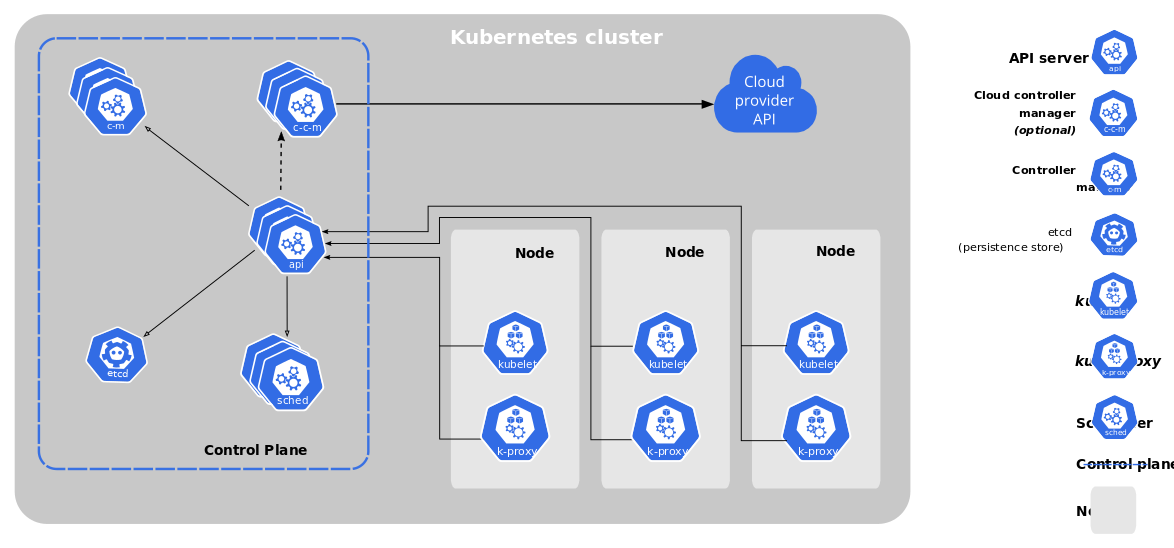
Kubernetes deployment orchestrates application containers across clusters of machines, enabling efficient scaling, management, and automation of application workloads. Running applications steadily across diverse infrastructures—from public clouds to on-site data centers—depends on creating a resilient and uniform environment through this methodology. For users new to Kubernetes or those at an intermediate level, following a carefully structured guide ensures that the deployment adheres to proven methods and avoids common pitfalls that could jeopardize application reliability.
Adopting a systematic approach to Kubernetes deployment—such as a step-by-step framework—offers multiple advantages. It allows users to comprehend each phase clearly, from preparing configuration files and manifests to launching the pods and services (in current public documentation). Managing numerous microservices or containerized applications within the same market becomes easier thanks to this step-by-step approach that cuts down complexity.
The benefits of a careful deployment include:
- Predictable application behavior: By defining explicit resource requirements and deployment strategies, applications perform reliably regardless of the underlying hardware or cloud provider, ensuring business continuity.
- Scalability: The ability to programmatically scale deployments either vertically or horizontally based on demand improves user experience and manages costs efficiently.
- Recovery and fault tolerance: Kubernetes deployment uses controllers that continuously monitor application health and automate recovery from failures, minimizing downtime.
- Simplified updates: Rolling updates and rollbacks allow for smooth application improvements or retractions without interrupting service availability.
- Unified management: Centralized control almost always minimizes operational overhead for devops teams, fostering consistency throughout development, testing, and production stages.
These manifest files act as the declarative foundation for Kubernetes to maintain the desired state of applications automatically. An explicit kubernetes deployment step by step guide also reveals the importance of crafting detailed manifests that specify containers, replicas, networking, and storage configurations. Users gain insight into essential components such as Deployments, Services, and ConfigMaps, learning how they interact within Kubernetes’ market (among the platforms reviewed here).
Also, practical examples demonstrating how to expose deployed services via LoadBalancers or Ingress controllers reinforce understanding of application accessibility and security. Focusing on step-by-step learning ensures that users can troubleshoot effectively when deployments encounter errors or unforeseen conditions.
What Is Kubernetes and Why Use It?

Emphasizing the deployment lifecycle, including monitoring and rollback techniques, equips operators to maintain applications with confidence over time. This deliberate progression from basic concepts to advanced topics helps teams of varying expertise to use Kubernetes effectively, ensuring workloads run smoothly and consistently in active production environments. Through such a guide, Kubernetes deployment evolves from an intimidating challenge into an achievable routine.
Documented deployments backed by real-world manifest files deepen comprehension and speed up adoption, helping organizations realize Kubernetes’ full operational potential. For more on container orchestration standards and updates, refer to the official Kubernetes documentation that outlines the latest stable release and platform features at Kubernetes official documentation.
- Detailed troubleshooting and common errors during deployment
- Complete example manifest files with commentary
- Explanation of exposing deployments with services and ingress
- Detailed rollback and update strategies for deployments
Essential Prerequisites for a Smooth Kubernetes Deployment
Before initiating a Kubernetes deployment, it is key to secure the right tools, access, and foundational knowledge to avoid common pitfalls and ensure efficient orchestration. Preparing your environment involves several concrete steps that set the stage for success.
- Install the
kubectlcommand-line tool, the primary interface for interacting with your Kubernetes cluster. Ensure it is configured correctly to communicate with your target environment. - Obtain access credentials to a functioning Kubernetes cluster. This may be a local setup, like Minikube or Kind, or a managed cloud provider cluster such as Amazon EKS, Google GKE, or Azure AKS.
- Have Docker installed and configured on your development machine to build and manage container images, which serves as the application packaging standard for Kubernetes workloads.
- Acquire a basic understanding of Docker containerization concepts, including building images, running containers, and pushing images to a container registry.
- Familiarize yourself with Kubernetes resource definitions and YAML manifests since defining deployments, services, and other objects commonly involves writing and editing these configuration files.
- Access to a container image registry (public or private) for storing and retrieving container images used by the Kubernetes deployment.
- Configure your local environment with tools for monitoring and logging Kubernetes resources, such as Helm for package management or Lens for cluster visualization.
- Set up a reliable network connection with permissions to interact with your Kubernetes cluster, including roles and namespaces configured via Kubernetes RBAC policies.
- Optionally, understand the basics of ingress controllers and service meshes if your deployment requires advanced routing or secure communication between microservices.
- Prepare a text editor or integrated development environment that supports YAML syntax highlighting and validation to reduce errors in manifest files.
These requirements ensure a strong foundation for your Kubernetes deployment step by step and avoid interruptions arising from missing components or misconfigurations. Having these prepared enables a smoother transition through deployment stages and minimizes troubleshooting overheads. For detailed insights into securing Linux server environments that could complement your Kubernetes setup, resources like the Step by Step Guide to Secure Nginx Web Server on Linux for Business Safety can be valuable references.
Detailed Guide to Deploying Applications on Kubernetes
- Define Your Deployment YAML
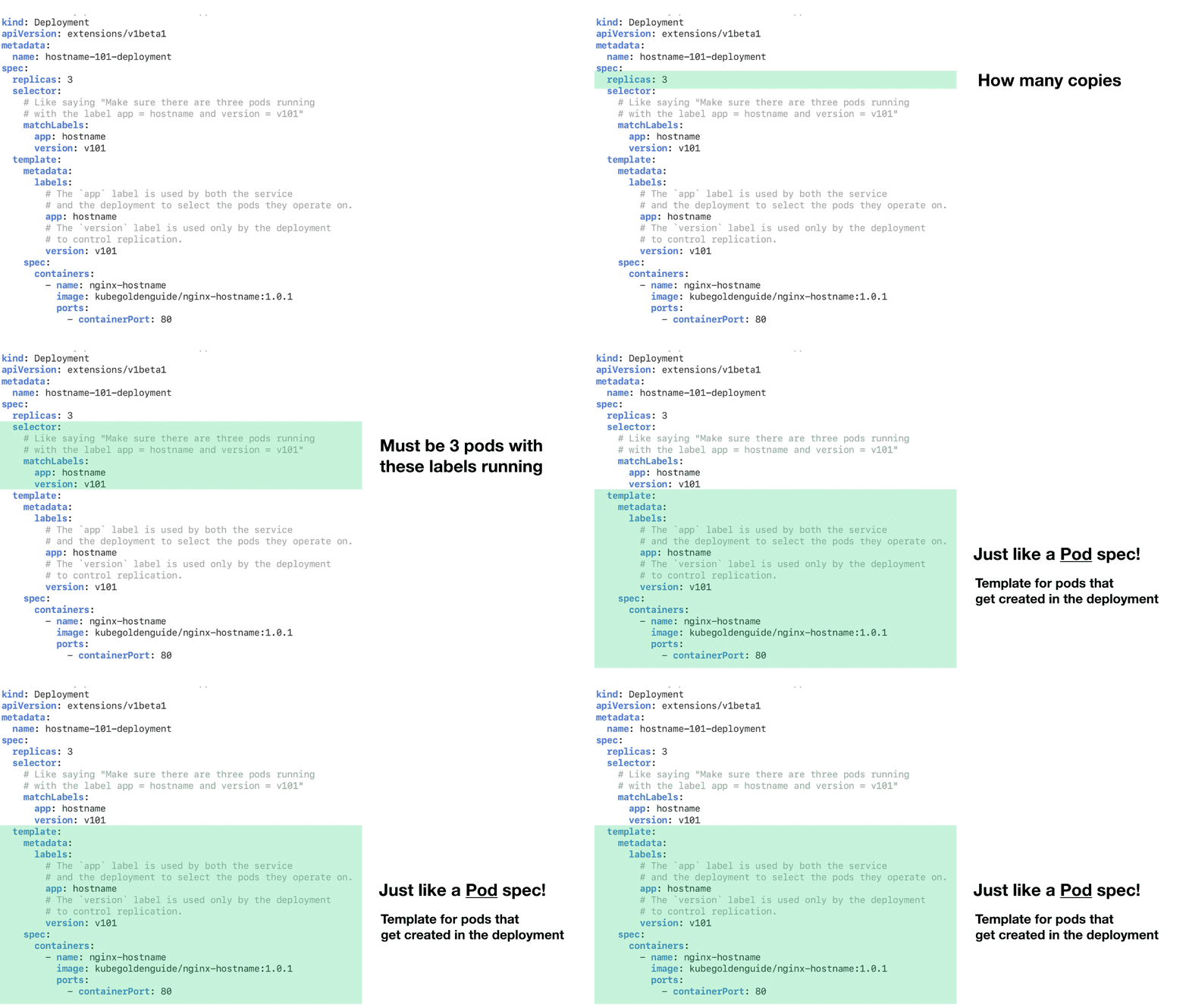
Begin by creating a deployment manifest file in YAML format. This specifies the desired state of your application, including the container image, number of replicas, labels, and resource requests. A clear and well-structured manifest ensures Kubernetes understands how to manage your pods effectively.
- Apply the Deployment Using kubectl
Use the command kubectl apply -f your-deployment.yaml to submit your deployment to the Kubernetes cluster. This command parses your YAML and creates or updates resources so, making your application ready to run. Using apply instead of create helps easier updates later.
- Verify Deployment Status
Immediately after applying the deployment, check its status with kubectl get deployments or kubectl rollout status deployment/your-deployment-name. These commands help confirm whether the replicas are up and running, indicating the cluster has successfully processed your configuration. Quick validation helps prevent hidden runtime issues.
- Inspect Pods and Logs
To diagnose issues early, list pods with kubectl get pods -l app=your-app-label and check individual pod statuses. Use kubectl logs pod-name to view logs for troubleshooting container startup failures or runtime errors. Complete log inspection is critical for ensuring pods behave as expected after deployment.
- Scale Deployment as Needed
Adjust the number of running pod instances by scaling your deployment with kubectl scale deployment your-deployment-name --replicas=N. Scaling addresses load changes instantly without downtime. This elasticity is key to meeting fluctuating user demands within the cluster.
- Update the Deployment for New Versions
Modify the deployment YAML to point to a new container image tag. Apply the update with kubectl apply -f updated-deployment.yaml to trigger a rolling update. Kubernetes orchestrates pod replacement without service interruption by incrementally updating replicas while maintaining availability.
- Monitor Rollout Progress
Use kubectl rollout status deployment/your-deployment-name to observe the rollout progress. This command outputs real-time feedback on pods being created or terminated, helping detect bottlenecks or failures during the update. Monitoring rollouts closely is essential for those relying on high uptime and reliability.
- Rollback to Previous Versions if Necessary
If the new deployment exhibits issues, execute kubectl rollout undo deployment your-deployment-name to revert to the previous stable version. This quick rollback mechanism minimizes application downtime and impacts on end users during problematic updates. The rollback feature safeguards continuous delivery pipelines.
- Expose the Deployment as a Service
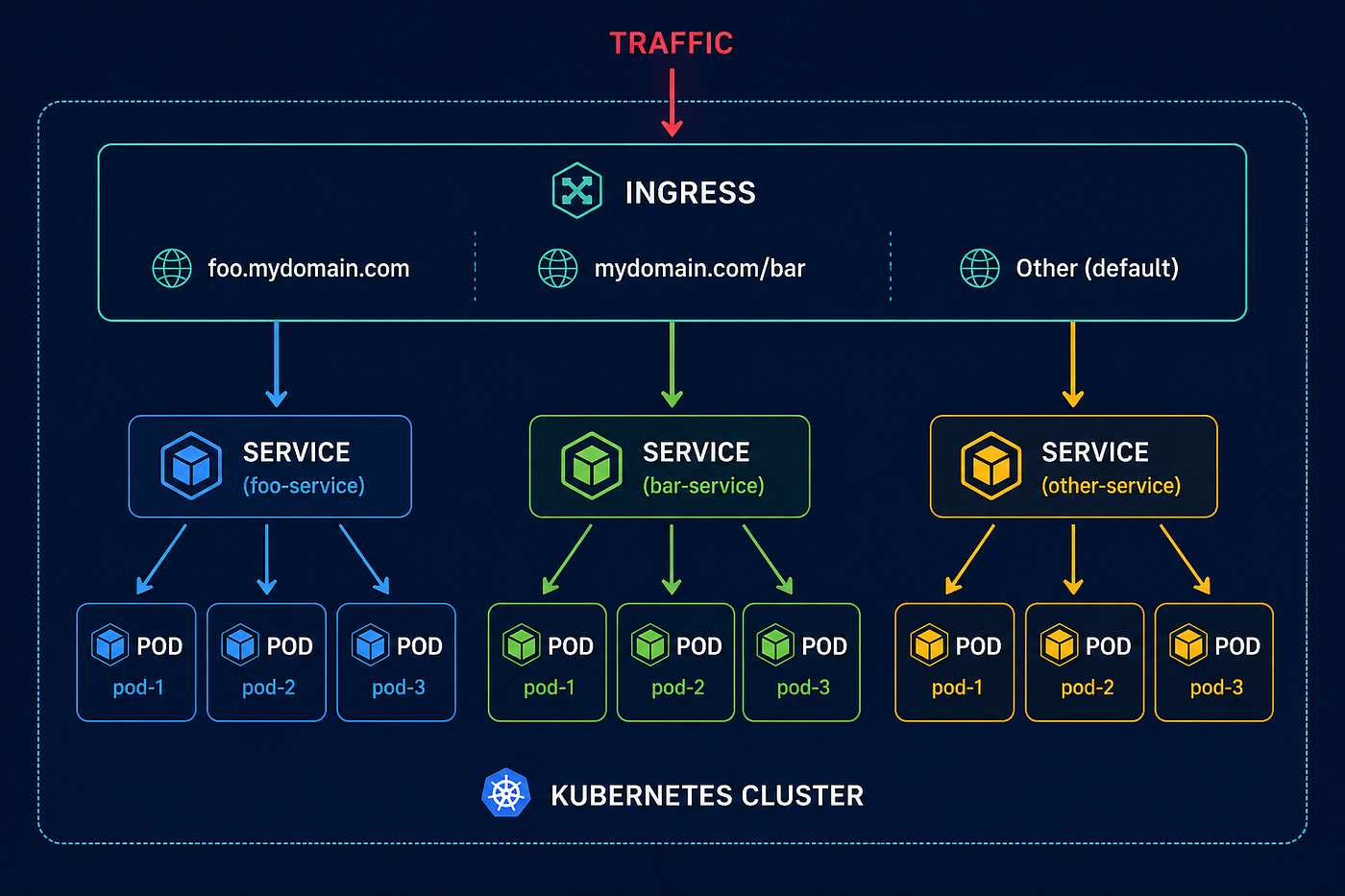
Create a Kubernetes Service YAML to expose your application, selecting the appropriate service type: ClusterIP for internal access, NodePort for external access via node IP and port, or LoadBalancer for cloud load balancer integration. Apply this with kubectl apply -f service.yaml. Services abstract pod IPs behind a stable endpoint, simplifying communication.
- Configure Ingress for Advanced Traffic Management
Implement an Ingress resource to define HTTP routing rules, TLS termination, and host-based access control, managed by an Ingress Controller like NGINX or Traefik. Deploy ingress manifests to enable more advanced and secure traffic routing beyond basic services. Ingress improves operational flexibility for public-facing applications.
- Troubleshoot Common Deployment Failures
When deployments fail, start by examining pod events with kubectl describe pod pod-name and inspecting relevant error messages. Common issues include image pull errors, insufficient resource limits, misconfigured environment variables, or failed readiness/liveness probes. Systematic diagnosis prevents extended downtimes and resource wastage.
- Validate Service Connectivity
Test service endpoints using kubectl port-forward or by accessing the LoadBalancer IP in cloud environments. Confirm application responsiveness and correct routing to pods. Connectivity checks verify that the application is reachable from intended clients and that traffic flows as designed within the cluster network.
- Implement Health Checks to Maintain Stability
Define liveness and readiness probes within your deployment YAML to let Kubernetes detect unhealthy containers and control traffic routing so. Proper health checks ensure high availability, automatically restarting or pausing pods without manual intervention. These probes are vital for stable production-grade applications.
- Set Resource Requests and Limits for Pods
Specify CPU and memory requests and limits in your deployment manifest to improve cluster resource allocation and prevent noisy neighbors. Accurate resource definitions help the scheduler place pods on suitable nodes, improving application performance and cluster efficiency. Misconfigured resource specs often cause pod evictions or crashes.
- Use Kubernetes ConfigMaps and Secrets
Use ConfigMaps for non-sensitive configuration data and Secrets for sensitive information like passwords or certificates, referenced in your deployment YAML. Applying these externalizes configuration, helping easier updates and improving security posture by avoiding hard-coded values in container images.
- Regularly Monitor Logs and Metrics
Integrate logging and monitoring solutions such as Prometheus, Grafana, or ELK stacks to collect metrics and logs from pods continuously. Monitoring deployment status reveals trends and early warning signals of performance degradation or failures, enabling proactive interventions and capacity planning.
- Document and Version Control Deployment Files
Maintain your YAML manifests in a version control system like Git. This practice builds collaboration, auditability, and rollback support beyond Kubernetes’ native mechanisms. Well-documented manifests improve reproducibility and onboarding for teams orchestrating complex deployments.
This structured approach covers all stages from crafting the initial manifest to handling advanced deployment lifecycle tasks like scaling, updating, exposure, and troubleshooting, delivering a complete operational blueprint for Kubernetes deployments. The ability to roll forward and back between versions combined with detailed resource management ensures dependable and maintainable applications in containerized environments. For authoritative detail on deployment strategies and supported manifest fields, consult the official Kubernetes documentation on Deployments and Services at Kubernetes Workloads: Deployments.
Common Mistakes to Avoid During Kubernetes Deployment

- Inadequate resource requests and limits configuration leads to pod instability and inefficient cluster usage. Avoid this by specifying CPU and memory requests and limits in your pod definitions according to real workload needs.
- Failing to use proper labels and selectors for deployments and services can cause misrouting of traffic or scaling issues. Always define clear, consistent labels on pods and reference them correctly in service selectors.
- Overlooking readiness and liveness probes results in unreliable deployment lifecycle management. Implement both probes with appropriate commands or URLs to help Kubernetes accurately monitor pod health and reload malfunctioning containers automatically.
- Neglecting namespace usage leads to cluttered cluster environments and potential resource conflicts. Use namespaces to logically separate and manage resources for different teams or applications.
- Deploying without configuring persistent storage risks data loss especially for stateful applications. Use PersistentVolumeClaims and appropriate storage classes to provide stable, reliable storage.
- Hardcoding environment-specific variables in manifests restricts portability and complicates updates. Use ConfigMaps and Secrets to decouple configuration data and sensitive information from container images.
- Skipping network policy definitions exposes pods to unintended ingress and egress traffic. Define network policies to control traffic flow and increase cluster security.
- Ignoring RBAC (Role-Based Access Control) settings can compromise cluster security by granting excessive privileges. Define strict RBAC roles and bindings custom to the principle of least privilege.
- Updating deployments without rolling update strategies risks downtime or service disruption. Use the built-in rolling update strategy with gradual pod replacement and health checks to ensure smooth transitions.
- Forgetting to expose deployments externally using appropriate Kubernetes Service types or Ingress resources limits application accessibility. Use LoadBalancer or NodePort services for external access or configure Ingress controllers for path-based routing and SSL termination.
- Insufficient logging and monitoring configuration makes debugging difficult when issues arise. Integrate monitoring tools like Prometheus and logging aggregators such as Fluentd or Elasticsearch to track application and cluster performance.
- Not handling failed deployments or rollbacks properly leads to lingering broken states. Use
kubectl rollout undoand track rollout statuses to quickly revert to a known good deployment.
Each of these errors is common but avoidable by following established proven methods and using Kubernetes features appropriately during a kubernetes deployment step by step. Clear manifest examples and automation scripts can reduce manual misconfigurations and improve deployment reliability. This systematic approach mitigates many pitfalls and sets a foundation for growable and secure application delivery within Kubernetes clusters. Using official documentation alongside trusted resources deepens understanding for any deployment scenario: Kubernetes Deployment Concepts is a thorough source for lifecycle management insights.
Common Issues and Proven methods in Kubernetes Deployment
Handling Pod CrashLoopBackOff Errors
Pod CrashLoopBackOff often signals a container repeatedly failing to start due to configuration or runtime errors. Begin troubleshooting by inspecting pod logs using kubectl logs to identify application-level failures or misconfigurations in environment variables. Adjust resource limits or fix code issues so to stabilize the pod lifecycle.
Improving Resource Requests and Limits
Accurate specification of CPU and memory requests and limits prevents resource contention or underutilization across the cluster. Monitor current resource usage through metrics servers or Prometheus, and refine values in YAML manifests under the resources field to balance performance and cost-efficiency. Over-provisioning leads to wasted capacity, while under-provisioning risks throttling and deployment failures.
Strategies for Rolling Back Deployments
Implementing rollback mechanisms requires enabling deployment strategies that support revision history, such as the default rolling update. Use kubectl rollout undo to revert to prior stable revisions when new deployments introduce faults. Coordinating health checks and readiness probes during rollouts minimizes downtime and speeds error recovery.
Proven methods for Exposing Applications with Services
Choose the appropriate service type based on access needs: ClusterIP for internal communication, NodePort for direct node access, or LoadBalancer to integrate with an external cloud load balancer. Define selectors accurately to target the relevant pods. Use Ingress controllers to consolidate and manage external HTTP/S routing, enabling SSL termination and virtual hosting.
Monitoring Deployments with Probes and Metrics
Incorporate liveness and readiness probes in deployment manifests to enable Kubernetes to automatically restart unhealthy containers and manage traffic routing. Supplement this with cluster monitoring using tools like Prometheus and Grafana, which provide reach into application metrics, pod health, and resource usage patterns, forming a feedback loop to guide scaling decisions.
Handling Persistent Storage in Deployments
Refer to PersistentVolumeClaims for durable storage needs, ensuring pods maintain data across restarts. Define storage classes aligned with underlying infrastructure capabilities and use volume mounts in pod specs to attach volumes. Observing storage capacity and I/O performance helps prevent bottlenecks impacting stateful applications.
Managing Configuration and Secrets Safely
Use ConfigMaps and Secrets for injecting configuration data and sensitive credentials into containers without baking them into images. Maintain least privilege access for secrets and enable encryption at rest within the Kubernetes cluster. Rotating credentials periodically through automation reduces exposure from compromised secrets. Period.
Troubleshooting Service Discovery Failures
Service discovery issues often arise from misconfigured DNS or incorrect service selectors. Validate the DNS resolution inside pods with tools like nslookup or dig. Checking service and endpoint objects with kubectl get svc and kubectl get endpoints confirms proper pod association.
Applying Labels and Selectors Effectively
Accurate labeling of pods helps workload grouping and targeted operations, including scaling and service exposure. Use clear, consistent label keys and values in manifests, and match selectors precisely in services and deployments to avoid unintended pod selection or service routing problems.
Using Kubernetes Namespaces for Environment Separation
Namespaces partition cluster resources, enabling isolated environments for development, staging, and production. This segregation controls resource quotas and access permissions, reducing risk of cross-environment interference. Automate namespace management with tooling to enforce policies consistently.
For authoritative details on deployment strategies and cluster configuration, the official Kubernetes documentation offers complete guidance at Kubernetes Deployment Concepts. Supplementary monitoring and troubleshooting proven methods can be explored in depth through academic and industry papers on container orchestration reliability.
This complete set of operational tips and correction techniques amplifies the practical application of a kubernetes deployment step by step, ensuring smoother management and resilience throughout an orchestration lifecycle.