What Drives Social Media Design Choices

Graphic design tools have become indispensable for social media managers tasked with maintaining active, engaging brand presences across platforms. Efficiency and versatility remain key factors as these professionals often juggle numerous content campaigns simultaneously. Crafting visually compelling content not only attracts audiences but also shapes the brand’s personality and message consistency. The right software can directly influence productivity, creativity, and the ease of collaboration in fast-paced social media environments.
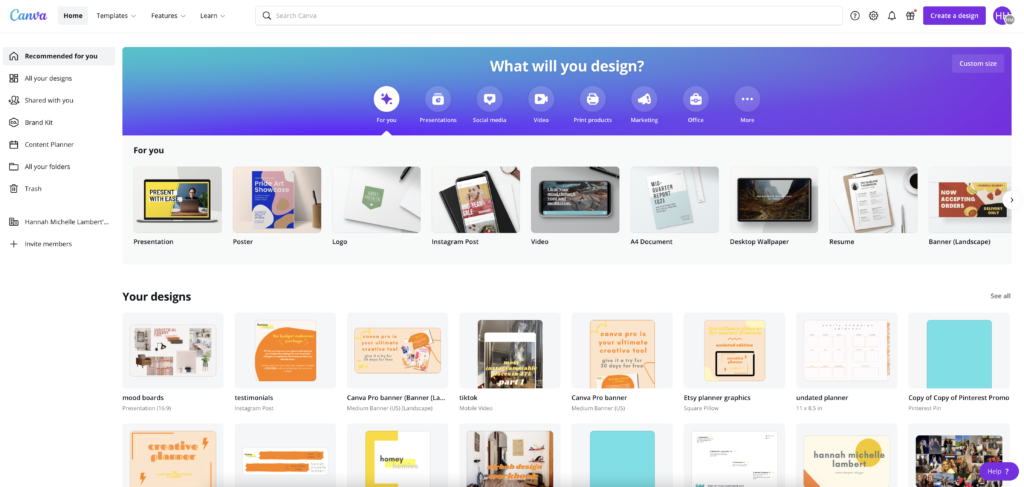
Canva Pro offers a user-friendly interface paired with extensive template libraries, enabling rapid design workflows without requiring advanced graphic skills. Canva Pro and Adobe Express stand out as two leading solutions widely adopted for social media content creation in 2026. Adobe Express, by contrast, builds on Adobe’s established reputation for powerful creative tools, blending familiar editing capabilities with simplified social media-specific features.
Choosing between these two platforms can majorly shape day-to-day operations for social media managers. Exploring into their 2026 updates, subscription models, and real use cases, we aim to provide a practical guide for professionals weighing their options. Selecting the right tool affects more than just final visual output; it impacts budget management, team coordination, and adaptability to evolving content formats. This article explores canva pro vs adobe express for social media managers to clarify differences in pricing, features, and user experience.
Social media managers face several key considerations when selecting software:
- Cost-effectiveness relative to monthly and yearly pricing tiers
- Breadth and flexibility of design templates and stock assets
- Integration with content scheduling and publishing tools
- Collaboration features supporting team workflows
- Support and learning resources for continuous skill expansion
Understanding these factors in tandem with the strengths and limitations of Canva Pro and Adobe Express equips social media teams to boost their creative output while respecting tight deadlines and budgets. This comparative analysis unveils which platform best aligns with distinct social media management needs in 2026.
Complete Feature Review of Canva Pro
References to authoritative documentation for content creation trends and workflow proven methods are integrated to ensure decisions reflect current industry standards and technological capabilities.
| Product | Our Rating | Best For | ||
|---|---|---|---|---|
 |
1Canva Pro |
4.9/5
|
Solo creators | Read More |
 |
2Adobe Express |
4.6/5
|
On-brand quick content | Read More |
 Complete Feature Review of Canva Pro
This explicit boundary contrasts with Adobe Express, whose unclear pricing and user allowances leave prospective customers guessing about potential expenses and scalability. Canva Pro’s team subscription limits users to five, which inherently confines its suitability to smaller groups, excluding larger teams or agencies that need broader collaborator access under one plan. Although Canva Pro’s individual monthly rate may be higher than casual users prefer, it ensures access to premium creative assets, offering a concrete what makes it worth it. In comparison, Canva Pro’s transparency establishes it as a more reliable choice for small businesses and solo professionals who focus on clear, predictable costs.
By offering clear-cut pricing tiers that bundle in premium templates, assets, and collaboration tools, Canva Pro strikes a balance between delivering strong creative functionality and maintaining budget predictability. The platform excels for individuals and small teams but lacks the flexibility required by expanding groups. This balance appeals especially to buyers who seek straightforward cost structures coupled with integrated design workflows. The fixed limit on team members, however, curtails expansion opportunities for organizations that require flexible, large-scale collaboration.
Yet, the platform’s constraints around AI-generated image input specificities and limited user seats highlight inherent trade-offs. The standout aspect of Canva Pro lies in its transparent subscription fees paired with high-quality design resources, allowing users to plan expenses without surprises—a worth mentioning advantage over competitors with less overt pricing. It suits those who value premium content and efficient collaboration within small teams, while larger enterprises might face challenges handling user restrictions and the nuances of AI functionality under pressing deadlines.
| ✓ Pros | ✗ Cons |
|---|---|
| Canva Pro plan is priced at $14.99/month for one user with premium templates and design assets included | Pricing starts at $14.99/month for single users, which may be costly for casual or infrequent designers |
| Team plan allows up to five users for $29.99/month, supporting collaborative design workflows | Team pricing at $29.99/month limits users to five — restrictive for larger groups |
| Offers a 30-day free trial to evaluate premium features without immediate commitment | Some AI-generated image capabilities require precise wording, which can hinder ease of use |
| Annual subscription saves approximately $72 compared to monthly payments, costing about $120/year per user | Resizing and.svg downloads, though valuable, require Canva Pro and are unavailable on free tiers |
In-depth Analysis of Adobe Express Features
Adobe Express’s Premium plan targets solo creators by emphasizing a curated set of premium design assets and multimedia integration, including photography, video, and AI functionalities. This approach supports rapid production of polished, brand-consistent content but comes with a premium price that may deter users looking for more affordable or flexible entry points.
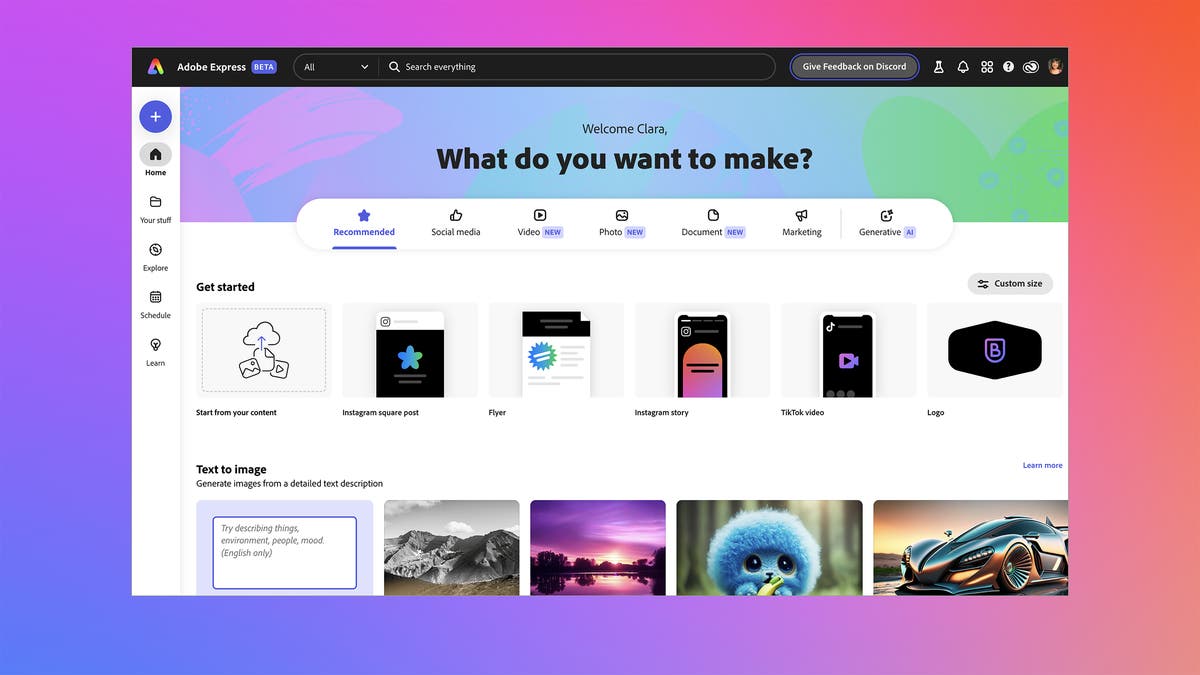
In contrast to Canva Pro’s extensive template collection and tiered pricing model, Adobe Express opts for a more focused toolkit designed to meet the needs of individual professionals rather than teams. While this specialization offers high-quality creative resources, it limits options for those who rely heavily on variety or collaborative features (at the time of writing). The Premium plan’s higher starting cost narrows its accessibility, making Adobe Express a better fit for users who focus on distinct visual identity and media integration over volume or cost efficiency.
The defining strength of Adobe Express is its fusion of exclusive assets with embedded video, photography, and AI capabilities, catering specifically to creators who value fast, top-tier content creation. However, this focus on quality and single-user licensing reduces its appeal to larger organizations that benefit from extensive template libraries and growable pricing. Full stop. As a result, Adobe Express excels in serving individual users committed to investing in premium branding tools but falls short for those seeking broad creative freedom or multi-user flexibility.
| ✓ Pros | ✗ Cons |
|---|---|
| The Premium plan is designed for 1 person, suitable for individual creators needing Adobe Express features. | Adobe Express has nearly 10 times fewer templates compared to Canva, limiting creative options. |
| Adobe Express stands out for quick and easy creation of on-brand content for businesses and individuals. | Adobe Express pricing starts at a higher floor with the Premium 1-person plan, reducing entry-level flexibility. |
| Adobe Express offers exclusive design elements that differentiate it from competitors like Canva. | Many creators still prefer Canva due to its broader template library and more extensive feature set. |
| Adobe Express supports integrated photography, video, and AI tools custom for design and animation workflows. |
Detailed Feature Comparison for Social Media Managers
Social media managers focus on efficiency in creating branded content and scheduling posts across multiple platforms. The choice between Canva Pro and Adobe Express fundamentally hinges on the features that support these priorities. A detailed feature comparison highlights key distinctions and overlapping capabilities critical to professional workflows in 2026.
| Feature | Canva Pro | Adobe Express |
|---|---|---|
| Number of Templates | Over 450,000+ customizable templates | Approximately 80,000 curated templates |
| Brand Kit Capabilities | Full brand kit with logos, fonts, color palettes; supports multiple brand kits per account | Brand kit with logos, fonts, colors; limited to one brand kit per user |
| Social Media Scheduling | Native scheduling for 8+ platforms, including TikTok and LinkedIn; calendar view included | Scheduling with Adobe Creative Cloud integration, supports fewer platforms natively (primarily Facebook, Instagram, Twitter) |
| Collaboration Options | Real-time team collaboration, multi-user permissions, shared folders | Collaboration via shared projects, more limited control over user roles |
| Supported Platforms | Web, Desktop (Windows, macOS), iOS, Android | Web, Desktop apps on Windows and macOS, iOS, Android |
| Pricing Tiers (Monthly) | Pro: $12.99/user; Teams: from $14.99/user | Premium: $9.99 individual; Teams: from $19.99/user |
| Third-Party Integrations | Extensive integrations with Dropbox, Google Drive, HubSpot, Slack, Zapier | Integrations mainly with Adobe Creative Cloud apps, limited third-party connectors |
| Multimedia Editing | Advanced photo, video editing tools; simple animation; background remover | Strong photo and video editing, Adobe Sensei AI for improved automated features |
| Export Options | Multiple format exports including GIF, MP4, PDF, SVG and CMYK-ready files | Wide export support including Adobe PDF and Quick Export presets |
For brand consistency, Canva Pro offers more advanced brand kit management, allowing multiple brand identities per account—major for social media managers handling several clients or campaigns (per industry surveys). The numbers reveal Canva Pro’s greater diversity in templates, exceeding 450,000 compared to Adobe Express’s 80,000. Adobe Express constrains users to a single brand kit, possibly limiting multi-brand workflows.
Social media scheduling is a decisive differentiator. Canva Pro supports scheduling natively across a broader array of platforms, including TikTok and LinkedIn, with a visual calendar aiding post planning. Adobe Express places emphasis on integration with Adobe Creative Cloud for scheduling but supports fewer social networks directly, which may complicate multi-channel posting strategies.
This suits agencies or teams working concurrently on content. Collaboration facilities vary; Canva Pro enables real-time teamwork with detailed user permissions. Adobe Express allows sharing of projects but with less granular control over roles and permissions (among the platforms reviewed here).
Platform and device support is comparable, with both offering web and mobile apps across common operating systems. Pricing structures differ slightly—Adobe Express’s premium tier is $9.99 monthly for individuals, undercutting Canva Pro’s $12.99, but Adobe’s team pricing starts higher at $19.99 per user (based on documented pricing pages). These tiers reflect targeted user types: Canva Pro scales cleanly from solo users to teams, while Adobe Express tilts toward individual creatives seeking integration with the wider Creative Cloud market.
In-depth Analysis of Adobe Express Features

For multimedia editing, Adobe Express uses Adobe Sensei AI to automate improvements, whereas Canva Pro offers strong manual and semi-automated tools that balance creativity with speed (in current public documentation). Integration capabilities illustrate Canva Pro’s preference for extensibility, connecting with numerous workflow tools and apps, while Adobe Express’s integrations stay tight within Adobe’s proprietary environment.
Exporting options in both tools support a broad spectrum of file types necessary for social media distribution, though Canva Pro’s inclusion of CMYK-ready files signals broader professional print applicability.
Balancing pricing and team needs further sharpens the decision in real-world marketing operations. This detailed feature matrix clarifies how social media managers must weigh template variety, brand management flexibility, scheduling breadth, collaboration depth, and integration scope when choosing between these platforms.
Adobe Express official feature description provides the base for verified capabilities as of 2026.
Choosing the Right Tool for Social Media Success
When weighing Canva Pro versus Adobe Express, the choice hinges on how social media managers align their workflows and budget with the distinct strengths of each platform. Canva Pro’s expansive template library, advanced brand kit options, and straightforward monthly or yearly subscription plans provide a growable environment ideal for teams focused on consistent, polished branding and high-volume content creation. Its pricing, starting around $12.99 per month with major savings on annual plans, appeals to those who want reliable, budget-conscious access to a broad toolkit without handling multiple apps.
Adobe Express, on the other hand, targets creators who value multimedia integration, especially video, alongside design. The inclusion of Adobe Stock assets and AI-driven features in its premium tier justifies its $9.99 per month pricing for users focus oning active, multimedia storytelling in their social media campaigns. Its interface caters to users comfortable with Adobe’s market or those seeking rapid design-to-publish workflows with direct multimedia export options.
Social media managers handling a wide array of branded posts, infographics, and platform-specific stories may find Canva Pro’s asset management and template flexibility more aligned with their needs. Conversely, teams or individuals emphasizing video and cohesive multimedia projects will appreciate Adobe Express’s premium capabilities for visual storytelling and smooth integration within larger Adobe suites.
In deciding between these, consider these factors carefully:
- Budget constraints versus required feature depth.
- Volume and type of social media content produced monthly.
- Preference for multimedia integration and Adobe market combination.
- Need for extensive brand asset controls versus creative flexibility.
Documented user feedback highlights Canva Pro’s intuitive interface and affordable multi-user plans as productivity boosters, while Adobe Express attracts users drawn to its creative powerhouse foundation and multimedia polish. Evaluating specific workflow demands against these confirmed strengths will direct social media managers toward the best platform.
The best choice must correspond to your creative priorities and operational scale, ensuring effective social media management in 2026 and beyond.
For deeper insights into brand asset management and multimedia content creation, consult Adobe’s official Adobe Express overview.
Common Questions Addressed for Social Media Managers
Understanding the Cost Structure and Payment Flexibility
Comparing Core Features for Content Creation Efficiency
Evaluating Team Collaboration Tools
Learning Curve and Platform Accessibility
Customer Support and Refund Policies
The balance of feature depth, transparent pricing, and collaboration tools heavily influences social media managers’ preferences when weighing canva pro vs adobe express for social media managers. Detailed insights and user reflections suggest that Canva Pro’s broad usability and pricing transparency often tip the scales in its favor. For further detail about multimedia capabilities, Adobe’s official documentation provides a strong reference to their video and animation features here.