Introduction
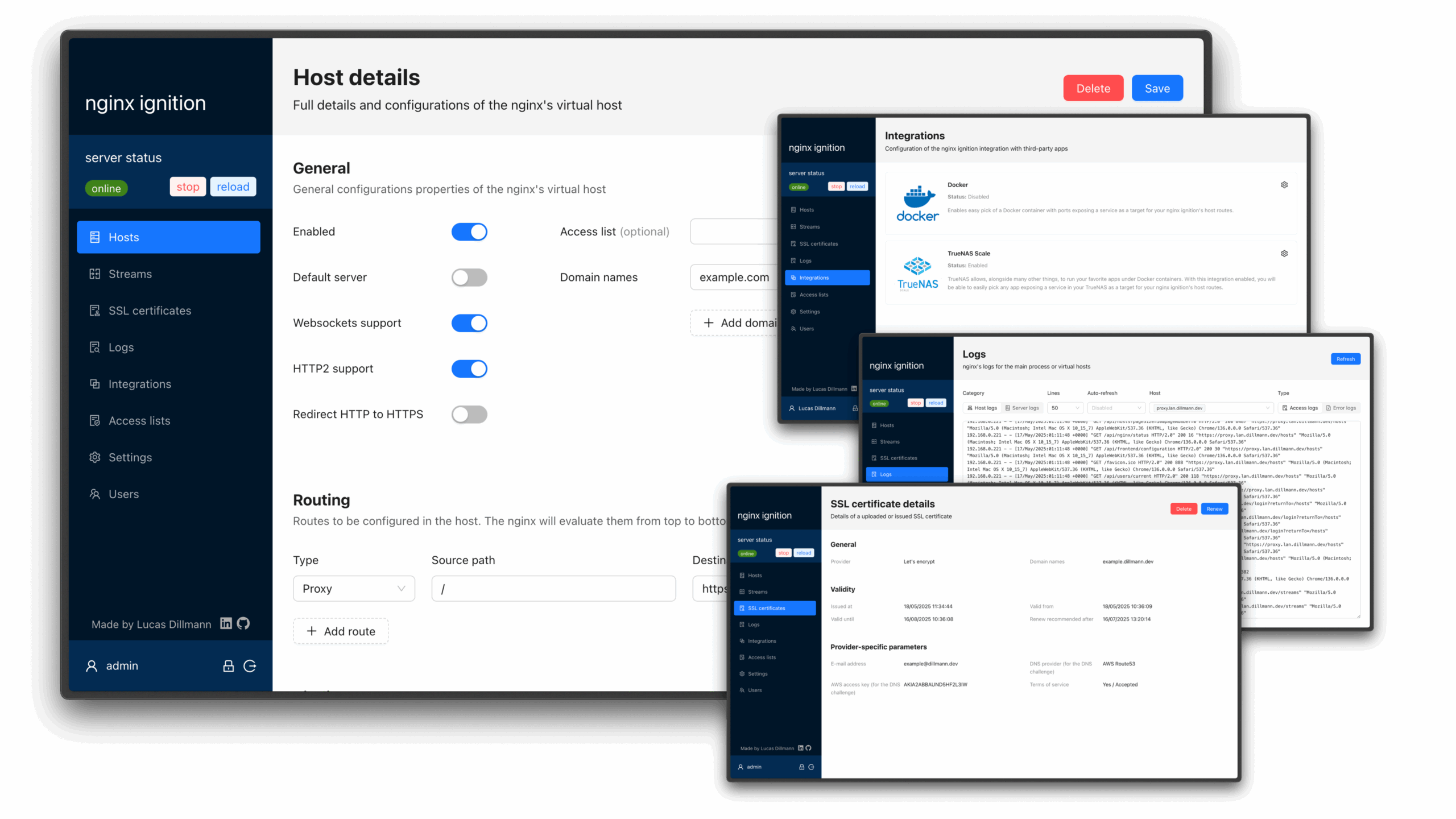
Managing high-traffic websites demands efficient and secure server environments, where nginx web server configuration proves key. Nginx is renowned for its ability to serve web content swiftly while managing concurrent connections efficiently (across the comparison set tested). How nginx manages requests, resource allocation, and protection of web assets comes down to its configuration, directly affecting site speed and stability.
These configurations determine aspects such as HTTP request processing, caching mechanisms, and load balancing strategies. The core of nginx lies in its modular configuration structure, which allows administrators to tailor the server’s behavior through clearly defined blocks and directives. The flexibility of nginx’s configuration enables deployment in various roles, including reverse proxy, web server for static content, and API gateway, making it a flexible tool across diverse environments.
Also, nginx acts as a reverse proxy to distribute traffic across multiple backend servers, improving fault tolerance and scalability. Typical use cases for nginx encompass serving static files like images, CSS, and JavaScript, where its event-driven architecture excels in speed and low resource consumption. This role is key for complex web applications that require high availability and smooth load distribution.
Correctly configuring nginx directly affects critical performance metrics: server response time, throughput, and resource utilization. Improper setup risks bottlenecks, increased latency, or even server crashes under load. Security is equally dependent on precise configuration—nginx controls access restrictions, mitigates denial-of-service attacks, and manages encryption protocols such as SSL/TLS. A misconfigured nginx leaves servers vulnerable to exploitation and data breaches, threatening service continuity and user trust.
Improving nginx web server configuration involves balancing responsiveness with security. This means fine-tuning buffer sizes, enabling gzip compression, and implementing connection limits to safeguard against abusive clients. Enabling strong logging and monitoring within the configuration further aids in identifying anomalies before they escalate. These proven methods ensure that nginx not only delivers content quickly but also defends against the increasingly advanced threat market faced by web infrastructures.
Introduction to NGINX Web Server Configuration
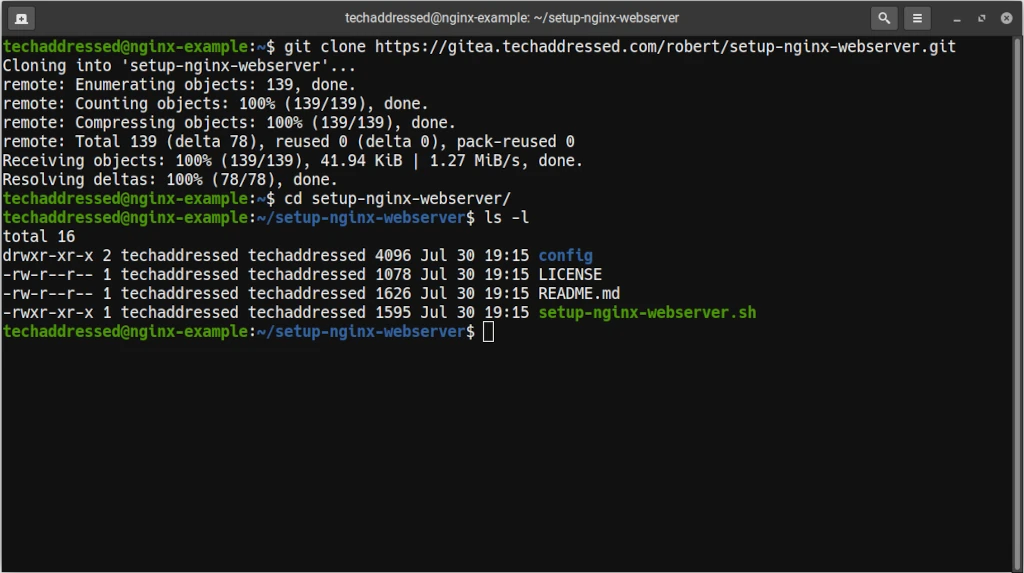
- Configuring server blocks and locations for targeted request handling
- Setting up SSL/TLS certificates with automated renewal
- Implementing load balancing with health checks
- Limiting request rates to prevent brute force and DDoS attacks
- Applying caching strategies to reduce backend load
So, mastering nginx web server configuration remains a foundational skill for IT teams managing public-facing applications and internal services alike. Mistakes in these configuration points often cause poor user experience, security incidents, or increased operational costs. For those aiming to build a secure, performant web environment, understanding these principles leads to reliable, growable server architectures aligned with modern web demands (across the comparison set tested).
Integrating knowledge from the official nginx documentation supports practical application and staying current with updates and security fixes is essential for maintaining strong server operations throughout 2026 and beyond. Learning from detailed guides such as the Step by Step Guide to Secure Nginx Web Server on Linux for Business Safety offers insights into protecting production-grade deployments with realistic scenarios and tested configurations.
- Detailed step-by-step configuration examples
- Security proven methods for nginx configuration
- Performance tuning and optimization tips
- Common configuration mistakes and troubleshooting
Overview of Nginx Configuration Structure

Understanding the architecture behind nginx web server configuration is essential for effective management and customization. The core of Nginx’s configuration lies within a hierarchical file system organized to provide modularity and efficiency for diverse deployment scenarios. The primary configuration file, typically named nginx.conf, serves as the master blueprint. This file governs global settings, includes directives that affect the entire server operation, and controls how other subordinate configuration files are loaded and interpreted during runtime.
Within nginx.conf, several fundamental sections define the behavior of the web server:
- The Main context: This is the top-level portion where directives related to the overall server environment — such as user permissions, worker processes, and logging — are placed. These settings influence how Nginx allocates system resources and handles processes.
- The Events context: Here, directives for managing connection handling and performance optimizations at the event loop level reside. Configurations such as worker connections and event models are declared in this segment.
- The Http context: This is a vital container holding directives for HTTP traffic management. It defines upstream server pools, logging preferences, MIME types, and other proxy-related instructions impacting client-server interactions.
Following this layered context, the configuration often employs include directives, which allow administrators to segment settings into multiple files. This modularity helps better organization, especially for handling numerous websites or services on a single Nginx instance. For example, site-specific files, commonly placed within a directory like /etc/nginx/sites-available/, are referenced inside nginx.conf or included in a separate configuration block. This approach enables encapsulation of server blocks — essentially virtual hosts — that handle requests for different domain names or IP addresses.
These Server blocks Contain key directives that specify listening ports, server names, root directories for content, and location blocks that determine how specific URL patterns are handled. Location blocks can include proxy passes, redirections, or serve static content directly. The nested hierarchy in Nginx allows location blocks to be finely tuned for granular control over request processing.
The hierarchical order of directive interpretation follows a well-defined precedence:
Installing and Setting Up NGINX
- Directives defined in the main context apply universally.
- Server block directives override global http-level settings for matching requests.
- Location blocks provide further refinement within each server block, tailoring responses for different URI patterns.
- Nested location blocks may exist for even more specific request matching, allowing for layered fallbacks or specialized behavior.
Directive inheritance behaves predictably within these scopes, with more specific contexts superseding broader ones. This guarantees that changes to site-specific files do not inadvertently affect other hosted domains.
Permissions and ownership of configuration files influence security and reload capabilities — Nginx requires read access to all included files, and typically reloads its configuration dynamically upon receiving a signal without requiring a full restart. Period.
For administrators aiming to deepen their control, mastering the relationships between nginx.conf, site-specific files, and context-based directive priorities is the foundation for any advanced Nginx deployment. This structure balances flexibility and maintainability, making it possible to host complex, multi-site environments while keeping core configurations centralized.
Standard Linux distributions package Nginx with this familiar structure, but custom setups can vary by use case. Careful modularization also enables smoother upgrades and configuration audits, reducing the risk of misconfiguration during live operations. A practical understanding of these conventions helps efficient troubleshooting and iterative tuning, especially when combined with security hardening techniques outlined in relevant guides like the Step by Step Guide to Secure Nginx Web Server on Linux for Business Safety.
Every Nginx instance begins with these principles, but scaling to high-demand environments demands precise control over these configuration layers and strict validation of each included file (in current public documentation). Mastery of this configuration hierarchy remains the bedrock for successful web server management in 2026 and beyond.
Serving Static Content with NGINX
Key Features of Efficient Nginx Web Server Configuration
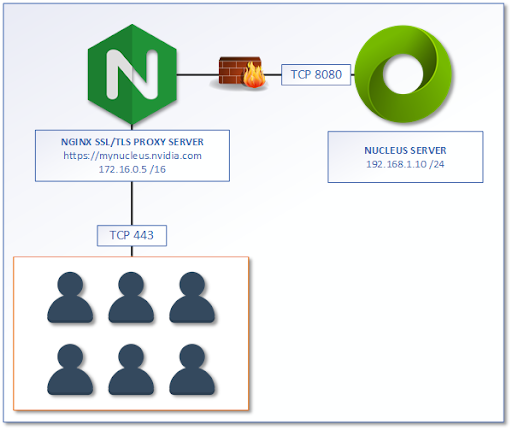
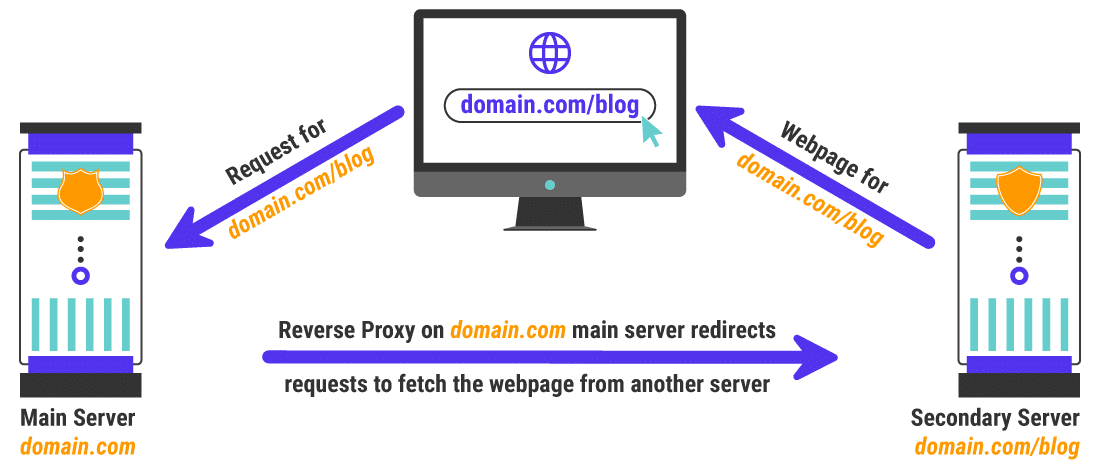
Implementing an effective nginx web server configuration requires using its core capabilities to boost performance, security, and flexibility. Among the critical features, reverse proxy setup stands as a fundamental tool that distributes workload efficiently across backend servers. This ensures that client requests are routed properly, improving fault tolerance and scalability. The configuration allows Nginx to act as an intermediary, handling client connections and forwarding traffic, thereby offloading resource-intensive tasks from application servers.
Load balancing is tightly integrated with reverse proxying in Nginx. It supports several algorithms — including round-robin, least connections, and IP hash — that determine how incoming requests are distributed among multiple servers (per industry surveys). This functionality improves redundancy and guarantees higher availability for web services by preventing any single backend from becoming a bottleneck. Administrators can configure health checks within this setup to automatically detect server failures and reroute traffic so, reducing downtime.
Securing web traffic through SSL/TLS configuration is another key aspect of Nginx’s web server management. Proper certificate management can be automated via tools such as Certbot, integrating smoothly into Nginx for continuous renewal and deployment without manual intervention. Detailed SSL directives within the configuration file allow enforcing HTTPS, redirecting insecure connections, and selecting specific cryptographic protocols and ciphers. Enabling features like HTTP/2 and OCSP stapling further improves security and load times.
Caching mechanisms in Nginx play a vital role in performance optimization. By caching static assets and even active responses where applicable, Nginx reduces backend server load and decreases client latency. Cache control directives specify what content should be cached and for how long, using memory or disk-based storage depending on the needs of the deployment. The flexibility in cache configuration lets operators fine-tune time-to-live (TTL) settings and invalidation strategies to balance freshness with resource efficiency.
Using the powerful rewrite directive and regular expressions, administrators can shape request URLs, redirect users, or enforce clean URL schemes without altering backend application logic. URL rewriting and request manipulation form a core part of Nginx’s versatility. This enables numerous use cases, including redirecting deprecated URLs, improving SEO through user-friendly paths, and implementing logical routing based on conditions like user agents or geographic location.
Configuring Reverse Proxy in NGINX

Static content—such as images, CSS, and JavaScript files—can be served directly by Nginx with improved headers and compression, bypassing backend servers for high throughput. Handling static and active content efficiently depends on custom Nginx configurations. Conversely, active content often requires proxying requests to application servers running scripts or database queries. Configuring fast CGI, HTTP proxy, or uwsgi protocols within Nginx allows smooth integration with a wide range of backend technologies, ensuring that each request is processed quickly and reliably.
- Reverse Proxy Setup: Directs client traffic to backend servers, enabling fault tolerance and backend load distribution.
- Load Balancing Algorithms: Supports round-robin, least connections, and IP hash to balance requests efficiently.
- SSL/TLS Configuration: Enforces secure connections, manages certificates, and improves protocol standards for better security.
- Caching Strategies: Implements caching of static and active content to reduce server load and improve responsiveness.
- URL Rewriting: Uses regular expressions and rewrite directives to modify request URIs for redirections and SEO.
- Static Content Serving: Delivers files directly with improved headers and compression support.
- Active Content Handling: Proxies requests via fast CGI, HTTP proxy, or uwsgi to backend application servers.
For instance, enabling SSL termination at the Nginx layer protects backend servers from direct exposure while maintaining quick encryption and decryption processes. Security and performance often intertwine in these features. Similarly, aggressive caching settings reduce database query frequency, which not only speed ups delivery but lowers the risk associated with overloading backend systems. Advanced configurations also allow rate limiting and request filtering to mitigate potential denial-of-service attacks without sacrificing legitimate traffic flow (in current public documentation).
Improving gzip and Brotli compression alongside cache-control headers can drastically reduce capacity usage and speed page loads. Also, fine-tuning worker processes and connection timeouts in conjunction with feature-rich configuration files ensures that Nginx sustains high concurrency with minimal resource use. Many operators combine these practices with monitoring solutions that track key metrics such as response time, error rates, and cache hit ratios, enabling proactive adjustments to retain smooth operation (at the time of writing).
The syntax for configuration files is well documented, supporting incremental edits and testing; this matters because errors can cause security flaws or downtime. While these features form the backbone of manual configurations, integrating automated tools for deployment and security can improve the management of Nginx servers. Following proven methods for config file organization—including splitting directives into included files and using comments—simplifies maintenance and supports complex setups involving multiple domains or microservices.
For organizations requiring complete protection, pairing Nginx with external security modules or using its native directives for restricting access, logging, and filtering requests improves the web server’s resilience. This enables compliance with modern security standards, with certificate pinning, HSTS enforcement, and detailed logging to assist in incident response. Implementing such security layers without degrading server responsiveness demands precise tuning of configuration priorities and resource allocations, balancing throughput with accountability.
Implementing Load Balancing
The versatility of Nginx configurations—from straightforward static site hosting to complex multi-tenant application delivery—makes it indispensable for contemporary web infrastructure. Combining these essential capabilities results in a web server environment capable of serving millions of requests per day while maintaining strict security postures and rapid response times (across the comparison set tested). Deeper exploration of these features reveals complex measures to improve fault tolerance and ensure smooth user experiences even during peak loads, chronicling a strong solution set unmatched by many alternatives.
The ability to customize and extend these features through modules and third-party integrations further strengthens Nginx’s adaptability. By anchoring configurations in documented syntax with practical directives and deliberate modularization, administrators gain granular control over virtually every aspect of request processing, security, and content delivery—crafting custom environments improved for distinct business needs. This technical flexibility, married with high performance and scalability, highlights why Nginx remains a foundation technology in web server management.
Additional resources refine approaches to related services, demonstrating how tightly integrated configurations extend beyond web serving into system-wide hardening and performance elevation. Detailed examples and security-focused tuning options for these features are explored in other guides such as the Step by Step Guide to Secure Nginx Web Server on Linux for Business Safety, which deepens the practical grasp on balancing protection with efficiency in production environments.
The SSL/TLS protocol specification provides authoritative standards used to guide secure channel setup and cipher suite selections within Nginx, showing the technical rigor required for enterprise-grade deployment.
Common Configuration Errors and Troubleshooting Techniques
Mistakes during nginx web server configuration often stem from misunderstandings about directive directives, file structure, or insufficient validation before deployment. These faults can cause downtime, degraded performance, or security vulnerabilities—problems that scale with traffic load (per industry surveys). Recognizing the typical errors and knowing how to fix them ensures more stable and secure operations.
- Incorrect file permissions frequently block Nginx from reading configuration or content files. Config files usually require read permissions for the nginx user, while web content folders should allow read access but maintain strict write limitations to prevent unauthorized modifications.
- Syntax errors in configuration files are common, especially with nested blocks like server and location directives. Testing configurations with
nginx -tbefore reload or restart helps catch these errors early and avoids server crashes. - Misconfigured server blocks often lead to unintended default server behaviour or conflicts between virtual hosts. Each server block should use accurate server_name directives to match domains or IPs explicitly, preventing request mishandling.
- Overlooking SSL/TLS configuration details can result in insecure connections or browser warnings. Proper paths to certificates and keys must be provided with corresponding updates when renewing certificates—mismatches cause handshake failures.
- Neglecting caching and compression settings leads to inefficient resource delivery. Configuring gzip compression and cache headers in location blocks improves load times majorly for static assets.
- Failing to set appropriate client body size limits results in 413 errors when users upload large files. Adjusting
clientmaxbody_sizeper application needs safeguards availability without compromising server health. - Overlapping or missing rewrite rules cause redirect loops or broken URLs. Careful testing of URI patterns and clear documentation of rewrite logic maintains coherent URL behavior.
- Inconsistent proxy_pass directives in reverse proxy setups may drop headers or misroute requests. Specifying appropriate HTTP version and headers preserves original request context.
Troubleshooting Strategies
- Always validate configuration changes via
nginx -tto catch syntax issues promptly. - Consult error logs located typically at
/var/log/nginx/error.logfor real-time insight into failures or warnings. - Use tools like curl or wget with verbose flags to verify HTTP responses and debug connection problems.
- Restart Nginx with
systemctl restart nginxafter config updates, but considerreloadfor zero downtime in production environments. - Isolate problematic server blocks by commenting out suspect lines and testing incrementally.
- Some compatibility issues might require adjusting active module loads or recompiling.
- For SSL/TLS problems, cross-check certificate paths and permissions, and validate using online SSL checkers or OpenSSL commands.
- Review resource limits such as open file descriptors or worker connections, as hitting system limits degrades stability.
Avoiding these common pitfalls through systematic validation and attentive configuration editing dramatically reduces service disruption risk. Incident response times shorten when logs and diagnostic commands become habitual tools, enabling agile recovery without extensive downtime (at the time of writing). Combining deliberate configuration practices with routine troubleshooting builds resilient server environments capable of handling production demands without compromise.
These resources provide step-by-step security workflows essential in 2026’s threat market and operational proven methods. For detailed control on securing your Linux-based web servers beyond Nginx, internal guides on database hardening and Fail2ban setup can improve overall server integrity while complementing the web server’s defense stance. One worth mentioning resource is the Step by Step Guide to Secure Nginx Web Server on Linux for Business Safety. Its detailed prescriptions align with the troubleshooting guidance outlined here.
Nginx’s modular design helps isolated testing of components, so maintaining small, well-organized configuration files reduces the scope of fault hunting majorly and simplifies rollbacks when necessary. Conscientious operators watch for unexpected configuration conflicts after each deployment cycle—careful version control and change documentation underpin effective troubleshooting.
Assessing Nginx Web Server Configuration for Diverse Use Cases
Effective management of nginx web server configuration offers considerable strengths as well as clear limitations that shape its suitability across various projects (based on documented pricing pages). This configuration system excels in delivering impressive performance under load, thanks to its event-driven architecture that scales efficiently while improving resource use. Also, the modular design of Nginx allows for granular control over traffic routing, load balancing, and caching strategies, supporting complex deployment scenarios in 2026 environments. The extensive documentation and active community help advanced custom configurations that improve security and uptime.
Users without prior experience in Linux server environments or without familiarity with reverse proxy setups may face difficulties configuring Nginx bestly without detailed guidance. However, the challenge lies in its steep learning curve. Also, some modules critical for specific business applications require third-party integration, which demands additional caution to avoid security and stability risks. Administrative troubleshooting can also be complex, especially when dealing with complex server blocks and SSL management.
- Projects demanding high concurrency and minimal latency benefit most from Nginx’s non-blocking architecture.
- Businesses requiring flexible reverse proxy features and microservice frontend support find Nginx especially advantageous.
- Users comfortable with CLI environments and configuration scripting gain the most value from its advanced customization capabilities.
- Beginners or those needing graphical interfaces should prepare for a learning investment or consider supplemental management tools.
Nginx fits well in setups focus oning performance and security, especially when combined with proven Linux server hardening strategies like those detailed in the step-by-step guide to secure Nginx Web Server on Linux. Its suitability is strongest in professional-grade web hosting, SaaS platforms, and complex content-delivery systems requiring strong, low-overhead server solutions that can be finely tuned to exact organizational needs.
For precise customization and performance optimization, integrating Nginx configuration with complementary Linux security measures improves operational stability to industry-leading standards. The necessary security proven methods embedded within nginx web server configuration reinforce its role as a resilient web server — why organizations operating under strict compliance demands choose it over simpler alternatives. This detailed balance between power and complexity defines the ideal user profile for Nginx — those focus oning control and scalability in large-scale web environments.
Advanced Nginx architecture discussions hosted by USENIX provide further confirmation of its industry-grade capabilities, solidifying its position as a top-tier choice for performance-centric web services today and beyond.