Understanding the Role of Privileged Access Management
Serious organizations can’t afford to ignore sensitive credential protection (at least usually). Data breaches splash across headlines almost every day. Choosing the right privileged access management (PAM) software reshapes how a company shields its core systems. Strict control and oversight of privileged accounts—those managing critical infrastructure—are the primary focus of these tools. The risks are enormous: leaked credentials can trigger data theft, operational mayhem, or fines hitting millions.
These aren’t just ordinary user logins. PAM occupies a distinct niche in security, targeting accounts with improved permissions. Such accounts grant powerful access to servers, databases, and network devices. Without strict limits, insider threats, hackers exploiting vulnerabilities, or errors can wreak havoc. History shows major breaches often begin when privileged credentials are compromised.
Leading PAM vendors combat these dangers using features designed for tight protection and traceability. Just-in-time access, credential vaults, session recording, and automatic password rotation all tighten control. By restricting who can do what — and precisely when — they cut down the attack surface. Automation triggers access only when necessary and revokes it immediately after. Attackers lose precious time windows.
They log every session with rich detail, spotting unusual or risky activities early on. Many experts see PAM as central to zero-trust models, setting clear trust boundaries inside networks. The top platforms don’t simply lock the door; they keep watch on who walks through it. Such audit trails are indispensable during breach investigations and to comply with standards like NIST and GDPR.
Going digital floods enterprises with sprawling cloud and hybrid IT environments, making manual tracking futile. By 2026, the importance of PAM will deepen further. Automated PAM functions as the backbone for securing these complex infrastructures at scale. Companies rely on it to protect the “keys to the kingdom”—the credentials governing essential systems.
CyberArk Privileged Access Management Overview
The best PAM platforms rest on three core pillars:
- Credential vaulting and management
- Access workflow automation and just-in-time privilege assignment
- Session monitoring, recording, and auditing
This trio thwarts misuse and limits insider threats while speed uping security operations. Any organization with sensitive data or critical infrastructure can’t overlook privileged access management. The PAM software you choose will shape how firmly you guard your digital gateway—and how quickly you respond when threats surface.
- CyberArk — CyberArk is consistently included in evaluations of the top 5 PAM tools in 2026 reflecting enterprise suitability
- BeyondTrust — Listed among the top 5 PAM tools in 2026 by multiple authoritative evaluations
- Thycotic — Pricing starts at $6 per user per month for the P1 tier with a free tier available
- Centrify — Offers a free tier allowing initial use without cost before committing to paid plans
- ManageEngine PAM360 — Offers free demos and trials to evaluate before purchase, improving buyer confidence
- One Identity Safeguard — Offers a free tier and a $6/user/month P1 plan, providing flexible entry points for different user needs.
| Product | Our Rating | Best For | ||
|---|---|---|---|---|
 |
1CyberArk |
4.4/5
|
Enterprise privileged access | Read More |
 |
2BeyondTrust |
4.2/5
|
Listed among the top 5 | Read More |
 |
3Thycotic |
4.6/5
|
Mid-sized enterprises | Read More |
 |
4Centrify |
4.3/5
|
Mid-sized teams | Read More |
 |
5ManageEngine PAM360 |
4.1/5
|
Enterprise PAM control | Read More |
 |
6One Identity Safeguard |
4.5/5
|
Offers a free tier and | Read More |
 |
7IBM Security Secret Server |
4.9/5
|
Mid-size teams | Read More |
 |
8Delinea |
4.7/5
|
Privileged access control | Read More |
CyberArk Privileged Access Management Overview

The price, though, tends to put it out of reach for smaller businesses. CyberArk offers a strong privileged access management (PAM) tool aimed at big companies facing tough security challenges in 2026. Even with licenses that cover lots of privileged accounts, the cost feels steep.
That’s a big advantage over competitors pushing flexible or cheaper starter options. CyberArk fits best with teams experienced in security, not small companies looking for quick, simple fixes. It’s made for enterprises wanting tight control and full reach over privileged accounts. Unlike BeyondTrust, CyberArk skips free tiers or trial runs—no easy test drive. The setup? Complicated enough you need cybersecurity pros, not just average IT staff. That complexity inflates costs and delays benefits.
The system constantly scans for insider risks or outside attacks, key in places where security can’t slip. CyberArk bets on serious security, not on cutting costs or speed (in plain terms). Its power lies in broad integrations with enterprise systems, handling tricky privileged access flows that matter in varied IT environments. Pricing tiers mirror this focus—built for large firms running big privileged account programs with strict controls. You get sharp access management and clear threat tracking, but the price includes high license fees and tough deployment.
For a peek into related secure access matters, see Why Best Identity And Access Management Solutions Favor Okta And Microsoft Azure Active Directory. Endpoint detection headaches, something CyberArk also tackles, show up in 5 Cost-Effective Solutions For Best Endpoint Detection And Response Software. CyberArk’s deep integrations link to challenges discussed in Best Cloud Cost Management Software Tested With Detailed Pricing And Features Comparison.
CyberArk Pricing and Deployment Constraints
CyberArk’s base license starts pricier than many PAM tools aimed at wider markets. That shuts smaller outfits out. The features focus on big enterprises—that’s clear in the price. Competitors might lure you with cheap entry or trials; CyberArk expects a heavy upfront bet. No free test versions mean you pay well before you get rolling. The setup requires hardened security teams to configure and maintain.
Without those, simpler, cheaper PAM systems often make more sense (more or less). It shines for companies with strong security squads who can master detailed access controls and automated threat alerts. CyberArk targets the premium league—huge setups with critical security needs instead of small teams wanting quick deployments or low costs.
The scope of CyberArk’s integration reach and security design makes it clear: this is an enterprise-level heavyweight, where cost and complexity set high boundaries.
Corporate Buyers Seeking Strong PAM Solutions
Prices rise with license size and integration depth. The trade-offs lean towards deep security rather than easy starts or cheap fees—geared for enterprises ready for tough rollouts. CyberArk appeals to buyers wanting a broad risk strategy spanning many enterprise platforms and knotty IT setups (for the most part). Budgets need sharp eyes; timetables must stay real. It suits organizations chasing top compliance and fearing insider breaches.
Licenses scale with growth, but steep costs usually block smaller companies or those with lighter needs. For firms that can pay and operate it, CyberArk pays back with stronger threat discovery and razor-focused privileged access control. Ideal users are sizable enterprises with dedicated security operation centers engaged in continuous monitoring and threat hunting to extract maximum benefit.
This push to deliver deep, enterprise-grade defense—embracing complexity and cost—makes CyberArk a top PAM pick for high-risk setups in 2026.
| ✓ Pros | ✗ Cons |
|---|---|
| CyberArk is consistently included in evaluations of the top 5 PAM tools in 2026 reflecting enterprise suitability | Does not offer a free tier unlike some other PAM platforms with limited feature free alternatives |
| Supports integration with multiple enterprise platforms for privileged access management workflows | Enterprise-level pricing places CyberArk above most PAM competitors, limiting small business accessibility |
| Features advanced session monitoring and real-time threat detection capabilities within its privileged access solution | Reportedly complex initial deployment requiring dedicated cybersecurity expertise for configuration |
| Offers growable license tiers to accommodate large organizations with extensive privileged account needs |
 BeyondTrust Privileged Access Management Features
BeyondTrust ranks near the top in privileged access management. That makes budget planning tricky for buyers. Reviews often put it among the best PAM tools available. It works smoothly in complex enterprise environments, slipping into existing PAM setups with minimal fuss. Pricing is a different story. Unlike some competitors, BeyondTrust doesn’t spell out costs or limits clearly.
CyberArk, a major PAM name, lays out its fees and device caps openly. Companies watching expenses often choose it for that reason. BeyondTrust’s unclear pricing can scare off organizations with tight budgets, even though its platform secures access well. Cost transparency matters. If you focus on broad integration and strong security—and don’t mind missing up-front cost details—BeyondTrust might be a fit. Smaller firms or those hunting free trials or basic packages may struggle to find clear pricing here.
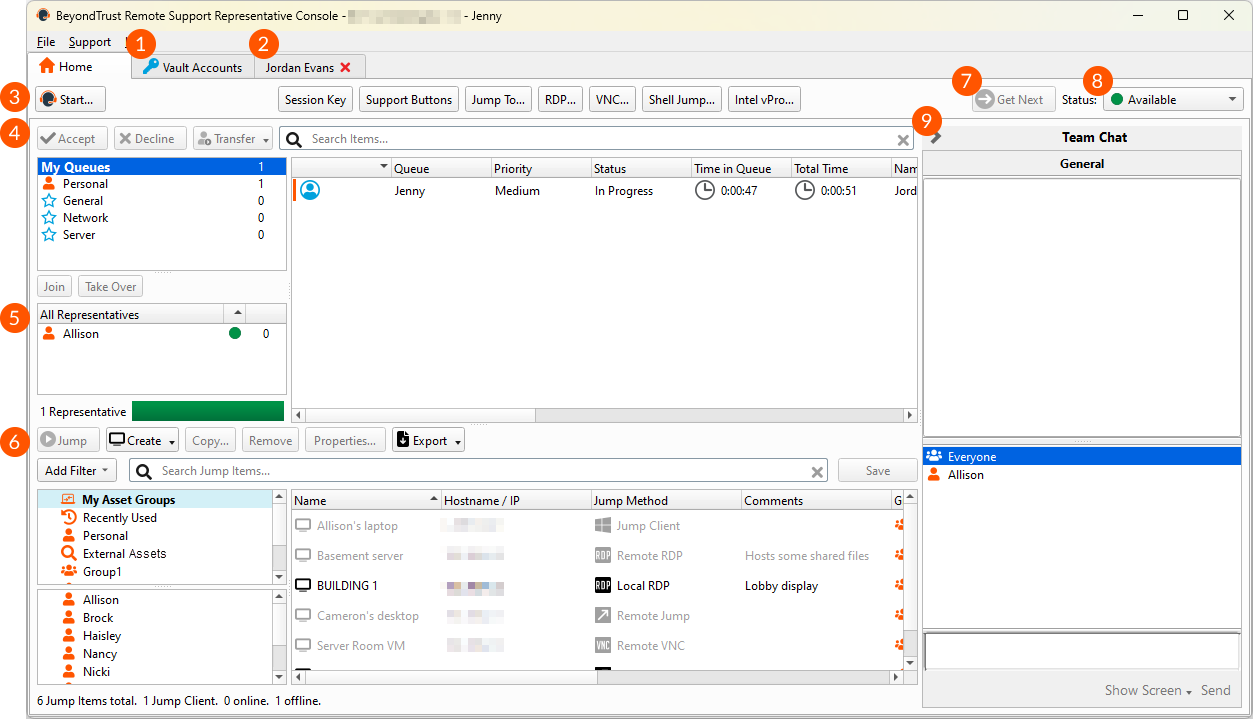
BeyondTrust shines in compatibility with large IT setups and sticks to strict security rules that big companies demand. It doesn’t offer free or trial versions—that’s a downside for budget-focused users. Still, it scales securely without stating device or user-number limits. This points to a user base of well-funded, security-first enterprises—not startups or mid-sized companies needing clear price info. For more on endpoint security tools, see 5 Cost-Effective Solutions For Best Endpoint Detection And Response Software. Its deep hooks and readiness for tough compliance make BeyondTrust a solid pick for large IT teams dealing with strict rules, as outlined in Gartner’s PAM Market Guide.
| ✓ Pros | ✗ Cons |
|---|---|
| Listed among the top 5 PAM tools in 2026 by multiple authoritative evaluations | No specific free-tier or free alternative plan identified among the top 10 PAM solutions |
| Included with major PAM platforms offering strong infrastructure integrations | Lack of documented unique differentiator outside of standard privileged access management features |
| Supports privileged access management capabilities aligned with enterprise security requirements | Limited public disclosure on detailed pricing tiers or feature limits compared to some peers |
| No explicit mention of device or user connection caps in standard plans |
 Thycotic Privileged Access Management Capabilities
There’s also a free version, but it has limited features. Thycotic’s basic plan costs $6 per user each month. If you want governance tools, you pay extra. The higher tier jumps to $9 monthly per user and adds more capabilities. This setup lets companies adjust how much they spend on privileged access management based on budgets and security goals for 2026.
Adding governance a la carte makes the total bill grow, though. They keep pricing clear and break it down into parts, unlike CyberArk, which often confuses buyers with murky fees. Smaller teams might lean toward bundled packages—even if pricier—just to avoid extra charges. Thycotic’s model suits those who want clear costs and only pick features they need. But businesses wanting all governance tools included upfront might look elsewhere.
This simple entry price and pay-for-what-you-use governance fits medium businesses wanting fine control without big upfront costs. You can try it first, which helps ease the buy-in. Still, jumping from the base to advanced tier adds a noticeable cost, making buyers weigh the extra features against the higher price.
Overall, it’s built for folks who value transparency and modular choices over all-in-one PAM suites.
Pricing and Buyer Profile Insights
Splitting core and governance fees shows they want to serve companies wanting steady expenses and choice in features. So, Thycotic aims at buyers growing their PAM step-by-step with controlled spending. The base plan covers the essentials of privileged access, while governance upgrades come at an added cost. This differs from bundled competitors and attracts users who prefer tailoring purchases instead of buying a full, expensive package. Those on tight budgets or needing minimal governance might like the starter price; however, firms needing tough policy controls could see it as less cost-effective once extra fees kick in.
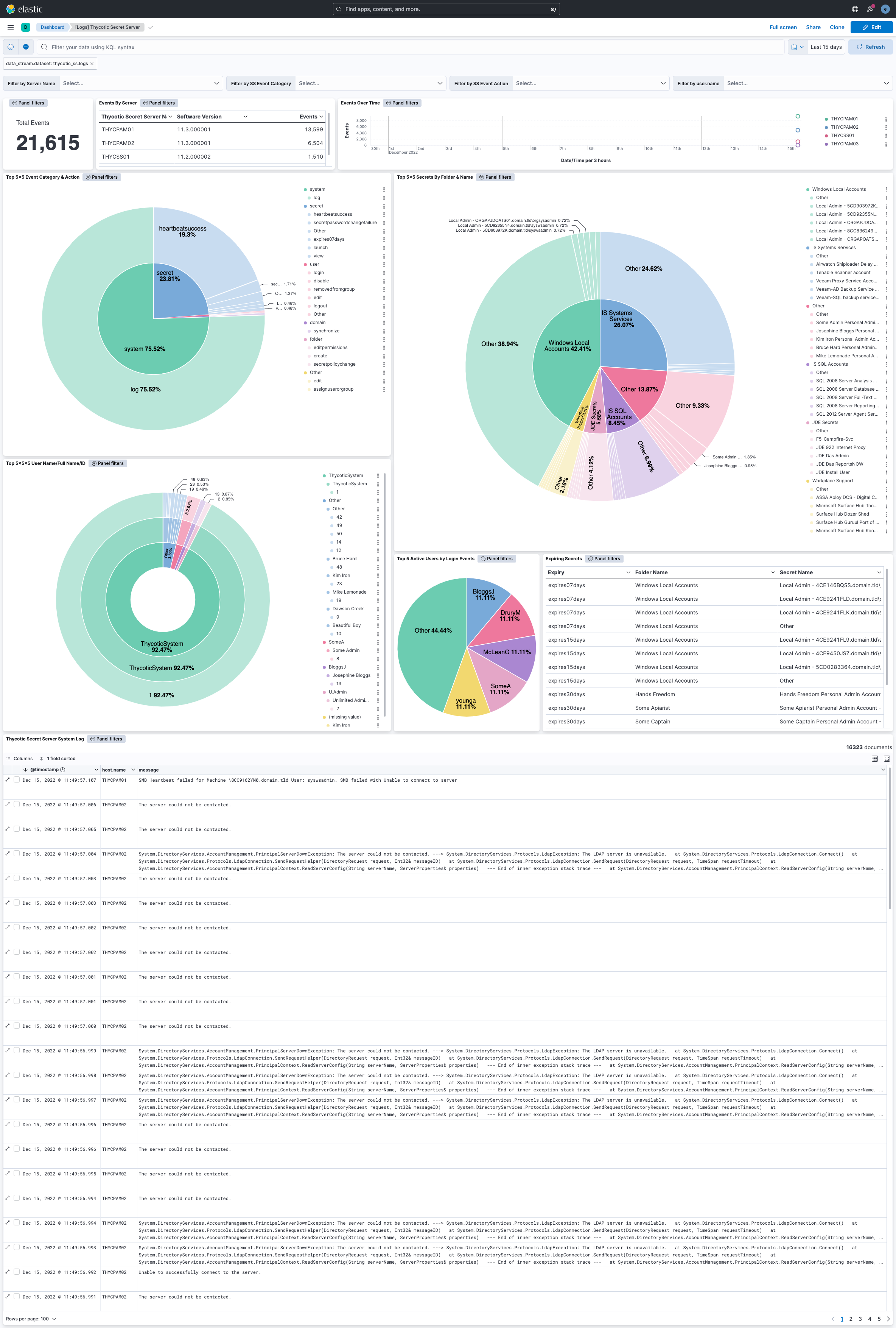
The trial lets cautious customers test integration, ease of use, and policy tools before committing. This suits careful buyers who want to limit risk, not fast movers looking for a full rollout straight away. Industry data shows rising demand for clear pricing paired with testing options, giving Thycotic a leg up in the PAM market Gartner PAM Report 2026. These pricing traits explain why certain buyers choose Thycotic and point to hurdles it faces against all-in-one providers.
| ✓ Pros | ✗ Cons |
|---|---|
| Pricing starts at $6 per user per month for the P1 tier with a free tier available | Governance features require an additional $7 per user monthly add-on, increasing total cost |
| Governance add-on is available for $7 per user per month to improve policy controls | Higher tier P2 plan costs $9 per user per month, above the base $6 pricing tier |
| Offers a free trial to test functionality before committing to a paid plan | Free tier likely has limitations as it is differentiated from P1 and P2 paid tiers |
Centrify Privileged Access Management Solutions
Centrify’s P1 plan costs $6 per user each month. That jump can hit budgets hard when detail matters. It’s a simple option for companies just starting with privileged access management. It handles basic needs well enough. But adding advanced governance doubles the bill.

Its upfront fees are higher. CyberArk usually targets bigger businesses (as a rule). Still, governance and security come built-in. Centrify splits out those features into a separate paid add-on. This makes tracking costs trickier and can push the total spend higher. Centrify offers a free tier, which CyberArk does not. That no-cost option feels handy but hides limits on usage and features. Small teams might struggle to judge the platform’s fit because of that. Overall, Centrify suits medium-sized firms who want some flexibility. Startups or very large outfits wanting all essentials in one package might find it pricey or fragmented. The simple per-user pricing with optional extras appeals to those who want clarity but can frustrate users wanting governance out of the box or a fully open free trial.
What really stands out is Centrify’s modular pricing style. You pay for governance features only if you pick them. This can save money for groups tightening controls bit by bit as they grow. But even the base $6 per user might feel steep for tiny teams before they add governance. The free plan tries to pull users in, but its vague limits cut down practical usefulness. So, this setup works best for orgs that want to control spending on access one step at a time, not for those demanding all-in-one packages right away. Choosing here means balancing modular scaling against creeping overall costs. For more insights on securing access, check out best identity and access management solutions. For a straight look at PAM pricing, read Gartner’s PAM market reviews.
| ✓ Pros | ✗ Cons |
|---|---|
| Offers a free tier allowing initial use without cost before committing to paid plans | Governance functionality requires a separate $7 per user per month add-on, increasing total costs |
| P1 plan priced at $6 per user per month, with P2 at $9 per user per month | Free tier exists but feature and user limits for this plan are unspecified, limiting evaluation |
| Governance add-on is available at $7 per user per month, enabling advanced policy controls | Pricing at $6 per user monthly may not fit small teams with tight budget constraints |
 ManageEngine PAM360 Detailed Features
ManageEngine PAM360 bundles privileged credential management and session oversight into one platform. CyberArk splits these features—charging separately for each. PAM360 blends them together. That can cut hassle and trim operational wrinkles if you want a simpler privileged access setup. That makes budget planning harder than with CyberArk’s clear numbers. No built-in multi-factor authentication either, which many enterprises expect for stronger security. PAM360 mainly fits medium to large groups chasing a single tool without heavy customization or locked-in support contracts.
PAM360’s license page tool stands out. PAM360 suits firms new to PAM, wanting integrated oversight and cost control more than elite resilience or finely tuned setups. It checks software licenses and privileged access compliance simultaneously—a pair rarely joined, even by rivals like BeyondTrust. IT teams can monitor risk and software costs in real time here. You’ll find little detail on session caps or account numbers. Most organizations rely on demos and trials to figure out fit. Those trials offer a taste but don’t fully reveal what you’re buying beforehand.
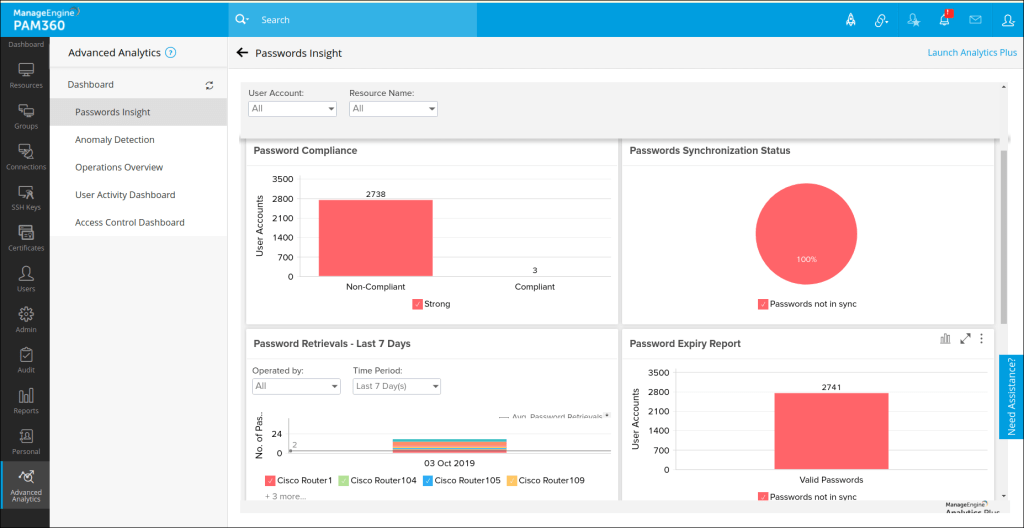
That mix eases juggling separate tools and aids audit readiness. The platform bundles password management, access controls, session monitoring, and license compliance into a tighter workflow. But security takes a hit—multi-factor authentication isn’t on by default. That’s critical against clever attacks. Pricing and deployment details stay fuzzy, pushing buyers to talk directly with ManageEngine for custom quotes. PAM360 appeals to users needing a full yet straightforward PAM package focused on managing credentials and assets, not those tied to strict incident response or instant support. Companies wanting fixed session limits, rapid help, or advanced authentication may find it lacking. For anyone curious about PAM pricing and purchase moves, Gartner’s security intelligence reports dig deep into vendor tactics and enterprise rollouts.
| ✓ Pros | ✗ Cons |
|---|---|
| Offers free demos and trials to evaluate before purchase, improving buyer confidence | No mention of multi-factor authentication integration as a standard feature limits security completeness |
| Centralizes privileged credential vaulting, brokering, and session recording in a single enterprise platform | No detailed SLA or support response time commitments disclosed for critical incident handling |
| License page tool tracks software licenses to ensure compliance and manage spending effectively | Lacks explicit documentation on caps or limits regarding simultaneous sessions or managed accounts |
| Includes advanced password management with access control and session recording features for secure operations | Free version or trial may have limited features compared to paid tiers, restricting full functionality access |
 One Identity Safeguard Enterprise Capabilities
The next step up is the $9 P2 tier, or you can add governance features for another $7 per user monthly. One Identity Safeguard starts at $6 per user per month with its P1 plan, making it affordable for smaller teams. This tier setup makes early budgeting clear. But as you add users and need more features, the costs can get tricky to track. Governance isn’t bundled into the basic plans, so companies wanting full oversight might end up paying more compared to rivals who include it.
Against CyberArk, One Identity Safeguard focuses on modular pricing and openness. This suits groups that want to pick and choose what to pay for, yet as add-ons pile up, the price can rise unexpectedly. CyberArk shines in regions like EMEA and offers automated controls that cut down privilege risks without needing much manual work—things One Identity Safeguard doesn’t do right now. So, it’s a good fit for mid-market companies wanting flexible growth and easy PAM entry. But global firms needing region-specific features or heavy automation might find it lacking.
A standout feature of One Identity Safeguard is task-specific access granted only for short bursts. That helps cut risks from long-lasting high permissions. This method tackles a usual security problem by restraining when and how privileges get used. Still, there’s no full automation to remove standing privileges, meaning admins may spend more time managing policies manually. The $7 governance add-on boosts compliance checks but adds a steep cost that some with tight budgets or multi-region needs might avoid. Companies focused on governance can handle this, though those wanting smooth, built-in governance might lean toward competitors bundling it. The clear $6 and $9 user prices make cost planning during growth key—a pattern independent PAM studies often find where growable, controlled access is in demand.
A Closer Look at One Identity Safeguard’s Ephemeral Access and Pricing Model
One Identity Safeguard’s core idea is short, role-limited access to shrink risks from always-on privileges. But big companies with worldwide reach and advanced automation needs might want something more complete. This approach boosts security without burdening users too much, as long as the tasks are well-defined and well watched. Adding the governance feature costs $7 per user monthly, boosting audit readiness but making it pricier than PAM vendors who bundle these tools by default. This choice suits teams wanting tight control over easy convenience. When expanding past the first tiers, organizations must weigh if the extra cost brings enough security value versus all-in-one alternatives. Since the platform doesn’t fully automate zero standing privilege rules, you’ll still need human eyes and hands for ongoing checks. That contrasts with PAM products built for automated threat controls. Firms looking for combined endpoint detection and privileged access may need add-on tools. One Identity Safeguard fits mid-sized businesses aiming for slow, measured PAM growth.
| ✓ Pros | ✗ Cons |
|---|---|
| Offers a free tier and a $6/user/month P1 plan, providing flexible entry points for different user needs. | P2 plan pricing at $9/user/month may be cost-prohibitive for smaller organizations with large user bases. |
| Governance add-on available at $7/user/month to improve access oversight and compliance controls. | Governance features require an additional $7/user/month add-on, increasing overall license costs. |
| Supports centralized control and monitoring of privileged accounts for audit-ready security compliance. | No evidence of multi-region or EMEA-specific strengths compared to competitors with regional focus. |
| Provides ephemeral, task-based access to close the privilege gap and minimize standing privileges risks. | No documented support for zero standing privileges fully automated, possibly requiring manual policy enforcement. |
 IBM Security Secret Server Overview

IBM Security Secret Server’s base P1 plan costs $6 monthly per user. Smaller outfits risk the cost ballooning too fast. It’s a straightforward entry point for privileged access management. For $9 per user each month, you can upgrade to a higher tier, unlocking extra privileges. That increase might strain small teams or tight budgets. The governance module adds $7 per user monthly, boosting compliance capabilities majorly. Price rises quickly after stacking features. Unlike CyberArk, which keeps pricing and premium compliance fees hidden, IBM lays out every tier transparently. This clarity benefits medium to large companies planning to scale security.
Its design slashes risk by enabling just-in-time, task-specific access. What truly distinguishes IBM Security Secret Server is its flexible pricing combined with solid governance you add only if needed. Admins won’t carry standing privileges that leave credentials exposed. Centralized privileged account management tightens oversight—a critical point for companies chained to strict regulations. Still, the governance add-on’s steep price and the lack of a dedicated session-focused PAM module hurt its appeal. Competitors often include session capture from the start. That feature matters. For compliance-heavy teams, particularly across Europe, the Middle East, and Africa (EMEA), that feature is often a must-have. The absence nudges organizations toward rivals with session-level monitoring custom to those regions.
This product is best for firms that want flexible budgeting alongside broad privileged account governance. It suits companies planning a gradual security buildup. Teams needing deep session management or those wanting to keep license fees low on small user counts might find IBM’s pricing and features misaligned. The real strength lies in centralized control paired with modular compliance options. It’s a sharp choice for businesses aiming for growable security oversight. Yet, tacking on the governance module requires careful financial planning to avoid surprise costs. Businesses focus oning detailed session recording could find better fits elsewhere. IBM Security Secret Server occupies a focused niche in privileged access management. For more detailed info and user reviews on PAM tools, check Gartner’s peer review platform—it offers valuable insights.
| ✓ Pros | ✗ Cons |
|---|---|
| Offers a free tier and P1 plan at $6 per user per month providing flexible entry options. | Higher price tier at $9 per user per month may be costly for small teams compared to base $6 plan. |
| Governance add-on available at $7 per user per month extends compliance capabilities. | Governance requires an additional $7 per user monthly fee, increasing total cost majorly. |
| Supports zero standing privileges and ephemeral, task-based access to reduce security risks. | No detailed session-focused PAM module like WALLIX Bastion specialized for EMEA markets. |
| Allows centralized control and monitoring of privileged accounts to improve oversight. | Free trial availability aids evaluation but lacks information on trial duration or feature limits. |
Delinea Privileged Access Management Platform
Delinea’s PAM suite pulls privileged account control into a single platform, zeroing in on security governance for enterprises. That’s hidden behind a curtain. Budgets wobble in the dark. CyberArk, a rival, spells out tiered pricing clearly, making cost projections straightforward. Unlike some products that split management from oversight, Delinea offers a tightly integrated governance model. Still, no word on workflow automation leaves a question mark over how well it scales. Companies wanting smooth governance might lean toward Delinea. Those needing clear price tags and built-in automation may look elsewhere. It typically fits mid- to large-sized firms aiming for strong privileged account oversight, while smaller outfits could find its pricing approach tough to unpack.
The platform excels by fusing discovery and governance into a unified workflow. This setup strengthens compliance controls under one umbrella. It skips the usual headache, where privileged access and governance live in separate silos. That quality grabs attention in highly regulated fields that insist on clear, enforceable policies. But once again, the missing public price list throws a wrench in decision-making. CyberArk’s transparent tiered pricing speeds up budget talks. Dollar-conscious teams could face delays untangling Delinea’s total cost. Its strengths fit compliance-focused groups itching for deep privileged account tracking. Still, you’ll want a clearer sense of expenses before signing on the dotted line.
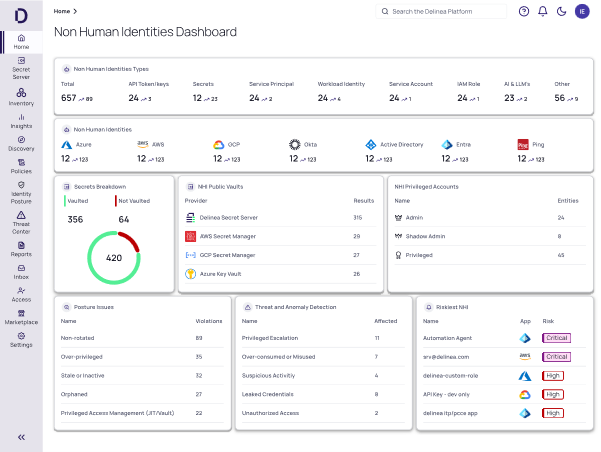
It nails discovery for organizations driven by audits and tight credential controls. Delinea’s biggest edge lies in weaving account management and governance to simplify security policies around critical assets. However, weak automation forces you to plug in extra tools just to lift efficiency beyond basic access management. This product targets mid-market and enterprise customers focus oning integrated governance over plug-and-play automation. Its opaque pricing means you need to enter sales talks to figure out costs. This makes it most attractive to teams after full governance coverage rather than instant price clarity.
For stronger security layering, zero trust network access solutions offer practical, cost-effective choices. If you’re wondering how privileged access connects with identity services, keep an eye on IAM giants like Okta and Microsoft Azure Active Directory; they heavily influence the scene. And to fit PAM into your wider IT budget, cloud cost management tools with detailed pricing reviews are worth a look.
Delinea’s Role Among Privileged Access Management Peers
But its pricing opacity stands out sharply beside competitors like CyberArk, which lay out tiered pricing for diverse enterprise needs. Delinea combines discovery and governance to tighten privileged account compliance, cutting down scattered oversight. That lack of clarity can trip up buyers juggling tight budgets and operational demands. Delinea mostly attracts those focused on compliance and integrated oversight without managing separate modules. Yet missing automation workflow details suggest scaling process efficiency might hit limits. Teams launching PAM projects on shoestring budgets could find Delinea’s pricing obscure, while those focus oning centralized privileged controls will appreciate its all-in-one design. It fits best in compliance-heavy environments, not where workflow automation rules the day.
Overall, Delinea leans into governance over broad automation or transparent costs. Without public pricing, comparing it to rivals like CyberArk—whose tiered rates ease purchasing—becomes tricky. Delinea appeals to enterprises needing strict, combined privileged access controls but might alienate smaller companies or automation-first buyers. It suits risk- and compliance-driven groups better than budget-watchers or automation fanatics.
It delivers strong compliance features, but nailing down total costs demands deep vendor talks. Delinea’s PAM approach aligns with Gartner’s 2026 vision, spotlighting governance integration as key in enterprise security. It’s a fit for security teams ready to invest in governance detail, though they must tolerate murky pricing.
| ✓ Pros | ✗ Cons |
|---|---|
| Delinea manages and governs privileged accounts to control access efficiently across enterprises | Absence of specific workflow or automation feature enumerations compared to other PAM solutions |
| Integrates management and governance functions specifically for privileged accounts to improve security compliance | Limited information about support responsiveness or SLA terms in PAM solution evaluations |
| Offers Privileged Access Management (PAM) capabilities including discovery and secure management of privileged accounts |
Tailoring Privileged Access Management to Your Organization’s Needs
CyberArk leads with precise access controls and compliance reports. Each top privileged access management software reviewed here shines in different ways, matching varied organizational needs. Big companies lean on it. The pricing is high. You pay upfront and commit long-term, but it chops down risks in tangled IT environments. This platform suits organizations ready to invest heavily in tight security integration.
It’s a solid choice for midsize firms needing flexible deployment. Plus, its transparent pricing helps teams map budgets as they expand. BeyondTrust balances ease of use with powerful features. The combo of endpoint privilege management and session monitoring creates a strong shield without drowning admins in alerts.
Its clean interface trims down training hours—a big score for lean IT teams (as a rule). Security budgets feel that impact. Thycotic fits smaller or medium businesses chasing quick setup and straightforward control. Real customers say it cuts unauthorized access by half within the first year.
One Identity Safeguard aims at heavily regulated industries with tight compliance demands. Perfect for companies merging diverse identity workflows on a large scale. Advanced auditing and granular policy controls manage complex hybrid setups smoothly. It links cloud and on-prem systems without a hitch. ManageEngine PAM360 stands out with a single management console and wallet-friendly licenses.
Delinea’s pricing isn’t clear, yet it focuses on security governance. It suits organizations wanting more than basic PAM—a platform delivering ongoing risk oversight and control.
BeyondTrust Privileged Access Management Features

- Small businesses should zero in on ease and ROI—Thycotic deserves a serious look.
- Midsize companies benefit most from flexible, monitored solutions like BeyondTrust.
- Large enterprises with complex policies should consider CyberArk or One Identity Safeguard for their extensive features.
- Teams needing consolidation or governance should explore ManageEngine PAM360 and Delinea.
The market offers no one-size-fits-all fix. Choosing the right privileged access management software matters to protect critical systems. Careful selection helps organizations reduce breach risks and fit their workflows. As cyber attacks grow sharper, these platforms stand as strong pillars holding fast, keeping business moving and trust alive.
Essential Insights on Privileged Access Management Solutions
Understanding the Core Functions of Privileged Access Management
Privileged access management tools lock down accounts that hold powerful permissions. These accounts can become serious security threats if handled carelessly. The software bundles tasks like storing passwords inside secure vaults, watching sessions in real time, and granting temporary privilege boosts. This setup cuts the risk sharply when insiders misuse their rights or hackers steal these credentials. Mistakes here can open doors to data breaches.
Recognizing the Impact of Pricing Structures on Budget Planning
Some vendors put their prices out in plain sight, neatly sorted into tiered packages. Procurement teams get stuck, unable to guess how much to set aside before signing any contracts. CyberArk, though, keeps their costs hidden behind consultations. This lack of transparency throws budgeting into chaos. When exact numbers aren’t clear, organizations face headaches planning for compliance expenses.
Identifying Integration Capabilities Across Environments
They work across cloud platforms, local servers, and virtual machines. Top-tier privileged access management solutions don’t play favorites. Such wide compatibility protects sensitive credentials wherever key applications run. Skip support for mixed environments, and you leave gaps in your defense—easy entry points for attackers lurking in wait.
Evaluating User Experience and Administrative Overhead
Good privileged access management finds a tricky middle ground. This friction becomes a breeding ground for vulnerabilities that attackers can exploit. Intuitive dashboards help admins monitor access patterns and automate approvals smoothly. If the interface is complicated or admin tasks pile up, users tend to find risky shortcuts.
Gauging Return on Investment from Privileged Access Management Deployment
Studies confirm that solid privileged access management cuts audit failures, speeds up fixing incidents, and stops attackers from moving laterally inside networks. The savings far outweigh licensing fees alone. For companies wary of risk, these benefits justify every dollar spent on these tools.
The privileged access management market is a tangled web. Why Best Identity And Access Management Solutions Favor Okta And Microsoft Azure Active Directory is a helpful read on that front. Vendors set themselves apart with their integration options, clarity of pricing, and operational ease. Delinea and CyberArk often lead on frameworks and feature sets. Yet, the best fit depends heavily on an enterprise’s unique IT market. Clear pricing tiers and feature specifics remain critical—they live in Gartner’s official reviews and detailed customer success stories. For a deeper look at how governance ties into access control, see how identity and access management blends with privileged access tools.