
The Critical Need for Linux Server Security in 2026

Even though Linux is well-regarded for stability, attackers often find ways to exploit weaknesses in systems that aren’t regularly maintained, putting critical data and services at risk. Securing a Linux server is no longer optional—it’s a fundamental requirement for any organization or individual operating critical infrastructure online. Understanding how to secure your Linux server helps mitigate many common risks that threaten continuity and data integrity today.
Broadly, Linux servers face threats from malware, ransomware, brute force attacks, and zero-day vulnerabilities. Often, security failures stem from out-of-date software, weak authentication measures, and inadequate network controls. Linux servers running outdated kernels or unpatched services become entry points for attackers to compromise the entire environment. The absence of strict access controls exacerbates these vulnerabilities. Attackers deploy automated bots to guess weak SSH passwords or exploit misconfigured services, making basic security hygiene indispensable.
Strong Linux server security brings several key benefits:
- Protects sensitive business and customer data from unauthorized access.
- Reduces downtime caused by malicious interruptions or system crashes.
- Preserves organizational reputation by preventing data breaches.
- Ensures compliance with increasingly strict regulatory frameworks.
- Enables safe remote management and automation without exposing unnecessary risk.
These advanced steps ensure early threat detection and rapid vulnerability closure — vital given the ever-increasing sophistication of attacks. A complete approach includes not only securing user access and passwords but also deploying intrusion detection systems and automating patch management. Implementing firewall zoning and secure logging further shields the server from lateral threats and enables forensic analysis post-incident.
Organizations must understand how to secure your Linux server through layered defenses and continuous monitoring. The complexity of today’s IT environments means relying on isolated tools or outdated methods is insufficient. This mindset reduces the attack surface and limits damage if a breach occurs, rather than relying solely on perimeter defenses.
Keep Your Linux Server Up to Date
With rising cybercrime costs substantiated by various governmental cybersecurity reports—highlighting that a major percentage of breaches originate from unpatched systems—focus oning Linux server security proves strategic and cost-effective. This groundwork minimizes costly recovery efforts and reinforces trust among stakeholders.
Embedding security throughout the server’s lifecycle drives resilience and improves performance, enabling businesses to focus on growth rather than firefighting attacks. Early investment in secure configurations and proactive management pays dividends in operational stability—an essential consideration for Linux administrators and IT professionals managing critical infrastructure at any scale.
The evolving threat market demands ongoing education about emerging techniques and security proven methods. References to tested methods reveal surprising truths about how to protect your digital identity online in 2026 and complement system-specific guidance with broader online safety principles. This evolution marks a transition from reactive fixes to sustained defense strategies built on evidence and proven standards.

Preparation and Planning for Linux Server Security
Before implementing any hardening measures, preparation and careful planning form the backbone of an effective security strategy. Assessing the existing Linux server’s configuration is the first critical step in understanding baseline security and identifying potential vulnerabilities. This includes inventorying installed software packages, verifying active network services, and auditing system logs for any unusual activity patterns. By establishing a clear snapshot of the system’s current state, administrators can design targeted interventions rather than generic, one-size-fits-all measures.
Linux servers often run multiple services and host user accounts with varying roles—from root administrators to limited-service users. Understanding user privileges and access levels is another foundational activity. Evaluating these privileges helps to minimize attack surfaces by cutting unnecessary rights and implementing least-privilege principles. This process requires cataloging every account, identifying default users, and ensuring that no accounts have excessive or unused permissions that could be exploited by threat actors. The creation of a dedicated privileged account, separate from the standard root user, is a best practice that reduces risks associated with operational errors or unauthorized access.
Goals may include reducing the server’s vulnerability footprint, complying with regulatory mandates, or protecting sensitive data stored or processed on the server. Mapping out explicit security goals is key to drive the entire hardening effort. Such goals direct technical decisions and help in focus oning tasks like patch application, firewall configuration, or monitoring setup. A clear articulation of these objectives in measurable terms leads to a more disciplined security posture and provides metrics for future audits and reviews (at the time of writing).
A detailed checklist of recommended preparatory steps includes:
- Conduct a complete audit of installed software and running services.
- Review and document current user accounts, privileges, and group memberships.
- Create a privileged account specifically for administrative actions to avoid the risks tied to using the root account.
- Define and document security objectives aligned with organizational policies and threat models.
- Identify all open network ports and associated services to evaluate exposure.
- Backup current system configurations and critical data to enable recovery if changes cause operational disruptions.
- Examine existing firewall rules and network zoning to understand traffic flow and enforce boundaries.
- Evaluate logging and monitoring configurations to ensure that security events will be captured effectively.
The effectiveness of any subsequent actions depends heavily on this foundational effort. Each of these steps contributes to complete situational awareness necessary before reconfiguring or tightening server security. An underprepared system will likely succumb to misconfiguration or overlooked vulnerabilities, undermining even the most strong security tools.
Create a Privileged Account to Avoid Mistakes
Decisions around access methods, automation, and patch management strategies must consider operational impact. Balancing ease of administration with security is another planning element. For example, automated patching can drastically reduce the window of exposure to known vulnerabilities but might introduce downtime or incompatibilities in certain environments. So, documenting precise update windows and rollback procedures are part of prudent preparation.
The scope and depth of these preparatory activities naturally vary depending on whether the server is a standalone machine, part of a cluster, or a resource in a cloud environment. A thorough inventory and security baseline should capture these contextual details. For example, cloud-based Linux servers often integrate with external identity providers and logging services, which require additional configuration and verification not found in on-premises deployments.
Structuring the preparation around clearly outlined goals and a deep understanding of the existing state makes the difference between security configurations that are effective and sustainable, and those that are brittle or incomplete (per industry surveys). As this phase concludes, the path forward towards more specific security measures—such as configuring firewalls, managing SSH keys, or enabling intrusion detection—becomes clearer and less risky.
An integrated approach considers user privileges in concert with system-wide settings to avoid configurations that inadvertently grant excessive access or leave secure defaults disabled. Documenting and reviewing these findings with operational teams ensures alignment and readiness before executing hardening procedures. Combining this planning stage with active tools like configuration management and auditing frameworks lays a solid foundation for all Linux server security efforts.
Security is a continuous process rather than a one-time implementation; so, regularly revisiting preparation steps amid changes in infrastructure or threat market is necessary. This initial groundwork is inseparable from ongoing maintenance, patch scheduling, and forensic readiness that collectively sustain a secure Linux environment. Proper planning reduces surprises down the line and allows IT personnel to act decisively rather than react defensively when incidents arise.
Set Up Secure SSH Keys and Passwords
For organizations seeking reference guidelines, government and industry publications from sources like the National Institute of Standards and Technology offer security checklists and benchmarks that complement internal planning. These external frameworks improve preparedness by connecting tactical preparation to broader cybersecurity standards, reinforcing trust and compliance through documented proven methods. An example is the NIST Special Publication 800-123 on securing Linux systems, which articulates many foundational steps enumerated here in 2026 security contexts.
Preparation and planning create the mental and operational framework that will shape every step taken towards securing the server. Without this, efforts are blind and rely on chance rather than strategy. This structured approach improves how to secure your linux server beyond reactive fixes to a deliberate, adaptive defense that evolves reliably over time.
The interplay of precise assessment, clear goal setting, and user privilege management underpin secure server implementation. These preparatory actions need strict documentation, interdisciplinary cooperation, and alignment with organizational risk appetite for security to sustain meaningful protections under real-world conditions.
Step 1: Update and Upgrade Your System Efficiently

- Refresh Package Lists
Start by running the package manager’s update command to refresh local metadata against the repositories. This ensures your system fetches the latest software package information, a necessary precursor before installing any patches or upgrades.
- Upgrade Installed Packages Safely
Execute the upgrade command to replace outdated software with the latest stable versions from official repositories. This process patches known vulnerabilities and helps reduce the risk of exploitation caused by obsolete software components.
- Consider a Full Distribution Upgrade
For distributions offering it, apply a full upgrade to update not only installed packages but also core system components including the kernel. This step is critical since kernel updates often contain security fixes for critical vulnerabilities at the system level.
- Restart Services After Upgrades
Some updated packages, especially those affecting system daemons or network services, require service restarts to apply security enhancements fully. Use commands like systemctl restart to avoid running vulnerable service versions unknowingly.
- Reboot Your Server If Necessary
Kernel patches and certain system-level updates typically mandate a full reboot to replace active components residing in memory. Scheduling server reboots promptly ensures that security fixes are active without unnecessary delay.
- Automate Package Management Tasks
Use tools like unattended-upgrades on Debian-based systems or dnf-automatic for Fedora to apply security updates automatically. This reduces exposure windows by promptly integrating patches, especially key when administrators cannot manually update frequently.
- Pinpoint Security Updates Only
When capacity or server stability is a concern, configure the package manager to focus on only security-related updates. This minimizes downtime and avoids unintended system changes while maintaining a hardened posture.
- Verify Patch Application and Integrity
Post-upgrade, check logs and package statuses to confirm all intended updates succeeded without error. Verifying checksums or digital signatures guards against tampered packages that could introduce backdoors or instability.
- Document Update Schedules and Outcomes
Maintain consistent records of update activities including package versions before and after upgrades. This practice supports tracking, auditing, and rollback procedures should an update negatively impact system functions.
Live patching technologies offer an advanced alternative by applying kernel patches without downtime, majorly minimizing disruption. While this requires subscription services or compatible infrastructure, it represents a latest approach to Linux server security in 2026 (among the platforms reviewed here).
Keeping the system current through disciplined update and upgrade routines forms the foundation of any Linux server security strategy. Neglecting this step leaves servers vulnerable to exploit kits targeting known flaws—attacks that automated intrusion detection systems might later flag but cannot undo. Because of this, learning how to secure your linux server demands mastery of this foundational process.
For complete technical guidance on Linux updates and package management, authoritative sources like the official Ubuntu documentation provide exact command references and proven methods custom to distribution variants Ubuntu package management documentation.
Step 2: Configure and Harden Your Linux Server Firewall

- Choose the Appropriate Firewall Tool for Your Linux Distribution
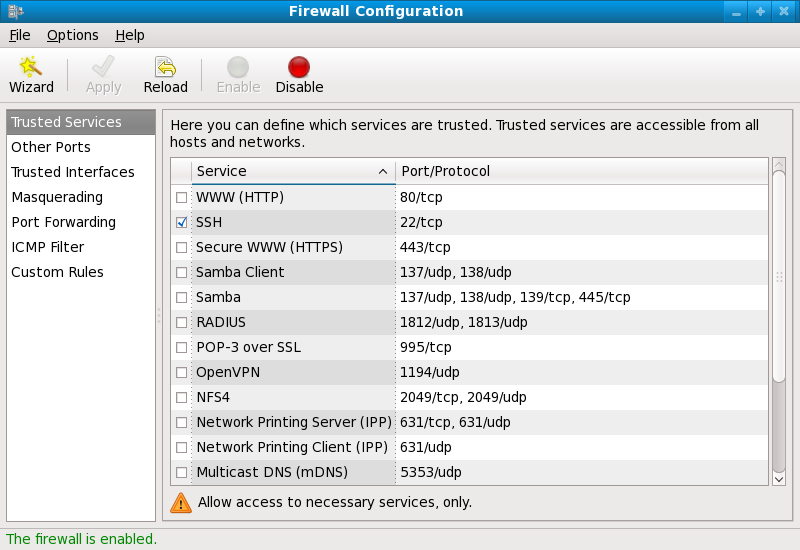
Linux offers multiple firewall management utilities, with iptables being the traditional choice and firewalld favored on newer distributions like CentOS 8 or Fedora. Selecting the right tool aligns with your server’s environment and simplifies further configuration.
- Install and Enable Your Firewall Service
Ensure the firewall package is installed and the service is enabled to start at boot. For example, use sudo systemctl enable firewalld and sudo systemctl start firewalld on systems using firewalld, or install iptables-services and enable it correspondingly.
- Set Default Policies to Deny Unwanted Traffic
Begin by setting default inbound policies to drop or reject connections unless explicitly allowed. This principle of least privilege minimizes attack surface by rejecting all unsolicited traffic by default, preventing possibly harmful packets from passing.
- Allow Essential Services Explicitly
Permit traffic only on ports required by your server’s functions, such as ssh on port 22 for remote administration or http/https on ports 80 and 443 for web servers. For firewalld, use commands like sudo firewall-cmd --permanent --add-service=ssh followed by a reload. This targeted allowance prevents unnecessary exposure.
- Create Custom Rules to Restrict IP Addresses and Subnets
Use firewall rules to allow or block traffic based on source IPs or network ranges. For example, limit SSH access to trusted IP ranges by adding rules: sudo iptables -A INPUT -p tcp -s 192.168.1.0/24 --dport 22 -j ACCEPT. Such granularity improves security by restricting remote access.
- Use Connection Tracking to Allow Established Sessions
Enable rules that accept packets related to existing connections while filtering new requests. This approach allows legitimate return traffic while blocking unsolicited attempts, key for protocols like TCP. Examples include iptables -A INPUT -m state --state ESTABLISHED,RELATED -j ACCEPT.
- Save and Persist Firewall Rules
After configuring, save firewall settings to ensure they persist across reboots. Commands differ: sudo firewall-cmd --runtime-to-permanent in firewalld or sudo service iptables save for iptables. Avoid losing hardening configurations because of reboots.
- Implement Rate Limiting for Login Services
To prevent brute-force attacks, configure rate limiting on SSH and other sensitive services. For instance, with iptables: sudo iptables -A INPUT -p tcp --dport 22 -m recent --update --seconds 60 --hitcount 3 -j DROP. This throttles connection attempts, deterring credential guessing.
- Log Firewall Activity for Monitoring Purposes
Enable logging of dropped or suspicious packets, aiding intrusion detection and providing insights into attack patterns. Use rules like iptables -A INPUT -j LOG --log-prefix "Firewall-Dropped: " to capture events in system logs, which can then be analyzed regularly for anomalies.
- Regularly Review and Update Firewall Rules
Firewall policies must evolve alongside server changes and emerging threats. Scheduling periodic audits ensures that only necessary ports remain open and outdated exceptions are removed, preventing accidental exposure resulting from legacy configurations.
Configuring a Linux firewall appropriately is foundational in defining your server’s exposure to external threats. The careful crafting of inbound and outbound rules, combined with logging and rate limiting, dramatically improves your security posture, making unauthorized access majorly more difficult without compromising necessary connectivity. For deeper security insight, the National Institute of Standards and Technology (NIST) provides detailed guidelines on firewall configuration in their cybersecurity frameworks, which align well with Linux server hardening practicesNIST Firewall Guidelines. These practices are vital components of any complete explanation of how to secure your linux server effectively.
By following these steps and integrating them with an overall security strategy, including automated patch management and intrusion detection, server operators can create a durable, controlled environment resistant to myriad network-level attacks and exploit attempts.
Step 3: Manage User Accounts and Permissions
- Audit Existing User Accounts
Auditing current user accounts is the foundation of securing access. Use commands like cat /etc/passwd and getent passwd to list all users, focusing on those with shell access or administrative privileges, ensuring no unauthorized accounts exist.
- Review and Adjust Group Memberships
Examine group assignments with groups username or getent group to verify that users belong only to necessary groups. Restrict membership in powerful groups like wheel or sudo to trusted personnel, minimizing the risk of privilege abuse.
- Enforce the Principle of Least Privilege
Grant users only the permissions essential for their roles. This reduces attack surfaces by limiting what users can modify or access. Employ file permission tools such as chmod and chown to tighten control over sensitive directories and files.
- Configure and Use Sudo Carefully
Replace direct root access by granting necessary commands through sudo, which logs all administrative actions. Configure /etc/sudoers with the visudo utility, specifying granular permissions for users or groups to prevent full root privilege misuse.
- Create Non-Privileged Admin Accounts
Set up dedicated accounts with sudo privileges for administrative tasks instead of logging in directly as root. This enables better tracking of actions and limits accidental changes, fostering accountability on the server.
- Disable Root SSH Login
Edit the SSH daemon configuration file /etc/ssh/sshd_config to set PermitRootLogin no, preventing remote root login over SSH. This measure forces attackers to compromise individual user accounts before improving privileges, adding an essential layer of protection. Essential.
- Implement Strong Password Policies
Enforce complex, unique passwords for all user accounts, particularly those with sudo access. Use tools like passwd to update credentials regularly and configure password aging policies with chage to prevent long-term weak passwords.
- Lock or Remove Inactive or Unnecessary Accounts
Regularly check last login times using lastlog and disable or delete dormant accounts with usermod -L or userdel. Removing these accounts eliminates potential backdoors and reduces attack vectors from unused credentials.
- Limit Access to Sensitive Files
Adjust permissions on critical system files such as /etc/shadow and /etc/sudoers so that only root or privileged users can read or modify them. This prevents unauthorized escalation and exposure of hashed passwords.
- Monitor User Activity and Login Attempts
Set up logging with tools like auditd and review /var/log/auth.log to track user actions and detect suspicious authentication attempts. Early detection allows rapid response to potential intrusions or misuse of privileges.
- Use Account Expiration and Two-Factor Authentication Where Possible
Configure temporary accounts with expiration dates using chage -E, and integrate two-factor authentication (2FA) to add an extra security factor beyond username and password. These steps majorly improve the defense against unauthorized access.
- Segment User Roles with Custom Groups
Create special groups with strictly defined resource access to enforce policy boundaries. For example, a group dedicated to web server management can be isolated from database administration, reducing cross-service exposure.
Proper user management reduces the risk of insider threats, accidental damage, and external exploits, forming a critical pillar of complete server security. These steps collectively create a hardened approach to managing user accounts and permissions, key to how to secure your linux server effectively. Given Linux’s flexibility, tailoring permissions tightly while maintaining operational necessity balances security and usability. Supplement this with strong logging and regular reviews to adapt as user roles evolve. Independent security frameworks affirm that granular access control tied with vigilant monitoring decreases breach likelihood majorly. This strategy synergizes well with other server security practices, ensuring a resilient infrastructure suitable for demanding environments, including cloud deployments or enterprise networks. Integrating these controls supports regulatory compliance for sensitive data handling and system integrity, aligning with standards documented by authoritative sources such as the National Institute of Standards and Technology (NIST). Strategies like disabling direct root login and favoring sudo accounts also address common attack vectors outlined by cybersecurity research, reinforcing defense-in-depth principles fundamental to how to secure your linux server.
For further complete techniques on server setup that complement this user management section, consult resources that address configuration specifics for Linux web services and network controls, for instance, the tested 2026 step by step guide to configuring a Linux web server. Monitoring identity protection aligns with tested methods to thwart account hijacking on administrative endpoints, improving overall security posture.
Step 4: Enable Secure SSH Access
- Change the Default SSH Port
Default SSH listens on port 22 — heavily targeted by automated attacks. Altering it to a high-numbered port minimizes scan exposure and reduces unauthorized login attempts. Modify the /etc/ssh/sshd_config file by changing the Port directive to a number between 1024 and 65535, then restart the SSH service.
- Use Key-Based Authentication Instead of Passwords
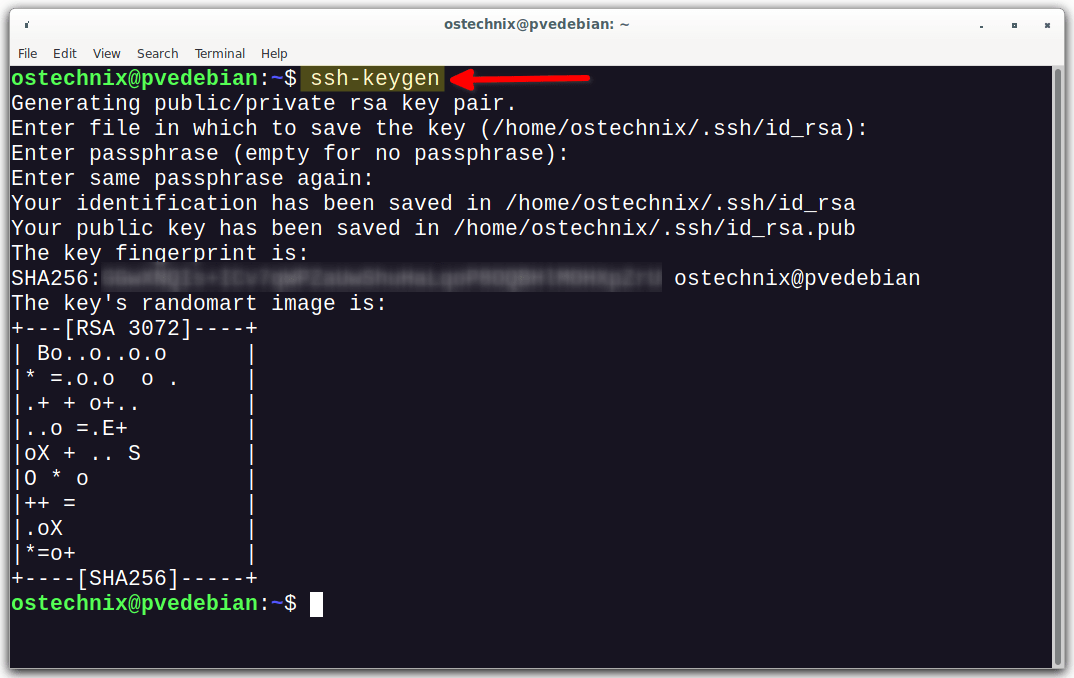
Passwords can be brute-forced or phished more easily than cryptographic keys. SSH keys offer stronger cryptography and eliminate the risk of guessing attacks. Generate an SSH key pair with ssh-keygen and deploy the public key to the server’s ~/.ssh/authorized_keys file for the user account. Ensure the private key remains protected locally.
- Disable Password Authentication Entirely
Once key-based authentication is in place and verified, disable password login to block password-guessing threats. Set PasswordAuthentication no in the SSH daemon configuration file to enforce exclusive use of SSH keys. This measure greatly strengthens access control but requires careful key management.
- Limit SSH Access to Specific Users or Groups
Restricting SSH login to designated users or groups prevents unwanted accounts from attempting remote access. The AllowUsers or AllowGroups directives in the SSH config file specify who may connect. This introduces an additional layer of account-level filtering, controlling access beyond login credentials.
- Enable Two-Factor Authentication (2FA) for SSH
For protection against compromised keys or stolen credentials, integrate 2FA mechanisms like Google Authenticator or hardware tokens. PAM modules can enforce a time-based code in addition to the SSH key. Although it requires users to complete a second verification step, it substantially raises the security threshold.
- Configure SSH Connection Timeout and Limits
Set parameters such as ClientAliveInterval and ClientAliveCountMax to disconnect idle sessions promptly, reducing exposure from abandoned or forgotten logins. Also, use firewall rules and tools like Fail2Ban to monitor and block IPs exhibiting suspicious connection patterns or repeated failed attempts.
- Use SSH Protocol Version 2 Exclusively
Protocol version 1 has known vulnerabilities and is deprecated. Confirm the server accepts only version 2 by setting Protocol 2 in the configuration to prevent use of insecure legacy protocols. This change is fundamental to maintaining cryptographic security for SSH connections.
- Audit and Monitor SSH Access Logs Regularly
Continuous monitoring of /var/log/auth.log or equivalent SSH logs reveals abnormal access patterns or brute force attempts early. Employ centralized log management or intrusion detection tools to automate alerts about unusual login activity. Proper logging and auditing contribute to quick incident response.
These steps form the first line of defense against unauthorized intrusion, critical to defending the server’s integrity. Properly enabling secure SSH access is a foundation in how to secure your linux server. For administrators configuring a Linux web environment, combining SSH hardening with strong firewall zoning and automated patch updates further reinforces overall security posture, reflecting proven methods detailed in the official Linux SSH documentation. Period.
Step 5: Install and Configure Intrusion Detection System (IDS)
- Start by selecting a reliable IDS that fits the server’s needs, such as Fail2Ban for lightweight intrusion prevention or Snort for complete network analysis. This decision impacts the level of monitoring and blocking capabilities available.
- Use your Linux distribution’s package manager to install the chosen IDS; for example, run
sudo apt install fail2banon Debian-based systems orsudo yum install snorton RedHat-based systems. This step ensures the software is integrated correctly within the existing environment. - Modify the default configuration files to define what constitutes malicious activity, including failed logins, port scans, or unusual traffic patterns. Custom filters improve detection accuracy by targeting specific attack vectors relevant to your server.
- Set thresholds for how many failed login attempts or suspicious activities trigger automatic blocking, specifying the ban duration and IP exclusion lists. Automatic responses reduce the risk of sustained attacks while minimizing false positives.
- Configure the IDS to monitor system and application logs continuously and send alerts to administrators via email or syslog forwarding. Prompt notifications allow for timely incident response and ongoing security awareness.
- Simulate attack scenarios or unauthorized access attempts to confirm that detection and blocking mechanisms function as intended. Regular testing avoids blind spots and confirms rule effectiveness.
- Coordinate the IDS with iptables, nftables, or firewalld to ensure blocked IPs are denied network access at the firewall level, reinforcing security enforcement. This layered approach deepens defense against malicious traffic.
- Regularly update IDS signatures and software packages to maintain protection against emerging threats. Maintenance prevents outdated configurations from exposing the server to vulnerabilities.
- Analyze alert history and adjust filters to reduce false alarms and improve detection precision. Continuous refinement aligns the IDS performance with the evolving threat market.
- Maintain clear documentation of configurations, alert protocols, and response actions for reference and future audits. Well-documented security setups boost team coordination and compliance.
This approach not only identifies suspicious behavior but also blocks repeated attempts to exploit vulnerabilities, majorly contributing to the overall security posture. Incorporating an intrusion detection system like Fail2Ban or Snort is critical for monitoring and mitigating malicious activities targeting Linux servers. Many organizations overlook how vital it is to bridge IDS alerts with automated firewall responses to minimize attack surface exposure.
In 2026, with threats constantly evolving, automating IDS configuration updates and using centralized logging frameworks improves both the efficiency and effectiveness of server defense. Configuring alert thresholds carefully while avoiding excessive false positives can heavily influence operational stability. For more cybersecurity standards related to network intrusion detection systems, consultation ofNIST SP 800-53 guidelinesprovides critical insight into recommended security practices.
Understanding the deployment and continuous management of an IDS strengthens resilience against persistent threats (at the time of writing). Implementing these steps diligently forms the core process of reducing the server’s attack surface and responding swiftly to ongoing network anomalies — indispensable knowledge in the discussion of how to secure your linux server.
Step 6: Enable Automatic Security Updates
- Identify your Linux distribution’s package manager. Different distributions use various package management systems—APT for Debian/Ubuntu, YUM or DNF for Fedora/CentOS, and Zypper for openSUSE. Knowing this is essential to configuring automatic updates correctly.
- Install the unattended-upgrades package on Debian-based systems. This package enables automatic installation of security updates. Use the command
sudo apt-get install unattended-upgradesto install it, followed by enabling the service to run at startup. - Configure the unattended-upgrades settings. Edit the
/etc/apt/apt.conf.d/50unattended-upgradesfile to specify which updates to install automatically. Focus on enabling security updates by uncommenting lines related to official security repositories, reducing exposure to vulnerabilities. - Set up periodic update checks. Create or edit the
/etc/apt/apt.conf.d/10periodicfile to control the frequency of update notifications and installations. For example, settingAPT::Periodic::Update-Package-Lists "1";checks updates daily, whileAPT::Periodic::Unattended-Upgrade "1";enables daily automatic upgrade installation. - On Red Hat-based systems, install and configure the dnf-automatic service. Use
sudo dnf install dnf-automaticthen edit/etc/dnf/automatic.confto automate security updates installation and to control email notifications. Enable the systemd timer withsudo systemctl enable --now dnf-automatic.timer. - Test the auto-update process before deployment. Manually run the unattended upgrade or dnf-automatic commands to ensure settings are correct and updates apply without errors. Verifying functionality before production reduces downtime risk.
- Configure email alerts for update results. Automatic updates should report their status to administrators. This helps monitor failures or reboots triggered by updates, especially important when managing multiple servers.
- Combine automatic updates with a reboot strategy. Security patches sometimes require reboots to take effect. Set up tools like
needrestarton Debian or yum’sAutomaticKernelUpgradeoptions to notify or schedule reboots after critical updates. - Regularly review update logs and system behavior. Automatic updates minimize exposure windows but do not eliminate risk. Continuous monitoring ensures any issues arising from patching can be detected and resolved promptly.
Enabling automatic security updates reduces human error and shortens the time between vulnerability disclosure and patch deployment (per industry surveys). Systems configured for unattended patching maintain improved defenses against exploitation without relying heavily on manual intervention, which aligns with proven methods outlined by government agencies such as the United States Cybersecurity and Infrastructure Security Agency. This automated approach is a foundation step in any sustainable security posture for Linux servers.
Step 7: Regular Logging and Monitoring
- Set up a centralized logging server using syslog-ng or rsyslog to consolidate logs from all services and servers. Centralization prevents log tampering and ensures complete audit trails for incident investigations.
- Activate detailed logging for critical components such as the kernel, sshd, and sudo by configuring appropriate log levels in their respective configuration files. This increases reach into system behavior while minimizing unnecessary noise.
- Implement log rotation policies with tools like logrotate to archive or delete old logs automatically. Proper log management prevents disk exhaustion, which could disable logging entirely and leave the system blind to attacks.
- Identify key event types for monitoring, including failed login attempts, privilege escalations, and unusual process executions. Tailor log watchers or intrusion detection systems (IDS) to alert on these events, enabling swift response to warnings of compromise.
- Tools like OSSEC or Wazuh aggregate logs and detect anomalies through pattern recognition and predefined rules. Integrating these IDS solutions improves threat hunting by correlating diverse log sources for suspicious activity indicators.
- Schedule consistent manual or automated reviews of logs to identify trends, false positives, or unseen attack vectors. Log analysis should become part of standard system maintenance, ensuring continuous coverage beyond automated alerts.
- Protect log integrity by encrypting log files and using secure transport protocols such as TLS for log transmission. This safeguards sensitive data against interception and alteration by unauthorized parties.
- Monitor critical system files and configuration changes by using tools like AIDE or Tripwire. These solutions record file hashes and notify administrators of unexpected modifications, signaling potential intrusions early.
- Configure alert systems to notify administrators via email, SMS, or messaging platforms when major suspicious activity is detected. Automated alerts reduce response times and help maintain security posture around the clock.
- Ensure all servers and devices are synchronized using NTP or Chrony services to maintain consistent timestamps in logs. Accurate time data is vital for event correlation and forensic analysis during incident response.
By weaving these measures into their workflow, system administrators gain the ability to spot subtle intrusions early and act swiftly before problems escalate. These logging and monitoring proven methods form the backbone of a proactive security framework, turning raw data into actionable security intelligence. To deepen knowledge on Linux web server configuration templates that assist in secure monitoring, refer to the 2026 step by step guide to configuring a Linux web server (based on documented pricing pages). The National Institute of Standards and Technology (NIST) offers detailed logging guidelines designed for enterprise settings, providing a well-founded benchmark for these security measures.
Essential Questions on Securing Linux Servers
Managing SSH Keys Securely
SSH key management requires generating strong, unique key pairs with passphrase protection to prevent unauthorized access. Use tools like ssh-agent to handle keys securely and avoid storing private keys on the server, limiting exposure to compromise through brute force or phishing attacks.
Establishing Effective Firewall Rules
Configuring firewalls involves defining strict inbound and outbound policies to deny all traffic by default and selectively allow only necessary services and ports. Tools such as iptables or nftables should be used to create layered rulesets that protect against external attacks and restrict internal communication when possible.
Frequency of Applying System Updates
Timely patching is critical; updates should be applied as soon as security fixes are released, ideally within 24 to 48 hours for critical vulnerabilities. Automating patch management reduces human errors and ensures the system remains resilient against known exploits — a vital aspect in how to secure your linux server consistently.
Designing User Privileges with the Principle of Least Privilege
Assign users only the permissions necessary for their function, avoiding unnecessary root access. Employ sudo with logged command auditing to limit privileged operations, minimizing the attack surface that stems from accidental or malicious misuse.
Monitoring Intrusion Detection Systems
Implement intrusion detection tools like OSSEC or Snort to monitor system logs and network traffic in real-time. This enables rapid identification of suspicious activity, allowing administrators to respond before an attack escalates or results in data loss.
Setting Up Secure Password Policies
Enforce password complexity standards requiring length, character diversity, and avoiding reuse across systems. Use tools such as PAM (Pluggable Authentication Modules) to enforce these rules and integrate account lockouts after multiple failed login attempts to mitigate brute force attacks.
Regular Backup and Recovery Planning
Maintain encrypted, automated backups stored offsite with clear recovery procedures tested periodically. This ensures data integrity and availability even in case of ransomware or physical server failure, a key piece in overall server hardening.
Establishing and Maintaining Secure Logging Practices
Configure logs to capture detailed authentication attempts, system errors, and application activities with timestamps. Use centralized logging solutions such as syslog-ng or the ELK stack to detect anomalies and comply with auditing requirements efficiently.
Implementing Network Segmentation and Zoning
Separate different network zones according to sensitivity and function, applying firewalls or VLANs to isolate servers and services. This containment prevents lateral movement by attackers if a breach occurs, improving overall system resilience.
Using Automated Patch Management Solutions
Use tools like unattended-upgrades on Debian-based systems or dnf-automatic on Fedora to automate patch deployment. This reduces windows of vulnerability by ensuring servers receive updates without manual intervention, supporting consistent compliance with proven methods in how to secure your linux server.
Limiting Open Ports and Services
Reduce the attack surface by disabling all unnecessary services and keeping only critical ports open, regularly auditing active services. Tools such as netstat or ss help administrators verify current status and prevent exploitation through unmonitored entry points.
Creating and Using Privileged Accounts Carefully
Designate a separate privileged account for administrative tasks to reduce accidental mistakes caused by routine use of root. This approach prevents broad system changes during daily operations and assists in tracking modifications for security audits.
Detailed attention to these areas is vital for maintaining a strong defense strategy. The US-CERT, part of the Cybersecurity and Infrastructure Security Agency, provides extensive guidelines on system security that align with these measures, highlighting the importance of continuous monitoring and prompt action in maintaining secure Linux servers. For in-depth technical standards and advisories related to Linux server security, the National Institute of Standards and Technology (NIST) remains an authoritative resource in cybersecurity frameworks and operating system configuration.