Alex has spent more than ten years writing about software, hardware, and new tech trends. He cuts through the noise with clear, no-nonsense reviews and sharp takes on the gadgets and tools everyone’s talking about. If it’s tech, he’s probably looked at it closely.
Understanding Brute Force Attacks on Linux Servers and Their Risks
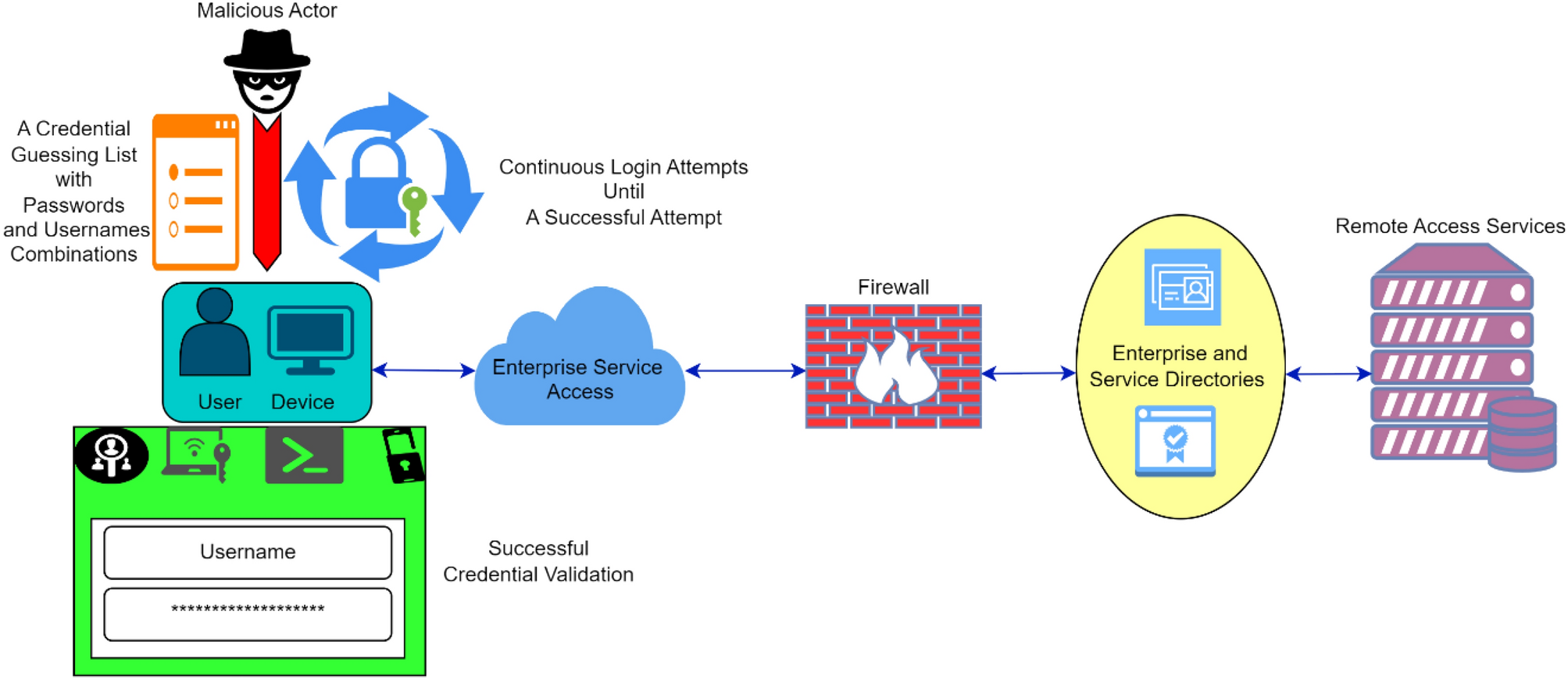
Brute force attacks target Linux servers by repeatedly attempting different username and password combinations until the correct one is found. The risk lies in the potential exposure of sensitive data, unauthorized control over systems, and the possibility of using compromised servers as launchpads for further attacks within a network. These attacks exploit weak or common credentials, overwhelming the server with login requests in an effort to gain unauthorized access. While this method is straightforward, it is highly effective and remains one of the most common tactics used by cybercriminals.
Securing Linux servers against these attacks is key because of the critical role many servers play in business operations, data storage, and infrastructure management. Left unprotected, brute force attempts can lead to service disruption, data theft, or compliance violations across regulated industries, resulting in costly damage. Servers often serve as gateways to internal environments, making their security top for overall organizational safety (at the time of writing).
This article provides a structured approach on how to secure your Linux server against brute force attacks by covering key areas that industry experts recommend:
Understanding the mechanisms attackers use during brute force attempts and why traditional password security alone is insufficient.
Implementing advanced SSH key management proven methods, which dramatically reduces attack vectors compared to password-based authentication.
A step-by-step guide to setting up Fail2Ban, an automated intrusion prevention system, with concrete configuration examples customized for Linux.
Techniques for complete log monitoring and alert systems to detect and respond rapidly to insecure access attempts or anomalous server activity.
Additional hardening strategies including SSH configuration tweaks and mitigating recent CVE vulnerabilities targeting Linux services.
Deploying these methods together forms a layered defense strategy that safeguards against evolving attack tools and methods. The article’s guidance is based on recent proven methods from cybersecurity research and real-world security frameworks as of 2026. Collectively, they help close gaps often missed by single-layered approaches to server security, providing thorough protection custom to Linux environments.
Readers will gain actionable insight for shielding their servers proactively—guarding against brute force without disrupting essential services or complicating administrative workflows. Achieving this balance is critical for operational resilience and maintaining trust in digital infrastructure. For reference on the nature of brute force threats and mitigation standards, authoritative government advisories offer detailed insights into persistent attack patterns affecting Linux systems globally (CISA Alert AA20-073A).
Understanding Brute Force Attacks
This foundation primes the discussion and implementation steps that follow, revealing how Linux administrators can improve security defenses systematically to meet the challenges posed by brute force attacks today.
✅
Fact-Checked
Editorial Review
🧠
Expert Analysis
Sourced & Cited
🗓️
Updated 2026
Current & Accurate
Close look Into How Brute Force Attacks Target Linux Systems
Rather than exploiting software vulnerabilities, these attacks exploit weak or reused passwords by exhaustively trying different username-password pairings. Brute force attacks rely on sheer volume and persistence to infiltrate Linux servers. Attackers use automated tools to speed up this process, leaving server administrators vulnerable if protective measures aren’t in place.
The goal is to eventually discover valid login data, granting unauthorized access. At its core, a brute force attack functions as a password guessing exercise—hackers systematically generate thousands to millions of credential combinations, cycling through them at high speeds. The technique is straightforward yet effective when coupled with weak authentication practices common in many Linux configurations.
Common attack vectors that threat actors use to launch brute force attempts include:
SSH Login Port: The Secure Shell (SSH) protocol, widely deployed for remote server management, is the most frequent brute force target on Linux servers. Attackers scan IP ranges for active SSH services, then attempt logins using common usernames like “root” or “admin” paired with a dictionary of weak passwords.
FTP and Telnet Services: Despite decreasing in popularity, FTP and Telnet remain vulnerable entry points on some legacy Linux setups. Their default configurations often lack strong encryption or adaptive lockouts, enabling attackers to repeatedly attempt access with ephemeral IP addresses.
Web Application Login Forms: Linux servers hosting web services face brute force on their user accounts through publicly accessible login pages. Attackers deploy bots that flood these forms with credential guesses, seeking entry points into underlying Linux environments.
Database Authentication: Certain database services running atop Linux, such as MySQL or PostgreSQL, expose authentication endpoints that, if insufficiently protected, become ripe targets for brute force attacks. Attackers attempt to crack database user passwords, jeopardizing stored data.
Attackers frequently employ specific methods and tools to conduct brute force attacks against Linux servers:
Credential Stuffing: Reusing leaked username-password combos gleaned from breaches on other platforms to quickly infiltrate. This lateral approach capitalizes on users’ tendency to recycle passwords.
Dictionary Attacks: Using curated lists of common passwords, keyboard sequences, names, and phrases to narrow and focus attempts. These wordlists may be combined with mutations such as appending digits or replacing letters with symbols.
Hybrid Attacks: Combining dictionary bases with brute force extensions by appending custom suffixes or prepending prefixes, boosting the likelihood of matching complex but predictable passwords.
Password Spraying: Trying a limited number of common passwords across many usernames to evade intrusion detection systems that flag repeated failures on a single account. This method prolongs attack attempts while flying under security radars.
Automated Botnets: Distributed networks of compromised computers perform coordinated brute force waves, amplifying attack speed and masking origin IPs through proxy chains or VPNs, complicating defense efforts.
Monitoring such logs is key to identify brute force patterns and implement timed bans or rate-limiting measures. Linux servers usually generate logs of failed login attempts across sshd, ftp, or web server logs. When integrated with security tools like Fail2Ban, these logs enable automated detection and blacklisting of offending IP addresses.
Configuring SSH for Maximum Security
The persistence and adaptability of brute force attacks demand layered defenses—from strong password policies and SSH key authentication to rate-limiting and address blocking. The methods attackers employ evolve rapidly, including emerging tactics like username enumeration combined with social engineering and zero-day exploit integration, making understanding this threat essential to protect Linux infrastructure effectively in 2026.
Information from cybersecurity research published by agencies like theUS Cybersecurity & Infrastructure Security Agency (CISA)highlights the ongoing prevalence of brute force as an attack vector, emphasizing proactive log monitoring and timely patching as critical countermeasures.
Step 1: Disable Root Login Over SSH for Improved Security
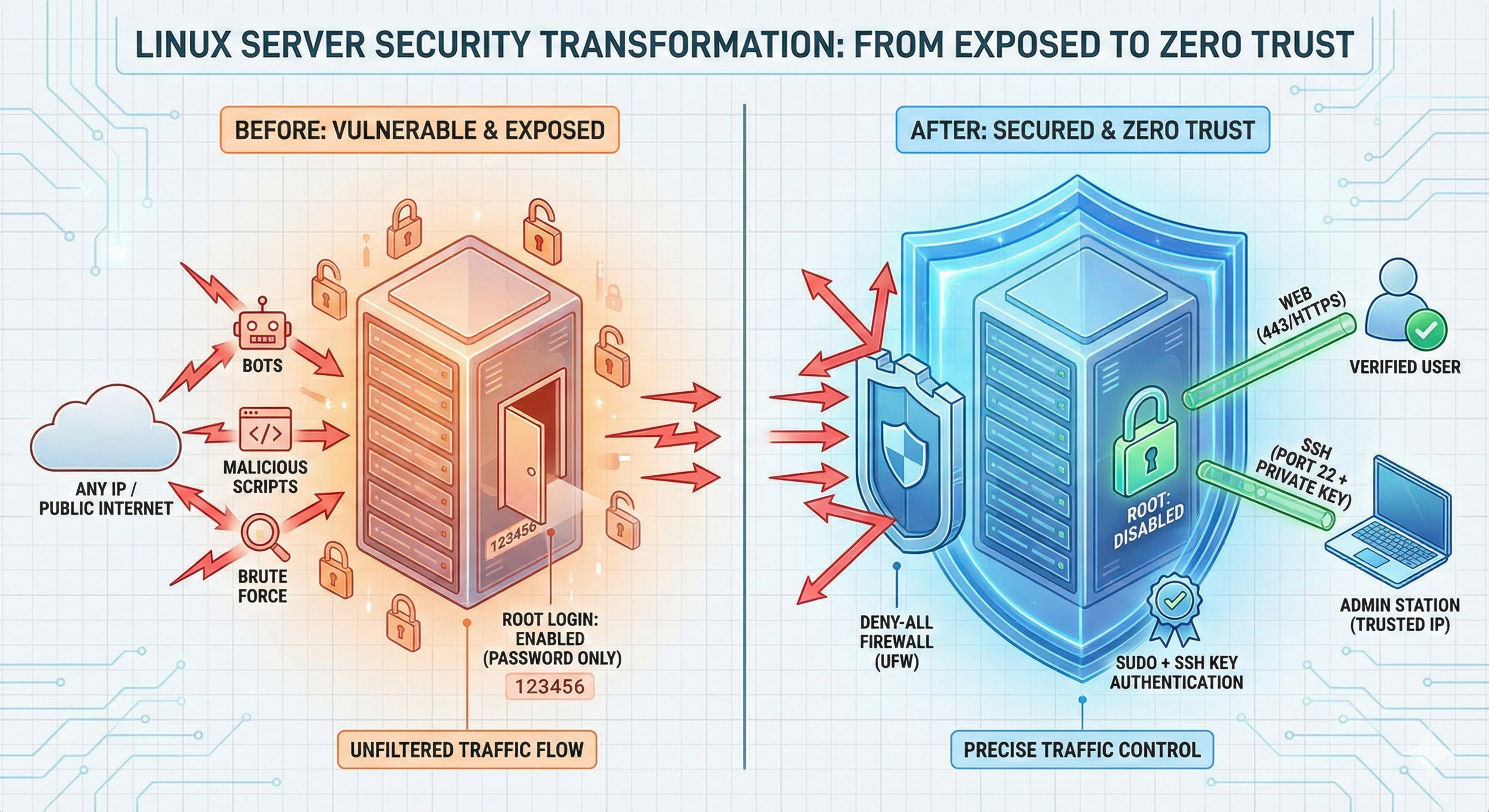
Disabling root login via SSH majorly reduces the attack surface on a Linux server. Root accounts hold unrestricted system access, making them prime targets for brute force attempts (among the platforms reviewed here).
Access the SSH Configuration File
Open the main SSH configuration file using a text editor such as nano or vim. This file is typically located at /etc/ssh/sshd_config. Adjusting settings here controls SSH daemon behavior.
Locate the PermitRootLogin Directive
Within the configuration file, search for the line starting with PermitRootLogin. It may be set to yes, no, or commented out with a #. This setting dictates whether root login via SSH is allowed.
Change PermitRootLogin to No
Modify the directive to read PermitRootLogin no. This setting instructs the SSH daemon to reject any direct root login attempts, forcing users to authenticate with a non-root account first.
Save and Exit the Editor
After making the change, save the file and exit the text editor. In nano, this is done with Ctrl+O followed by Ctrl+X. Changes will only take effect after the SSH service restarts.
Restart the SSH Service to Apply Changes
Reload the SSH daemon using a command custom for your distribution. Common commands include sudo systemctl restart sshd or sudo service ssh restart. This enforces the updated rules immediately.
Verify the Configuration is Active
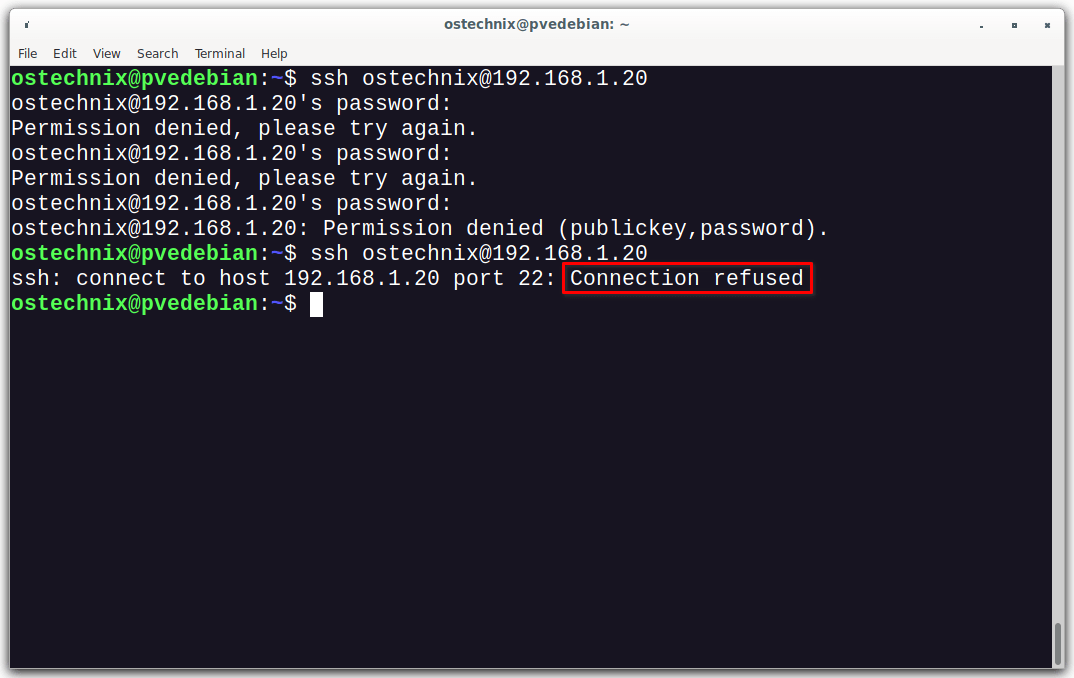
Attempt to log in as root over SSH from a separate session. The connection should be denied, confirming the setting’s effectiveness. This verification avoids accidental lockouts while maintaining security.
Disabling root login compels administrators to authenticate using regular user accounts with sudo privileges, adding a layer of defense against brute force attacks. This practice aligns with best security measures recommended in Linux server management and is central to how to secure your linux server against brute force attacks efficiently. The change reduces the odds for automated scripts that target the default root username, an approach extensively cited in cybersecurity guidelines such as those by the National Institute of Standards and Technology (NIST SP 800-207 on Zero Trust Architecture). Period.
Step 2: Implement Firewall Rules to Block Unwanted Traffic
Configuring firewall rules is a foundation strategy for reducing attack vectors targeting Linux servers. Limiting incoming traffic to essential services majorly reduces the risk surface for brute force attempts. Firewalls act as gatekeepers, filtering connections before they reach sensitive services like SSH.
Deny All Incoming Connections by Default
Starting with a default-deny posture helps prevent unauthorized access. New connections that do not match an explicit allow rule get dropped. With tools like ufw, this is done by running sudo ufw default deny incoming, creating a secure baseline from which you selectively open necessary ports.
Allow Only Specific IPs or Subnets
If remote access requirements are limited to known networks or IP addresses, restricting inbound traffic to those addresses increases resilience against brute forcing from random outsiders. For example, sudo ufw allow from 203.0.113.25 to any port 22 allows SSH access solely from a trusted IP.
Open Only Necessary Ports
Only services explicitly required for your server’s function should have open ports. Typically, this means enabling port 22 for SSH, port 80 for HTTP, and port 443 for HTTPS while blocking all others. Using iptables, the command iptables -A INPUT -p tcp --dport 22 -j ACCEPT opens SSH port only.
Rate Limit Connections on SSH Port
To prevent rapid repeated connection attempts, firewalls can impose rate limiting. With iptables, this involves commands like iptables -A INPUT -p tcp --dport 22 -m state --state NEW -m recent --set followed by iptables -A INPUT -p tcp --dport 22 -m state --state NEW -m recent --update --seconds 60 --hitcount 4 -j DROP, restricting more than three new SSH connections per minute.
Log Dropped Packets for Monitoring
Enabling logging for blocked packets offers insights into attack patterns and potential sources. In ufw, appending sudo ufw logging on helps track denied attempts — key for ongoing security assessment and effective response.
Persist Firewall Rules Across Reboots
Ensuring firewall settings remain active after reboots prevents accidental exposure. ufw handles this automatically, but with iptables, you must save rules using iptables-save > /etc/iptables/rules.v4 and configure the system to restore them on startup.
Test Firewall Configuration Before Deployment
Applying firewall rules can unintentionally block legitimate access if not tested carefully. Before enabling, verifying configuration with simulation modes or dry runs helps avoid lockouts. For example, ufw status verbose confirms active rules and their effects.
These rules act as a frontline defense by filtering connections early in the network stack, improving resilience against brute force attacks that seek to overwhelm authentication services (per industry surveys). Using firewall tools effectively complements other methods like Fail2Ban, yet it requires precise configuration to avoid over-blocking or creating loopholes.
Official Linux security documentation provides authoritative guidance on firewall setup and management, critical for maintaining strong server defenses in 2026 and beyond.NSA guidance on Linux firewall configurationoffers complete details on establishing effective rule sets.
Step 3: Setup SSH Rate Limiting and Fail2Ban
Fail2Ban is a key intrusion prevention tool that automatically monitors log files to detect repeated failed SSH login attempts. Begin by installing it on your Linux server using your distribution’s package manager, for example,sudo apt-get install fail2banon Debian-based systems. This step initiates protection by preparing your server to detect brute force threats in real time.
Fail2Ban operates through jails—configurations defining how it monitors and reacts to specific services. Create or edit the SSH jail configuration file, normally found at/etc/fail2ban/jail.localor/etc/fail2ban/jail.d/defaults-debian.conf. Enable the[sshd]jail by settingenabled = true, which activates monitoring of SSH login attempts.
Adjust key parameters to specify conditions for blocking an IP address.
maxretry defining how many failed attempts are allowed (commonly set to 3-5).
bantime, the duration (in seconds) for which the IP is banned; 600 seconds (10 minutes) is a typical minimum.
findtime which sets the time window within which failed attempts count against the attacker.
These values control balance between security and user convenience, limiting how often a host can attempt to connect.
Fail2Ban uses regex patterns in filter files—located in/etc/fail2ban/filter.d/—to detect malicious login attempts logged by SSH. The predefinedsshd.conffilter matches authentication failures and invalid login messages. Reviewing and customizing these filters ensures accurate detection and minimizes false positives — vital for maintaining uninterrupted legitimate access.
Configure Fail2Ban to send email alerts or log critical events to a centralized logging server by settingactionparameters in the jail configuration. This way, system administrators gain real-time insights into brute force attack attempts, helping timely responses or audits. Email alerts demand specifying a valid mail server and admin address.
After configuration updates, reload the service withsudo systemctl restart fail2banor a distribution-appropriate command. This step enforces the new rules, activating automated IP banning based on your defined thresholds, which immediately raises the barrier against persistent brute force attackers.
Usesudo fail2ban-client status sshdto check the current status of the SSH jail, including the number of banned IPs. Monitoring active bans offers feedback on the frequency and scale of detected attacks, allowing administrators to fine-tune settings according to observed threat patterns.
Complement Fail2Ban by hardening the SSH daemon itself:
Change the default SSH port to a non-standard port to reduce automated scans.
Disable password authentication in favor of SSH key authentication.
Limit user logins to authorized accounts using the AllowUsers or AllowGroups directive.
This layered defense thwarts brute force attempts by minimizing attack surfaces and ensuring Fail2Ban works alongside server-level restrictions.
Keep the Fail2Ban package and server software up to date to patch vulnerabilities known from recent CVEs, preventing attackers from exploiting unpatched bugs. Review logs and ban lists periodically to understand attacker methods and to adjust configurations that reflect evolving threats.
Setting up Fail2Ban with precise rate limiting for SSH combines automated security enforcement with proactive monitoring, directly addressing how to secure your Linux server against brute force attacks by blocking attempts before they exhaust resources. The approach balances usability and protection by tailoring ban durations and retry limits to each server’s normal activity profile — essential for operational stability under persistent threats. Further refinements, such as integrating fail2ban with centralized monitoring systems and augmenting SSH config specifics, create a strong shield documented by leading Linux security proven methods and incident response standards in 2026. For authoritative guidance on SSH security settings and intrusion prevention, the National Institute of Standards and Technology provides detailed frameworks that ensure compliance with recognized cybersecurity benchmarksNIST SSH Security Guide.
Step 4: Use Strong Passwords and SSH Keys
Choose Long, Complex Passwords
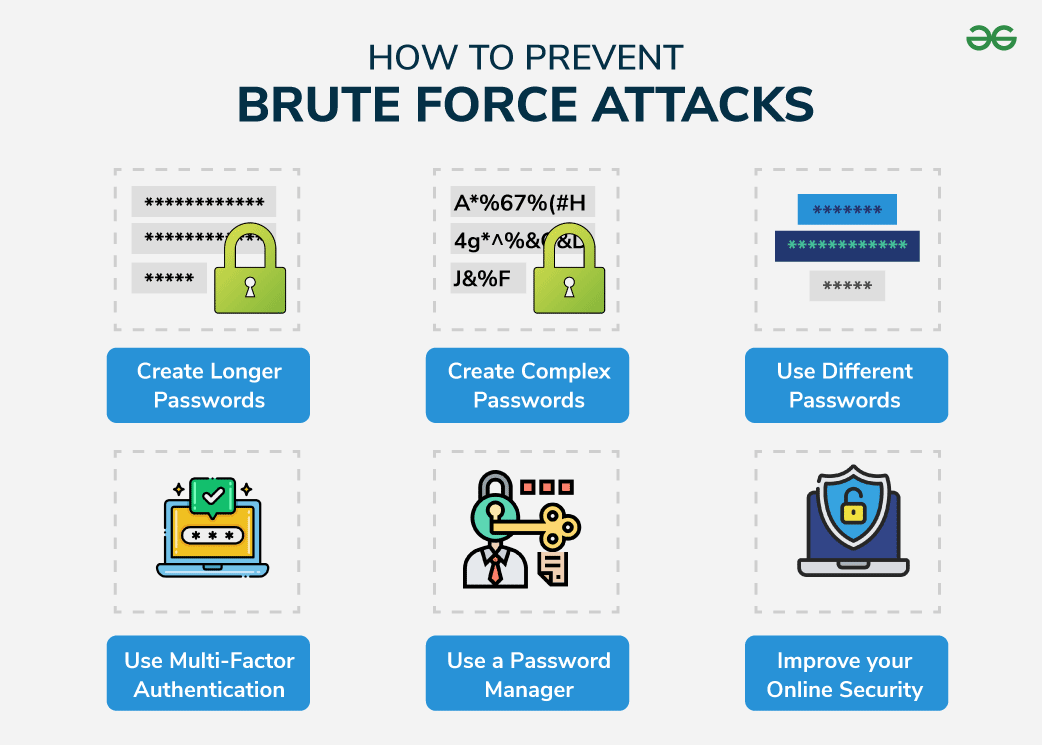
Long passwords combining uppercase and lowercase letters, digits, and special characters dramatically increase resistance against brute force attempts. Aim for at least 15 characters to push attackers into computationally infeasible territory, limiting simple dictionary or brute force successes.
Replace Passwords with SSH Key Authentication
SSH keys provide asymmetric cryptographic authentication that eliminates reliance on passwords vulnerable to guessing or repeated trial attacks. Public keys remain on the server, while private keys stay securely with users, offering a far stronger barrier against intrusion.
Generate SSH Keys Using Secure Algorithms
Use tools like ssh-keygen with modern algorithms such as Ed25519 or RSA with a key size of at least 4096 bits. These choices ensure cryptographic strength remains adequate well into 2026 and beyond, reflecting proven methods for securing SSH sessions against emerging computational advances.
Protect Private Keys with a Strong Passphrase
Even the strongest SSH key can be compromised if the private key file is stolen without encryption. A strong passphrase encrypts the private key on disk, so unauthorized access requires cracking that additional layer, majorly improving overall security posture.
Deploy SSH Public Keys to User Accounts Securely
Upload the public key to the Linux user’s ~/.ssh/authorized_keys file, ensuring correct file permissions: directories 700, and file 600. This setup prevents unauthorized users from reading or modifying the key files, preserving authentication integrity.
Disable Password Authentication for SSH
Modify /etc/ssh/sshd_config to set PasswordAuthentication no, forcing all users to authenticate solely via SSH keys. This policy prevents brute force attempts on passwords altogether but requires users to have configured keys beforehand to avoid being locked out.
Regularly Rotate SSH Keys and Passphrases
Periodic rotation of keys and passphrases limits exposure time if a key is ever compromised or weakens due to cryptographic advancements. Adhere to an established schedule—such as every 6 to 12 months—and enforce checks to prevent outdated or unused keys lurking on servers.
Use SSH Agent Forwarding Sparingly and Securely
SSH agent forwarding can help access to multiple servers but risks private key exposure to intermediary hosts. Restrict forwarding usage to trusted environments only and disable in untrusted locations to reduce attack vectors for credential theft.
Audit and Remove Unused or Unauthorized Keys
Maintain strict inventory control of authorized keys by periodically auditing the authorized_keys file for stale or unknown entries. Removing obsolete keys minimizes the attack surface, closing potential backdoors that brute force attackers could exploit to gain entry.
Combine SSH Key Authentication with Fail2Ban for Added Defense
Fail2Ban monitors failed login attempts and blocks suspicious IP addresses temporarily, adding a active layer of protection alongside SSH key enforcement. This combined approach drastically lowers successful authentication attempts through brute force or stolen credential brute forcing.
Implementing these steps creates a formidable defense against unauthorized access. SSH keys with proper management protocols dramatically reduce attack vectors reliant on password guessing, central to any strategy on how to secure your linux server against brute force attacks. The National Institute of Standards and Technology (NIST) supports SSH key usage in its Digital Identity Guidelines, highlighting keys as industry-standard best practice in server securityNIST SP 800-63B.
Step 5: Monitor Logs and Regularly Update
Consolidate authentication and system logs into a central location to improve reach across your Linux server environment. This practice simplifies checking for patterns indicative of brute force attempts by aggregating data such as failed SSH logins, unusual connection times, or repetitive access from the same IP.
Focus on reviewing/var/log/auth.logor/var/log/securefiles depending on your Linux distribution. These logs record SSH authentication events, allowing administrators to detect frequent failed login attempts, which signal brute force activity targeting your server’s SSH service.
Configure tools like logwatch or custom scripts to trigger real-time notifications on suspicious activities, such as multiple consecutive failed login attempts or attempts from blacklisted IPs. Prompt alerts enable immediate investigation and mitigation before an attacker can succeed.
Combine your monitoring efforts with Fail2Ban logs to verify bans and identify gaps in protection. Analyzing these logs helps confirm whether the intrusion prevention system is effectively blocking attacker IPs trying to brute force login credentials.
Review not only failed attempts but also successful logins outside regular hours or from unexpected geographic locations. These anomalies often hint at compromised credentials and require further audit and remediation.
Brute force defenses do not rely solely on detection; patching server software—including the Linux kernel, OpenSSH daemon, and installed applications—is vital. Regular updates close vulnerabilities that attackers might exploit to bypass traditional protections.
Use tools like unattended-upgrades or equivalent system-specific mechanisms to minimize human error and ensure consistent application of critical patches, markedly reducing the window of exposure to known exploits that help credential guessing.
Stay informed of newly discovered vulnerabilities affecting your server stack by subscribing to security mailing lists or advisories from trusted sources such as the National Vulnerability Database. Timely knowledge aids in focus oning updates that directly harden your server against emerging threats.
Updates occasionally reset or alter security settings; verifying that your hardened configurations—like disabled root login or enforced SSH key authentication—remain intact after patches is essential for maintaining your defense posture.
Retain logs long enough to perform thorough forensic analysis if a breach occurs, balancing storage with privacy regulations and administrative overhead. A clear policy supports incident response efforts and compliance standards that affect many organizations managing Linux servers.
Combining diligent log monitoring with steadfast update strategies provides a layered shield against brute force attacks, reinforcing protections implemented via methods such as advanced SSH key management and Fail2Ban configurations. Concrete guidance from the Cybersecurity & Infrastructure Security Agency explains how timely patching directly mitigates attack avenues used by threat actors targeting Linux systems, emphasizing its role in a complete security frameworkCISA Security Tip ST04-006. This step ensures system resilience against increasingly advanced brute force tactics encountered in 2026 environments.
Final Thoughts and Essential Guidance
The subtle art of defending a system hinges not only on reactive measures but also on proactive practices that close off attack vectors effectively. These steps collectively reduce the attack surface while providing early detection and rapid response capabilities — vital in a market where brute force attempts often precede more advanced breaches. Securing Linux servers against brute force attacks remains a fundamental priority in 2026, especially as threat actors continue refining their methods. Implementing advanced SSH key management, deploying intrusion prevention tools like Fail2Ban, and monitoring system logs form the pillars of a resilient infrastructure tightly aligned with security proven methods documented by authorities such as the U.S. Cybersecurity & Infrastructure Security Agency.
Detecting Brute Force Attempts Efficiently
Recognizing brute force attacks early requires vigilant log monitoring and automated alerting mechanisms. Tools can parse the system authentication logs to identify repeated failed login entries over short intervals, signaling potential brute force activity. Configurations like Fail2Ban improve this by automatically banning offending IP addresses after configurable thresholds are exceeded, thereby reducing exposure. Integrating log analysis with centralized SIEM platforms further helps administrators to correlate suspicious patterns across multiple hosts, yielding a complete detection strategy.
Using Proven Tools for Prevention
Fail2Ban is a widely endorsed open-source tool that dynamically updates firewall rules based on login failures, mitigating brute force risks effectively. Combining Fail2Ban with SSH hardening practices—such as disabling root login, using non-standard ports, and using key-based authentication—dramatically strengthens defenses. Complementary tools like SSHGuard and commercial endpoint security solutions can also add to protection by providing layered responses that adjust to evolving threat profiles and predefined policies.
Implementing Best Security Practices Consistently
Focus oning SSH key lifecycle management is critical; keys should be regularly rotated, encrypted with strong passphrases, and tightly scoped for access permissions. Only authorized keys should be stored in secured directories with restricted access to prevent misuse. Also, setting account lockout policies, enforcing two-factor authentication when feasible, and restricting login access by IP address ranges further improve security posture. These measures, combined with continuous vulnerability patching—including addressing relevant CVEs promptly—form a cohesive strategy that stays adaptable to emerging brute force tactics.
Educating Teams on Security Awareness
Ensuring that system administrators and relevant stakeholders remain trained on updated security protocols and attack indicators builds an environment where brute force mitigation is a shared responsibility. Frequent audits of account access, detailed documentation of configuration changes, and simulation of attack scenarios help maintain readiness against evolving threats.
Maintaining Ongoing Monitoring and Review
A security program that incorporates periodic reviews of firewall rules, log analysis trends, and failed login incident patterns can preemptively identify weaknesses before exploitation. Using automated alert systems and maintaining backups allow for rapid recovery and investigation when breaches occur.
For detailed guidelines on setting up Fail2Ban and SSH configurations, official documentation from security-focused organizations offers extensive resources that complement internal policies and procedures. These complete steps form the backbone of strong Linux server defenses against brute force attacks, aligning emerging proven methods with proven technologies to keep infrastructures secure in a demanding environment improved by continual cyber threats.
Understanding the Role of SSH Key Management
A well-structured SSH key management policy controls who can access the Linux server and how. It includes generating keys using strong cryptographic algorithms and establishing strict key usage policies. Automated tools that audit and manage keys at scale help avoid key sprawl — a critical risk factor in large organizations, especially when keys are never removed after leaving a project or role.
Developing a Fail2Ban Configuration That Fits the Environment
Fail2Ban’s effectiveness depends on careful tuning of parameters like ban time, find time, and max retry attempts. Customized filters that match the specific log formats of the Linux distribution in use improve detection accuracy. Testing configurations in a controlled environment before deployment ensures minimal disruption and best blocking behavior — essential for high-availability production systems.
Using Log Monitoring for Early Warning
Continuous parsing of authentication logs, combined with real-time alerts on anomalies, allows rapid identification of brute force trends. Employing solutions that integrate syslog servers with alerting frameworks ensures that suspicious activities receive immediate attention. This removes reliance on manual log review — error-prone and inefficient at scale.
The consistent application of these measures boosts defense capabilities without introducing operational bottlenecks, securing Linux servers effectively against brute force methods that remain persistent attack vectors throughout 2026 and beyond.
Focus oning Patch Management for Vulnerability Mitigation
Security patches addressing publicly disclosed CVEs reduce the window of opportunity attackers exploit. Operators should automate patch deployment or use configuration management tools to keep systems updated. Complete patch regimes control known vulnerabilities exploited during brute force campaigns and reduce risks associated with credential exposure. Keeping abreast of advisories from official sources ensures timely response to emerging threats.
Setting Granular Access Controls
Implementing minimal privilege policies limits the capabilities of compromised accounts, reducing the impact of successful brute force attempts. Employing role-based access control and restricting SSH login to specific user groups or service accounts further discourages unauthorized access. These granular controls, integrated with logging and alerting, create defense-in-depth for critical systems.
The strategies outlined here provide a complex approach with proven tools, organizational policies, and continuous vigilance that together form an effective response frame for how to secure your Linux server against brute force attacks, encompassing not just technology but also operational discipline key for sustainable security posture.